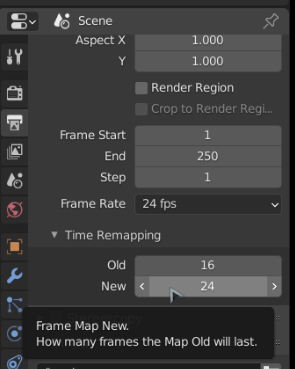
So I have an animation that I have made between two files – The first is of a piece of paper being blown out of a window from inside of a house, the second is the paper blowing through the air outside of the house (The scene would have been way too poly heavy to do in one file)
The animation is seamless so the switch works at the point when the camera goes through the window glass.
The problem I have is that the way I have made the paper blow with the camera following it is quite complex , with various constraints and any slight change to anything messes up the whole shot.
Now both shots need to be made into one animation in the VSE. The issue is that shot one looks fine at 24FPS , whereas shot 2 really needs to run at 16FPS or it looks odd. Usually I would just extend the keyframes of shot 2 to suit but as mentioned earlier , it messes up hours of work and I would be better starting again….
Is there a way to have the VSE (or any other way) make this animation with the first section at one frame rate and the second at another?
I suppose I could just make them as seperate animations and join them together in the VSE but I am not sure how that would affect quality?
Thanks in advance.

.