Viewport render works, regular render bones don’t move

Forum Archive Viewport render works, regular render bones don’t move

Viewing 11 posts - 1 through 11 (of 11 total)
  • Author
    Posts
  • #15255
    Austin Dunham
    Participant

      I’m not sure what I miss-checked, but in Blender 3.2 the viewport animation works just fine, but the regular animation everything stays where they’re at.

      #74695
      Martin Bergwerf
      Participant

        Hi @wardred ,

        Yes, you’re not supposed to do that….

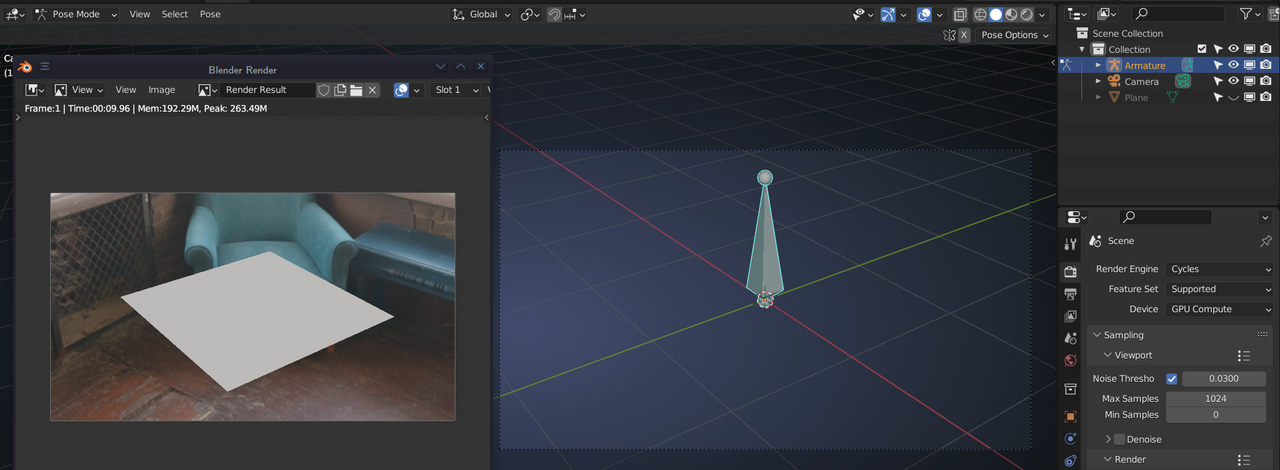
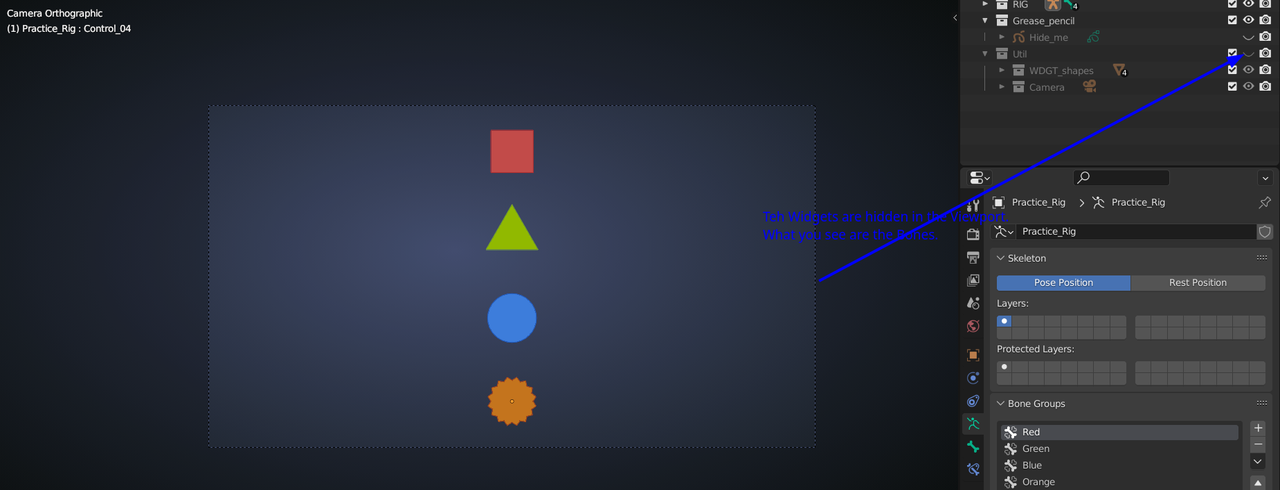
        You are rendering the Widget shapes from the Utillities Collection (they are disabled in the Viewport). The Rig (Bones) is not rendered, which is normal. That is why you want to do a View > Viewport Render (Animation), which renders everything that is visible in the Viewport (hence the name).

        #74696
        Martin Bergwerf
        Participant

          The situation is something like this:

          Rig.png

          #74697
          Omar Domenech
          Participant

            I don’t know if Wardred is referring to bones visibility. You mean they animation is not playing back for you? What do you mean by regular animation? You mean you have rendered all the frames and nothing moves? 

            #74698
            Austin Dunham
            Participant

              Hi @spikeyxxx and @omar,

                 I may have mispoken about the bit that was getting animated.

              Omar,

                 You are correct, the Widget shapes are visible both in the viewport animation and in the final render.  In the viewport animation they’re animated.  In the final render they’re static.  I hope that’s clearer.

                 I’m not sure which switch I’m missing that’s not turning the animation on in the final render.

              #74699
              Omar Domenech
              Participant

                Ahh I see. Ok I think I see what is going on. Probably the widget collection has the render icon on. You know the widgets on a rig are there because they are taking their shapes from geometry objects. Normally you use that geometry to give the widgets shapes, but you turn that collection off because you don’t want those shapes rendered. And they normally remain static where they lay. Soooo, I’m guessing they are being renders in each frame for you. Get it?

                #74700
                Martin Bergwerf
                Participant

                  | the Widget shapes are visible both in the viewport animation and in the final render

                  No they’re not..You must have misunderstood me:

                  Bones.png

                  Like Omar also explained.

                  #74701
                  Wayne Dixon
                  Participant

                    Hi Wardred,

                    Hopefully the explanations above can make it a little clearer.

                    But to try and put the problem a simple way…

                    The shapes you are seeing when you hit ‘render’ are not the shapes you animated.  They are different objects.
                    The objects you animated can only be seen in a ‘viewport render’ – they will always be invisible in a ‘render’.

                    #74702
                    Austin Dunham
                    Participant

                      Thank you Wayne, Omar, and Spikeyxxx.

                         Sorry, i just wasn’t getting that bit of it.  I expanded everything and took a closer look at things.  As everyone stated, the WDGT_shapes themselves and the controls are different objects.  I haven’t messed much with animation or creating control widgets yet, so it was a little unusual to see the same shapes in the same location, but not moving.

                         I do see that the controls, which is what I was grabbing, do not have the option to render, like Spikeyxxx said a few times.  Omar, it makes sense that the controls would have to get their shape somehow.

                         I think what was further confusing me, and I probably did this to myself, was the shapes object was turned off on the view layer, but was on on the render layer, so it looked like there was only the one object; just animated in the viewer and not so in the render.

                         Thanks everyone for your patience!

                      #74703
                      Omar Domenech
                      Participant

                        Glad to help out man. Keep on rocking in the free world. 

                        #74704
                        Martin Bergwerf
                        Participant

                          What Omar said! And just keep asking until you get it; we are here to help.

                        Viewing 11 posts - 1 through 11 (of 11 total)
                        • The topic ‘Viewport render works, regular render bones don’t move’ is closed to new replies.