
Vertices are making a shade when adding node to grey plastic

Forum Archive Vertices are making a shade when adding node to grey plastic

Viewing 4 posts - 1 through 4 (of 4 total)
  • Author
    Posts
  • #21083
    Erik Vos
    Participant

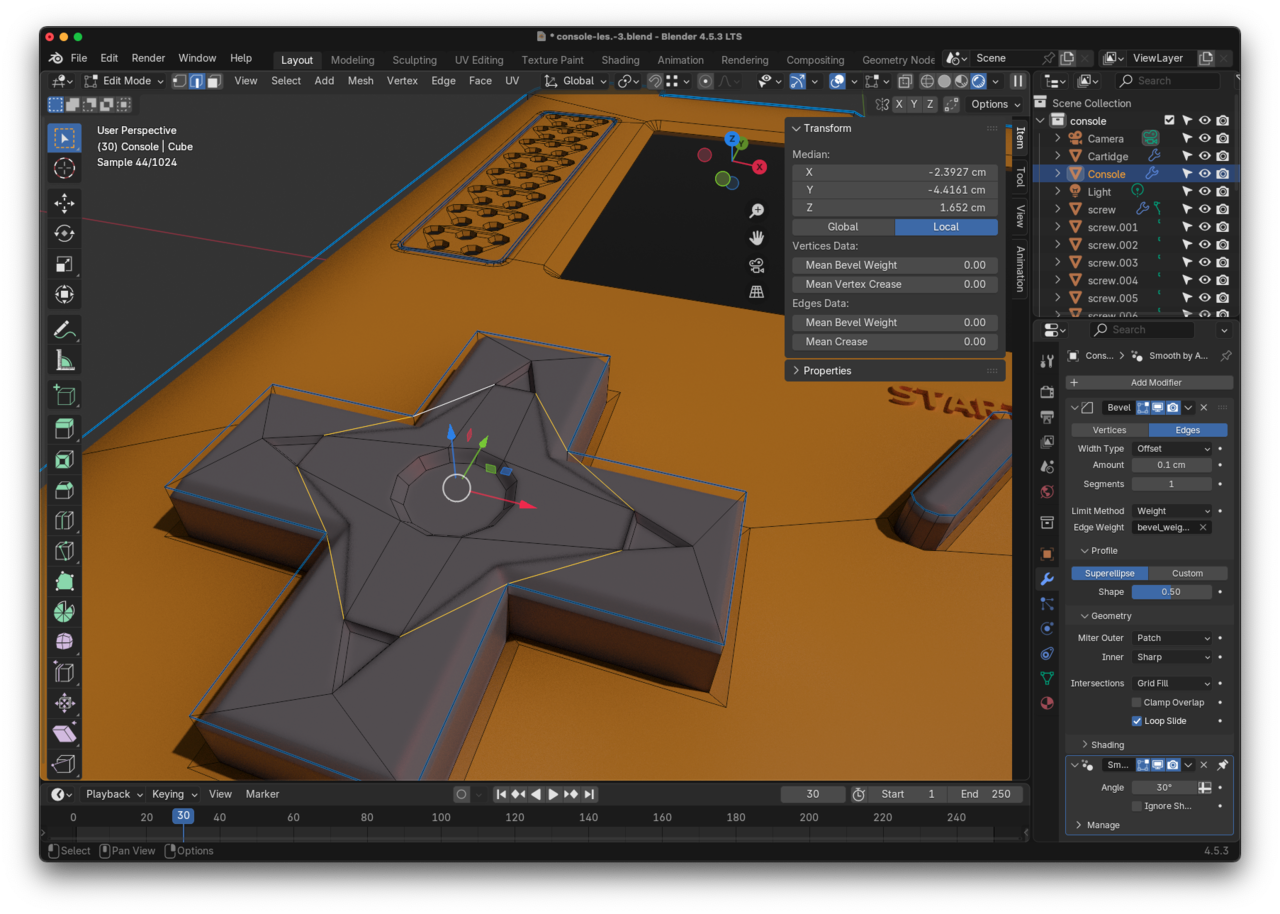
      Hi, when I add this node with a slight bevel to “grey plastic” all of a sudden I get this shade to the grey arrows-selection-thing? I can’t dissolve any of those edges, they are not marked sharp, the vertices are all in the same plane, I can’t change the bevel in the modifier because it would effect the whole console… what to do?

      #98315
      Erik Vos
      Participant

        Dont know why the image wasn’t showing in the first place:
        2-03 om 11.40.36.png

        #98316
        Martin Bergwerf
        Participant

          HI Erik,

          Make sure your Normals are all correct (enable Face Orientation in the Overlays Dropdown).

          Also, for clarity, you are talking about the Bevel Node in the Shader, right?

          #98317
          Erik Vos
          Participant

            Thanks! That was the problem! And yes, I was talking about the Bevel Node in the Shader

          Viewing 4 posts - 1 through 4 (of 4 total)
          • The topic ‘Vertices are making a shade when adding node to grey plastic’ is closed to new replies.