Turn ON/OFF Move, Rotate and Scale Gizmos – Shortcut

Forum Archive Turn ON/OFF Move, Rotate and Scale Gizmos – Shortcut

Viewing 6 posts - 1 through 6 (of 6 total)
  • Author
    Posts
  • #17570
    Roxana Moise-Dan
    Participant

      Hello!

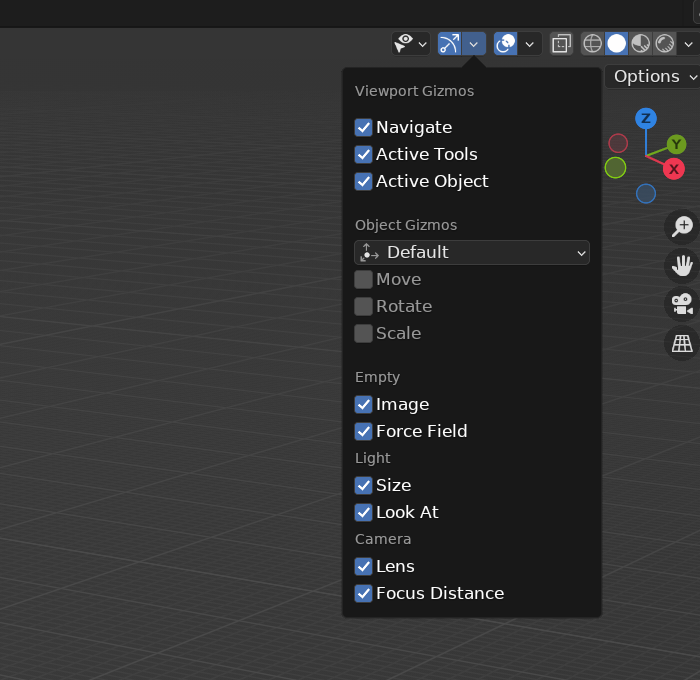
      Is there a shortcut to quickly turn on and off the MOVE gizmo (or any other gizmo) in Blender, without having to go to the Viewport Gizmos menu every time? I would like to know if there’s a shortcut for that, because I can’t find anything. I know I can move objects by pressing ‘G’, but sometimes it helps to see the arrows, and using ‘G’ won’t show them.

      Thanks.gizmos.png

      #84418
      Omar Domenech
      Participant

        I use Control + Tilde and it works for me. Tilde or ~ is the one on top of the Tab key.

        #84419
        Roxana Moise-Dan
        Participant

          Thanks, Omar! So if you want to hide them you press W, right?( to go back to selection mode). Because if I press CTRL ~ again it won’t turn them Off.

          #84420
          Dwayne Savage
          Participant

            With Blender there are multiple options. 

            1. You can right click and add them to quick menu or assign a shortcut

            2. In preferences under keymap you can change grave accent to Gizmo. This gives you a gizmo pie menu instead of the default view pie menu when you press tilde key. This is the gizmos under gizmo drop-down.

            3. In preferences under keymap you can change tool key from immediate to active tool. This will switch to the tool on the toolbar when you press G, R, or S.

            4. This is my preferred method. In preferences under keymap check alt click tool prompt. This makes it so to tap the Alt key(don’t hold it down) then you can press G, R, S, or T to switch to the tool on the toolbar. T is all 3 transform. W by itself returns you to select tool

            5. If you have default spacebar setup. Then you can use shift+spacebar to bring toolbar options to your mouse cursor in the 3D Viewport.

            #84421
            Dwayne Savage
            Participant

              Ctrl+tilde(~) toggles show/hide all gizmos

              #84422
              Roxana Moise-Dan
              Participant

                Thank you, Dwayne! This is perfect.

              Viewing 6 posts - 1 through 6 (of 6 total)
              • The topic ‘Turn ON/OFF Move, Rotate and Scale Gizmos – Shortcut’ is closed to new replies.