Turn a varying color jpeg into a coin

Forum Archive Turn a varying color jpeg into a coin

Viewing 2 posts - 1 through 2 (of 2 total)
  • Author
    Posts
  • #19873
    Sid Edwards
    Participant

      I don’t…but then…well if…hmm…

      I’m trying to engrave an image into a sphere, like a coin. The image itself has decent data for a “height map” from which I’d like to “cut out” of the sphere. 

      How do I tell blender to use the image’s black/white data to construct a height map to cut out of a sphere? Is this a geometry nodes thing? 

      #93801
      Martin Bergwerf
      Participant

        Hi Sid,

        I doubt that a JPEG gives decent results, when used as a Height map, but anyway:

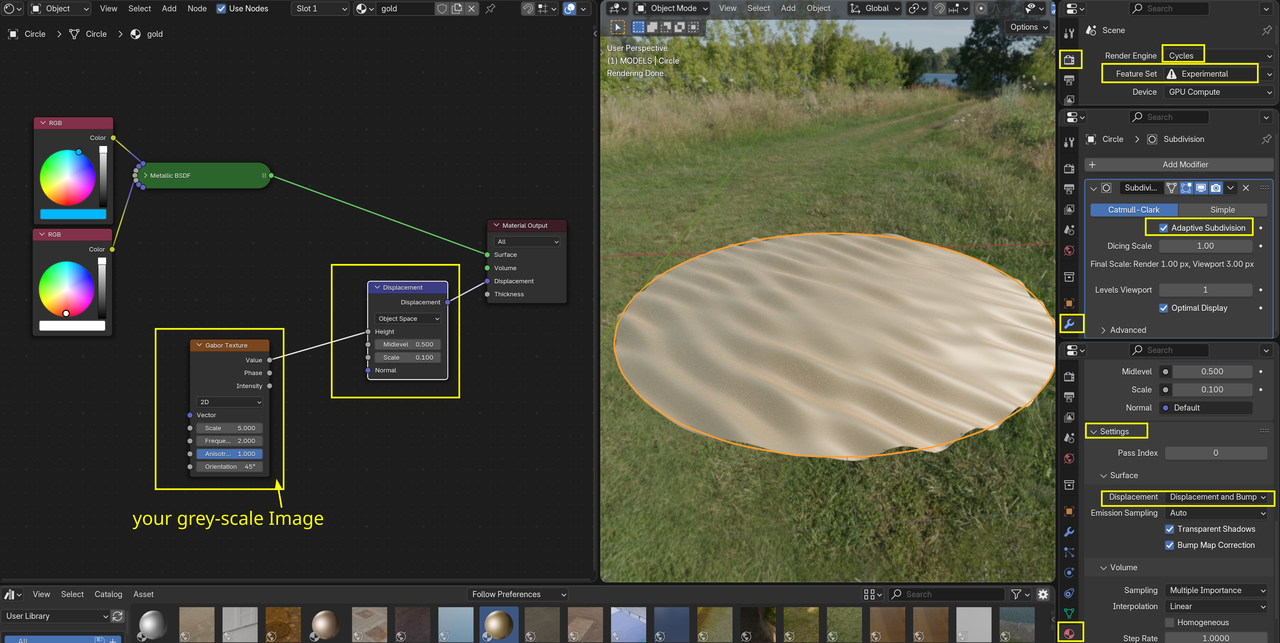
        you’ll need a lot of Geometry on the coin, but then any grey-scale Image can be used as a Height map by plugging it into a Vector > Displacement Node and change the Material Settings to anything but Bump Only:

        Height.png

        See also the Fundamentals of Texturing (the older one, that is more in-depth, or the newer one with Blender 4.2) on how to set this up. They will also tell you where to find Image Textures.

      Viewing 2 posts - 1 through 2 (of 2 total)
      • The topic ‘Turn a varying color jpeg into a coin’ is closed to new replies.