
Trouble with CBaileys Fish Scale tutorial
Forum Archive › Trouble with CBaileys Fish Scale tutorial
- This topic has 18 replies, 3 voices, and was last updated 2 years ago by
Martin Bergwerf.
-
AuthorPosts
-
August 13, 2024 at 7:46 am #18450
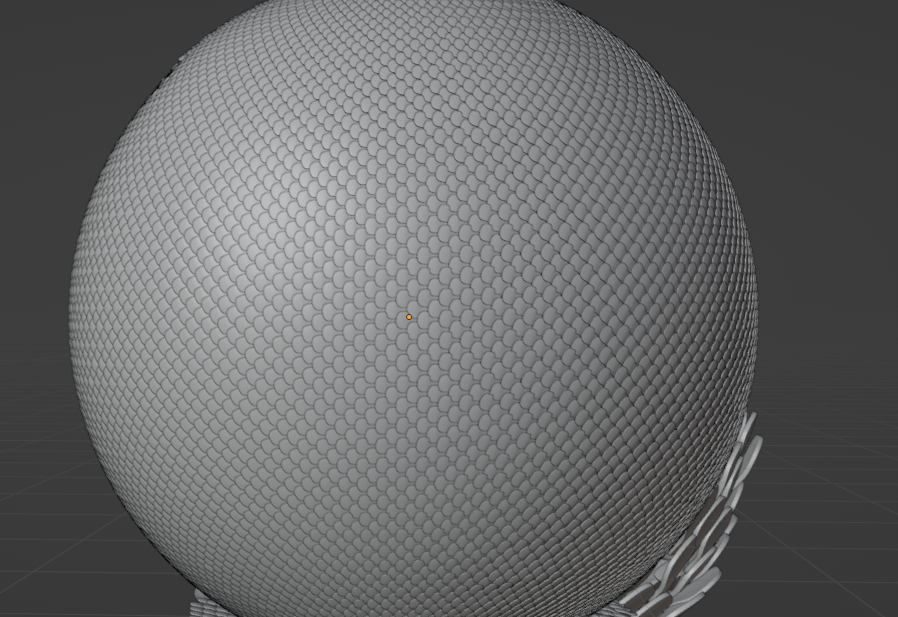
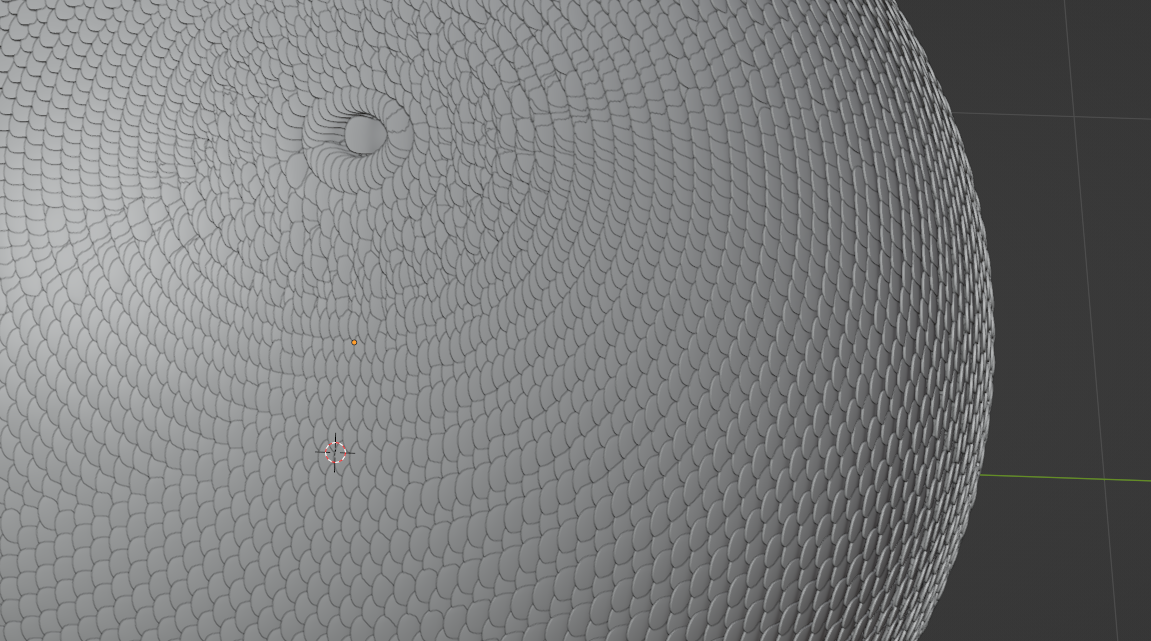
Hey All, I’m trying to apply the tutorials from youtube for a gig I’m trying to win. In that project I need to put scales to a form (like a cucumber statue). But I’m always getting dirty results at top and bottom of the objects. sideview looks clean, but top view is really dirty. I suppose I should try to remove vertices in geonodes with merge by distance. But that gives a very irregular result as it is working all directions and not only on an edgeloop… Any ideas to solve this?
side= oK
Top = disaster
 August 13, 2024 at 8:22 am #88088
I have no idea how to go about that, hopefully Adrian or Martin will. Circles are famously hard to UV unwrap, that’s why the earth globe map is distorted in all the world maps you see. It’s no surprise getting all those little pieces to conform to the circle shape is proving a nightmare. Why not use a texture?
August 13, 2024 at 8:40 am #88089Well because we need to also be able to 3dprint the output. Otherwise if only for video I would’ve indeed cheated with textures and maybe closeup shots of the correct zones. I here used a sphere, because the works I need to apply this to are all kind of spherical forms bent in multiple directions
August 13, 2024 at 8:44 am #88090Hi Seb,
You are probably facing a mathematical impossibility.
I think your best bet, would be to Unwrap your model as best as you can and use the UV Map to ‘place the scales’.
August 13, 2024 at 8:48 am #88091It’s impossible to get it perfect (for most shapes)…
Alternatively, you could try to use (slightly) different sizes of scales, which you might be able to get to work with GN, if the model isn’t too irregular.
August 13, 2024 at 8:49 am #88092Do it manually by hand. Yikes.
Perhaps you can do it via instancing? Here’s a demo video, you just would need lots of vertices:
August 13, 2024 at 8:55 am #88093Maybe also have a look at how nature does things like this (Fibonacci and so)….sunflower math is a great example, but probably way too advanced for what you are trying to achieve.
August 13, 2024 at 10:21 am #88094Thanks guys, I’ll try these things. I hope I can automate 90% through Geonodes, otherwise it’ll become a mosterproject.
August 13, 2024 at 11:04 am #88095Just another thought, you think Chris would be open to share the project files for this? When looking at his tutorial for the 20th time to see if I didn’t miss a thing, I notice that at the end his scales on the sphere look perfect. I can get the same result for the torus, not for other objects. https://youtu.be/fmDv81dMQ6c?t=1543
August 13, 2024 at 11:10 am #88096Perhaps shoot him an email, I can’t see why not he wouldn’t share the file. Maybe he’d even be willing to join on a call on Discord with you? Can’t hurt to try. Put your CG Cookie Collab cred, that might help out.
August 13, 2024 at 11:55 am #88097I will try to watch the tutorial (haven’t seen it yet) tomorrow to see what is going on exactly.
August 13, 2024 at 11:33 pm #88098Hey Seb,
Chris doesn’t address your issue, in fact he has the same problem with the UV Sphere, but just doesn’t show it in the end of the video.
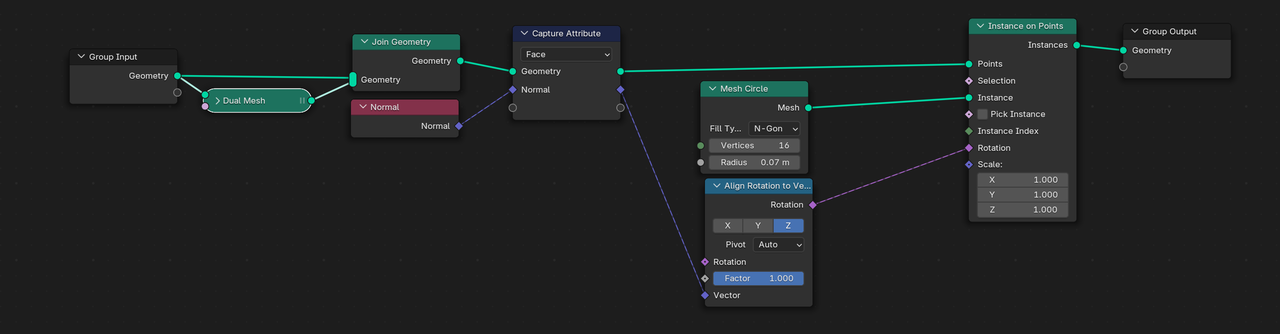
The first part of the video to get the center of Faces can be done a lot easier now with a Dual Mesh Node (added to Blender, shortly after this video was made), so the whole thing look something like this (with Circles as scales):
 August 14, 2024 at 1:18 am #88099
Thanks Martin,
So it’s not me :)))). Good catch about dual mesh, I’ve used it before but it didn’t hit me as an option 🙂
I’m continuing on my quest, will let you know what I find
Séb
August 14, 2024 at 3:41 am #88100Hi Seb,
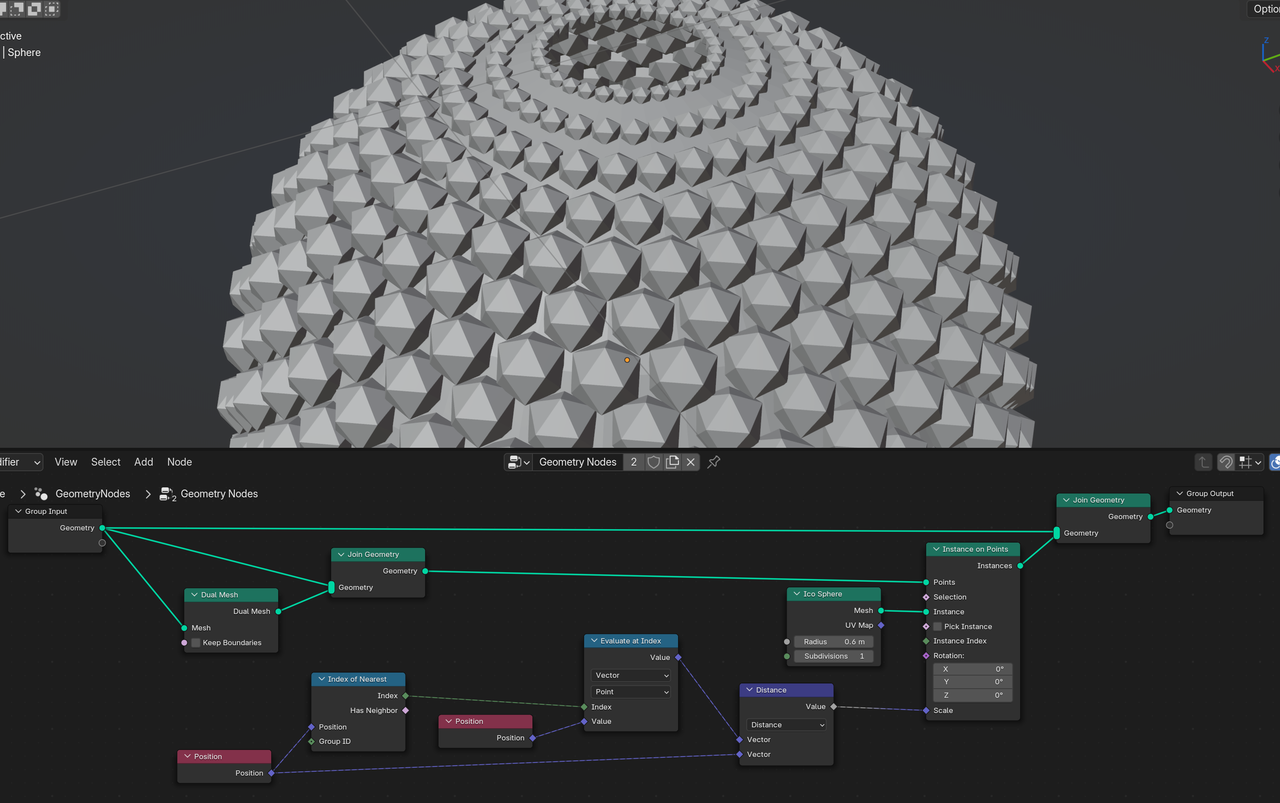
to be fair, Chris did mention in the tutorial, that you could do some math to reduce the size of the scales, depending on how close they are together.
Here is the beginning of an idea of how that could be done:
 August 14, 2024 at 4:17 am #88101
Completely true, he did mention that. I’m withdrawing my statement, sorry about that!
-
AuthorPosts


- The topic ‘Trouble with CBaileys Fish Scale tutorial’ is closed to new replies.