Hey @blanchsb @rationalrats , I didn’t get to this question on the stream so I’d like to answer it here!
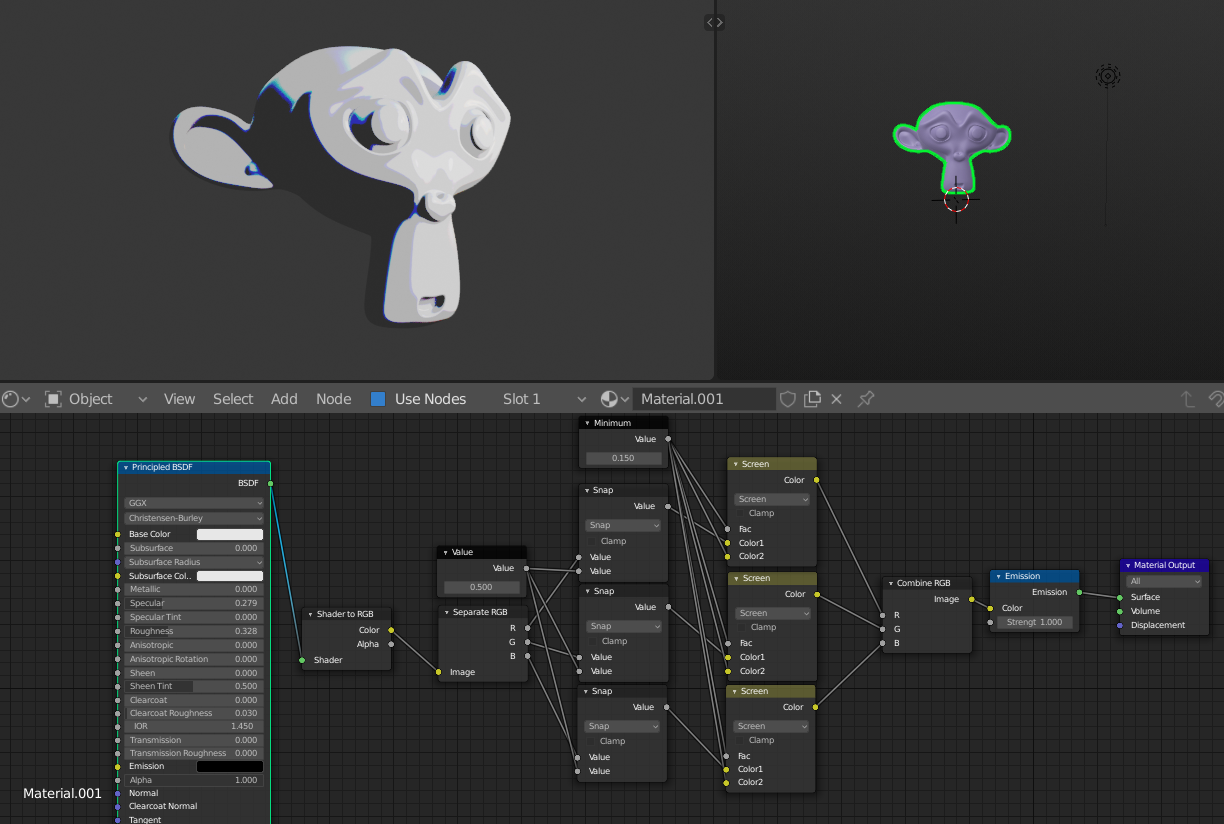
That Kamikaze shader pack looks amazing! One thing I notice is that it only works with Eevee, which is a clue into how it works. I’d bet anything that the heart of it is the Shader to RGB convert node, which you can use to get really cool NPR effects but does not work in Cycles.
Here I’m using it with a Separate RGB node to add a constant falloff to each color channel. I think the Snap node is only in 2.82, but you can just as easily use a color ramp.
Clash of Clans isn’t using anything like this – they’re just well lit, high roughness materials with some SSS and post-pro sharpening.
As for getting Cycles or Eevee shaders into Unity, I have some bad news – you can’t. Shaders are entirely tied to the render engine, so they can’t transfer. There are standards like PBR or OSL that allow different render engines to deliver similar results, but Blender nodes are specific to Blender and you’ll need to build your Unity shaders with Unity’s shader graph or custom scripts.
Here’s a great course by Gonzo about Unity shaders: https://cgcookie.com/course/shader-school
That said, you can bake your diffuse, roughness, emission, etc. maps down to textures and use those in Unity or any other app, which will make sure they look nearly identical. The animated procedural stuff or effects that cannot be baked are a no-go though.
Hope that clears things up! Happy shading 🔮

.


