Tool icons from the Toolbar have disappeared

Forum Archive Tool icons from the Toolbar have disappeared

Viewing 10 posts - 1 through 10 (of 10 total)
  • Author
    Posts
  • #17557
    Gary Norwalt
    Participant

      While working on a project the tool icons have vanished from the toolbar.  Hitting the T key toggles the toolbar (I can see the little arrow toggle) but no tools appear in the menu.  Any ideas on what may have happened would be greatly appreciated.  This is also affecting the right hand toolbar when the N key is pressed.

      #84324
      Martin Bergwerf
      Participant

        Hi Gary @gnorwalt ,

        That is weird…I never heard that one before…

        Try File > Defaults > Load Factory Settings.

        If the problem persists, then you might need to update your drivers (especially the GPU).

        If the problem goes away when using Factory Settings, it might be a 3rd party Addon that is misbehaving.

        It could also be, that you accidentally changed some setting somewhere, but I wouldn’t know how or which setting that would be.

        #84325
        Martin Bergwerf
        Participant

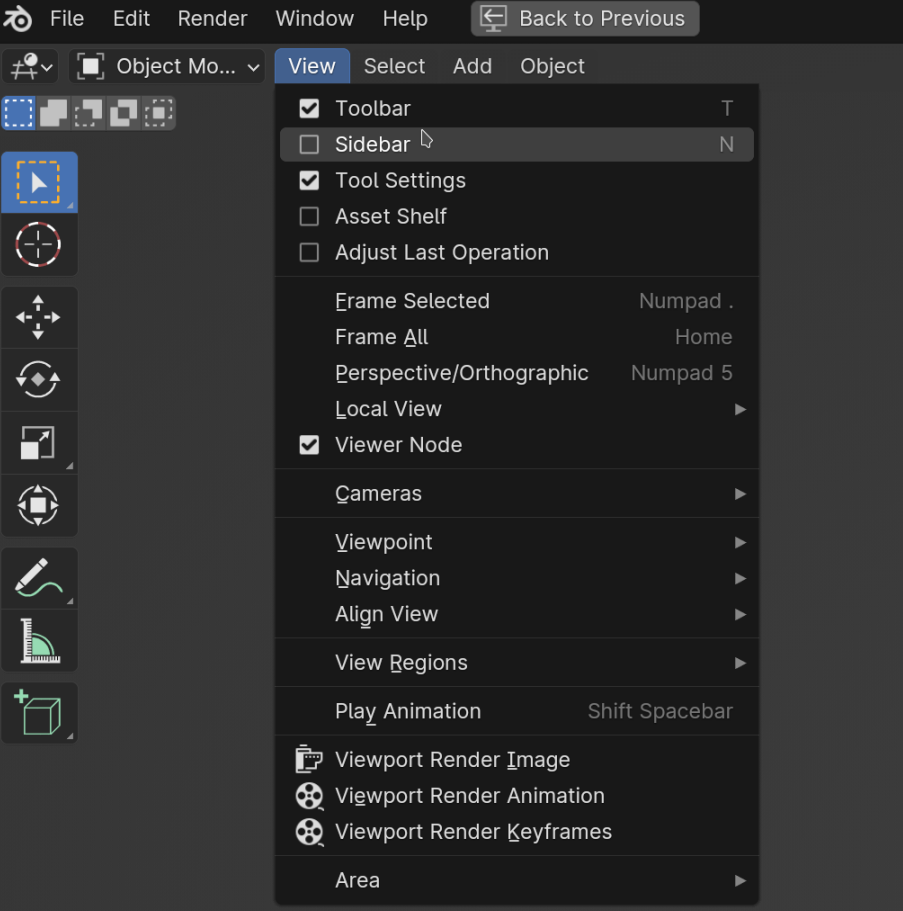
          Can you access them from the View dropdown menu?

          View_01.png

          #84326
          Martin Bergwerf
          Participant

            …or did you maybe change your Keymap in your Preferences to Industry Compatibel?

            #84327
            Adrian Bellworthy
            Participant

              @gnorwalt have installed any addons recently?
              Some third party addons are notorious for this type of issue.

              #84328
              Omar Domenech
              Participant

                Or the nuclear option, I’d download a fresh copy of Blender and install it from scratch. 

                #84329
                Gary Norwalt
                Participant

                  Thank you for so many quick responses.  I will try these ideas (very interested in the GPU idea since it has caused issues before) and will update you on how they work.  I can get the icons back simply enough by starting a new project but reopening the old blender files takes me right back to the problem.  The workaround so far seems to be to go back and append the old meshes and material to a new blank file. 

                  #84330
                  Gary Norwalt
                  Participant

                    Update – PROBLEM SOLVED –  I tried all your suggestions with no luck, thank you all for your help.  I was about to go nuclear as Omar suggested which luckily led to me stumbling on the problem.  It turned out to be User error. The original file was created using Blender 4.0.  When I opened the file again on the next day the computer opened it in Blender 3.6 without me noticing it.  Something about the version differences caused the tool icons to vanish.  Opening the file again in Blender 4 restores everything.

                    #84331
                    Martin Bergwerf
                    Participant

                      Thanks for the update Gary!

                      I will have to remember that this can happen 🗒️

                      #84332
                      Omar Domenech
                      Participant

                        Blender being Blender, or computer being computers. Skynet will never happen.

                      Viewing 10 posts - 1 through 10 (of 10 total)
                      • The topic ‘Tool icons from the Toolbar have disappeared’ is closed to new replies.