
this fill thing aint working
Forum Archive › this fill thing aint working
- This topic has 13 replies, 6 voices, and was last updated 2 years, 11 months ago by
Brian Ireland.
-
AuthorPosts
-
July 22, 2023 at 4:18 pm #16665
around the 1:45 mark he talks about selecting all the vertices of the d pad and hitting fill will make one solid face. that doesn’t work for me. the 5 individual squares remain.
at the 3:04 mark he connects the vertices between the edge of the console and the d-pad using the (left mouse + shift left mouse) click combo and then strings those connections all around the bottom side of the console. that also doesn’t work for me. can’t make a single string connection even though i follow all his click/button combo commands exactly.
at the 3:37 mark he’s using the ctrl button to connect vertices all around the edge of the console, and he also has a PICK SHORTEST PATH window. none of that works or is happening for me
July 23, 2023 at 12:51 am #80419Hi Skyler @skyblaze ,
at this point, I think Omar gave the best advice in answer to your other question; at least watch (and practice):
https://cgcookie.com/courses/blender-3-basics-intro-to-blender
As for the D-pad, try Select All Vertices, M > Merge > By Distance, followed by SHIFT+N. This may or may not help. Or better: make it again (easy way: Add a Plane in Edit Mode, Subdivide (2 cuts) and Delete the 4 corner Vertices).
If you can’t make a ‘string’ of connected Vertice, you might have Double Vertices; again: M > Merge > By Distance.
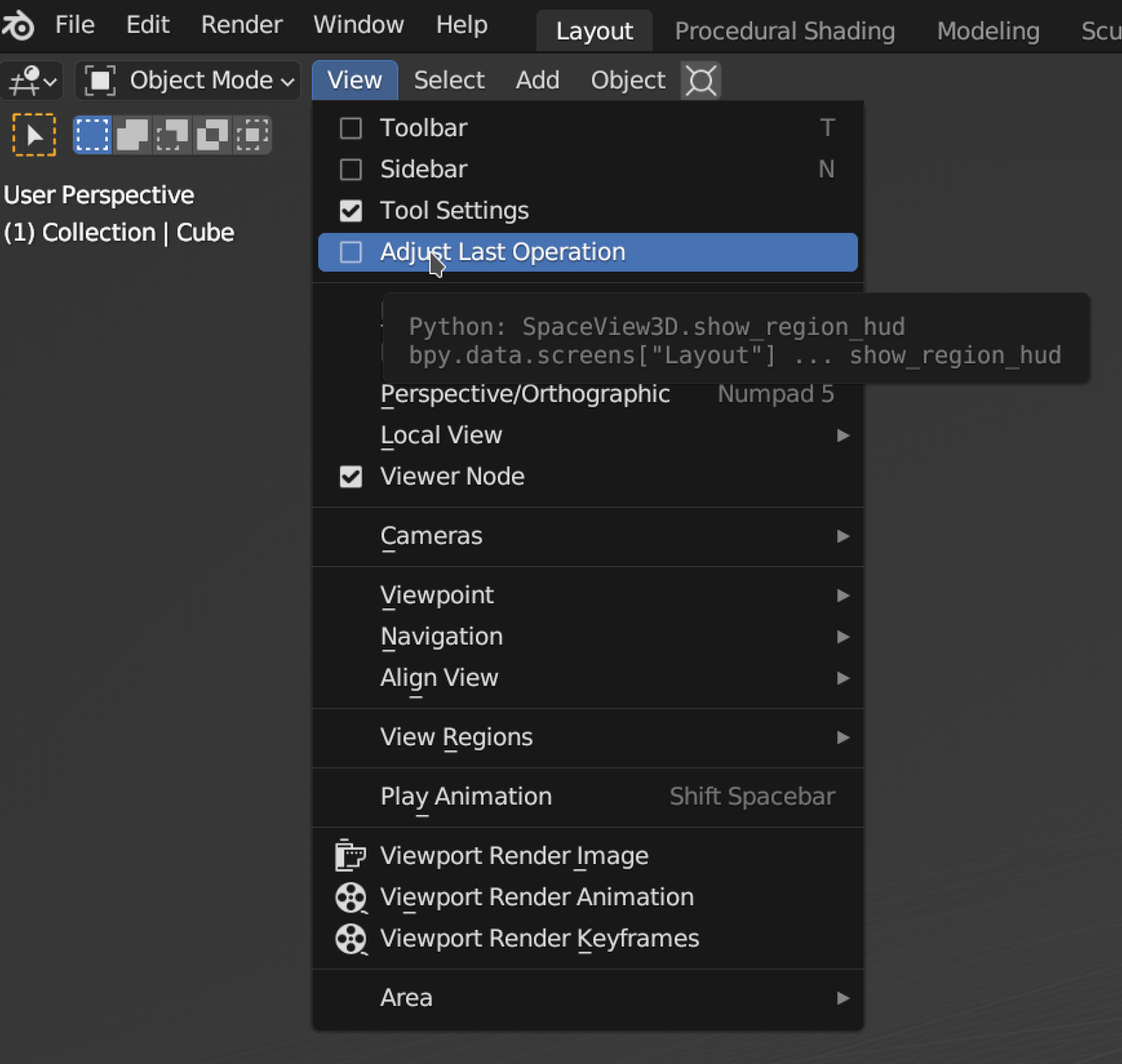
If you can’t see the popup Window, check the Adjust Last Operation checkbox:
 July 24, 2023 at 7:12 am #80420
Hello Skyler. Well, Blender is tricky and it’s impossible for us to guide you through every click you have to make, text based conversation for troubleshooting is challenging enough. In the beginning things wont work the way you expect and you see the people on the video doing it like it’s nothing, but that’s because they have years and years of experience. So just stick to it, try it over and over again and little by little you’ll start to get the hang of it.
The way I watch tutorials is that I watch it first as if it was a movie, just paying attention and not doing anything with the mouse. Then I watch it a second time and this times I’m hands on with the mouse and Blender open, trying to do what I see on the screen and following the explanations. And if I get stuck, I go back to the beginning and try it again, only this time I for sure am faster and get pass where I got stuck. But again, the key word is grit, trying and persevering.
July 25, 2023 at 12:18 pm #80421Also, if you want to share your file when you get stuck, we can look at it and diagnose the issue much faster than guessing from the description. I hope Martin’s suggestion of merging vertices and recalculating normals worked for you! That would have been my suggestion as well.
July 26, 2023 at 5:55 pm #80422still stuck. unable to attach the .blend file. no attachment options on here. sent it to support yesterday. maybe they still have it. idk
July 27, 2023 at 3:13 am #80423Hi Skyler @skyblaze ,
You can upload your .blend file to Dropbox, Googledrive, or so and post a link here.
July 31, 2023 at 11:54 pm #80424still stuck. wasted way too much time on this one step.
at the 3:37 mark he’s using the ctrl button + left mouse click to connect vertices all around the edge of the console, and he also has a PICK SHORTEST PATH window. none of that works or is happening for me. unable to make the faces as a result or continue.
why?
August 1, 2023 at 4:31 am #80425Hey Skyler,
Like mentioned before> please upload your .blend file.
August 1, 2023 at 4:51 am #80426It sounds to me like you may already have faces where you are trying to fill.
If you share a screenshot, we may be able to tell you exactly what is wrong.
The .blend file would be even better.August 1, 2023 at 5:04 am #80427Also use CTRL + Left Click to select shortest path.
SHIFT + Left Click will add to the currently selected.In your original question you mentioned SHIFT.
August 1, 2023 at 7:37 am #80428Again, you can also consider putting Press Start on pause and jump into a simpler course. You might run the risk of getting discouraged. Press Start is beginner friendly but it does have some tricky stuff underneath. I suggest you build yourself up by watching other fundamental courses first. If not, well then press on, we are here to help if we can.
August 2, 2023 at 9:58 pm #80429Already watched the fundamental courses
Here you go . . .August 3, 2023 at 1:08 am #80430Hey Skyler @skyblaze ,
Here’s your problem:
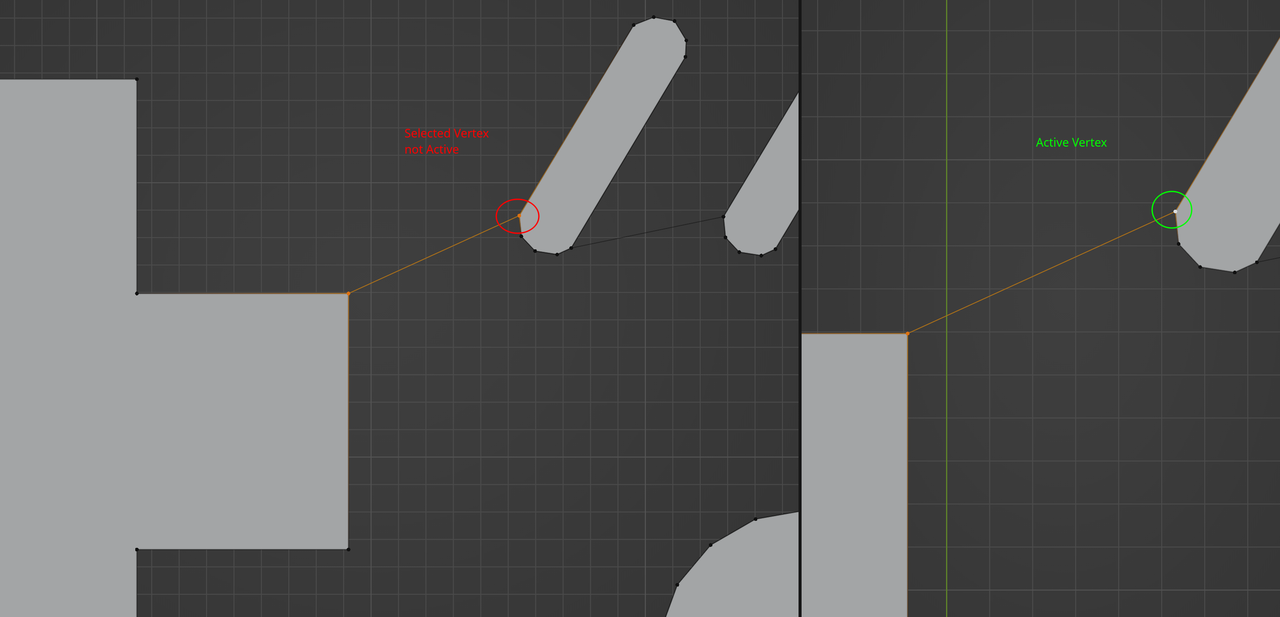
Blender needs an Active Vertex to know where to start the Shortest Path from.
October 4, 2023 at 8:06 pm #80431Unless I’m mistaken, ‘F’ hotkey works for filling in mesh objects. Did you accidentally create a bezier circle?
Note: my fill “wasn’t working” either, that’s how I figured this out, so you’re not alone!
-
AuthorPosts


- The topic ‘this fill thing aint working’ is closed to new replies.