
The teeth of the gear is looking strange

Forum Archive The teeth of the gear is looking strange

Viewing 5 posts - 1 through 5 (of 5 total)
  • Author
    Posts
  • #17663
    Oskar Erikpers
    Participant

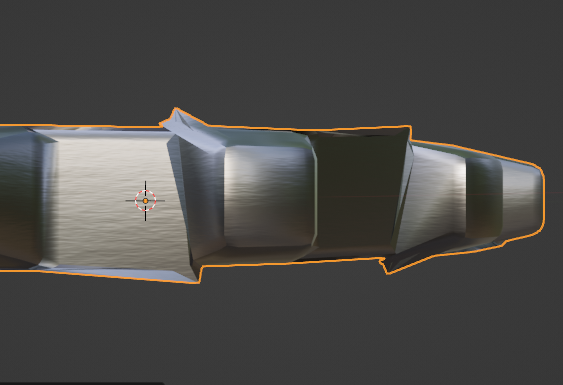
      Looks perfect all around the gear except this spot, what might cause this?

      #84764
      Oskar Erikpers
      Participant

        Gear.png

        #84765
        An Sunn
        Participant

          Maybe normals, or double vertices?

          #84766
          Omar Domenech
          Participant

            Yeah it’s probably along the lines of some interior face in there, double vertices, scale not applied, flipped normals, maybe triangles or Ngons, perhaps you have a solidify or bevel modifier that has too high a value and is throwing things off. Check for all of that in your geometry. 

            #84767
            Chris Bailey
            Participant

              Yeah, I think Omar and An may be right.  Enter edit mode and select all your geo then hit “m” to merge and select the “by distance option” .  You could also try going into edit mode and going to the top menu in the 3D viewport and select mesh -> normals -> recalculate outside.  Hopefully one of those will do the trick. 

            Viewing 5 posts - 1 through 5 (of 5 total)
            • The topic ‘The teeth of the gear is looking strange’ is closed to new replies.