
The mix is transparent?
Forum Archive › The mix is transparent?
- This topic has 28 replies, 8 voices, and was last updated 1 year, 11 months ago by
Sean Kennedy.
-
AuthorPosts
-
August 16, 2024 at 9:43 am #88233
I have never reported a bug. Where would I do that?
August 16, 2024 at 9:48 am #88234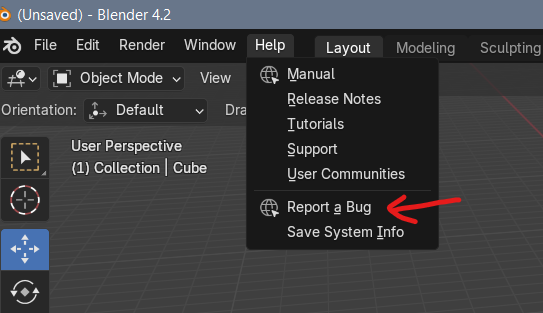
You can do it right from in Blender!
It’s such a weird bug, I’ll be very curious to hear what they say about it and if they confirm it’s a bug.
During production of the course, I thought I had found a bug with the Blur node. I was halfway through writing it up as a bug report when I thought I should test it outside of my project, and it worked fine. So Blur node was working as expected in one Blender project, but “broken” in the project I was working on. Very bizarre, and I still don’t know what caused it.
August 16, 2024 at 11:26 am #88235Awesome. Done. If/when it gets fixed I’ll come back here to share what happened, just in case someone else has the same issue.
August 17, 2024 at 8:54 am #88236Ha! The one thing I didn’t think to test… was the GPU compositor setting. The Bug Report crew quickly picked up on that, so anyone using Macs might encounter the issue for now.
Here’s the thread for future reference, or until it gets fixed: https://projects.blender.org/blender/blender/issues/126412#issuecomment-1273561
August 17, 2024 at 11:20 am #88237Cool. Thanks for letting us know. So, does it feel good to know that you’ve helped start a fix for your fellow Mac users? As a Linux users, it always makes me feel good. Also it’s nice to have an explanation for something weird.
August 17, 2024 at 11:59 am #88238Totally! I’m also surprised with how quickly they set it in motion. I’ve had issues that went forever unanswered in Adobe forums.
Good stuff.
August 17, 2024 at 12:12 pm #88239They are great. I think it’s because like the CG Cookie’s team they are very passionate about their work or at least that how they come off to me. Where other places the people are just there for the paycheck. Not to say that there aren’t passionate people at Adobe. Just in my experience it’s the users of Adobe that are Most of the passionate ones.
August 17, 2024 at 2:35 pm #88240Yeah usually in corporations there’s not much passion to be found, it’s just the nature of those institutions. Conversely the organic nature of open source is like a magnet for real joy and excitement, not a manufactured one like you see in big companies.
August 18, 2024 at 12:01 am #88241That’s awesome, so glad you found that bug and reported it! Congrats on getting a bug fixed! Making Blender better!
August 20, 2024 at 2:14 pm #88242@nathitappan – I’m a fellow Mac traveler, and I am having the same issue with alpha as you are.
I started to go through the same steps you’ve done, but then I found this comment and see that you’ve already posted a bug.
I just thought you might like to know that you’re not the only person experiencing the issue. I’m going to try without the GPU in the compositor and see if that helps.
August 20, 2024 at 2:18 pm #88243Cool, I’m glad this helped you figure out that it wasn’t your node tree!
Changing from the GPU to CPU fixed it, but the speed change is noticeable.
Hopefully they’ll fix it so we can enjoy the beauty of GPU speeds!
August 20, 2024 at 2:20 pm #88244I looked at the bug report. You did a great job with it! It was very detailed and looks like it gave them exactly what they needed to replicate the issue.
I see that it is already confirmed, along with the note to turn off the GPU rendering as a work around.
October 5, 2024 at 10:57 am #88245I have encountered the exact same problem!
However changing from GPU to CPU did do something, it still shows a very odd result.
When using the “Alpha Over” node, it only shows the layer that is plugged into the bottom input of the node.
Now upon checking it seems that all alpha layers are value 1.. And I have no idea why. (followed all the exact same steps as Sean did).
I have also tried combining everything using the “mix color” as node set to “mix” @mackdadd suggested (and tried other options as well) without usable result.
I am running on a M2 Ultra. (Blender 4.2).
So I guess I have to wait for a patch in a new update?
UPDATE: I made it work.
I also needed to switch to CPU, but during the process of figuring out why it wasn’t working, I also disabled the “transparent” in film settings. This resulted in fully white alphas. Enabling this resulted in usable alphas 🙂
October 5, 2024 at 6:17 pm #88246Excellent, glad you solved it!!
-
AuthorPosts


- The topic ‘The mix is transparent?’ is closed to new replies.