the controls

Forum Archive the controls

Viewing 6 posts - 1 through 6 (of 6 total)
  • Author
    Posts
  • #15013
    edward13
    Participant

      Where did you get all these controls

      #73962
      Adrian Bellworthy
      Participant

        Which controls do you mean @edward13 ?

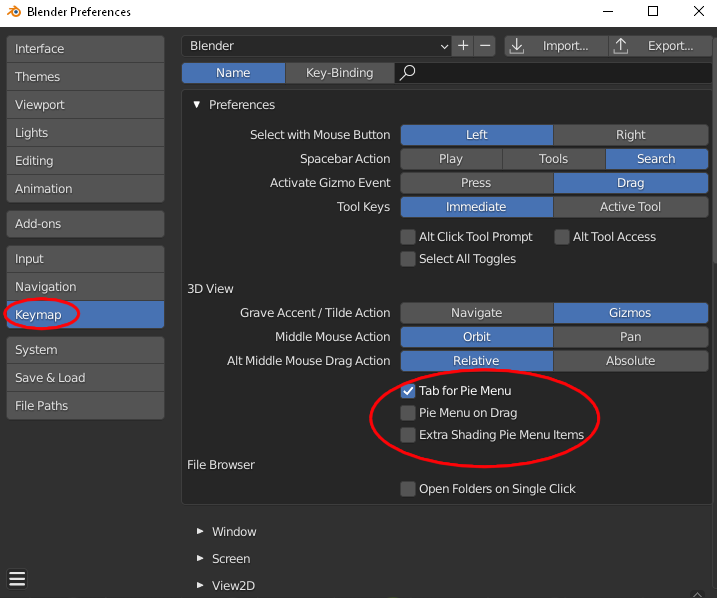
        Do you mean the pie menu?

        If so you can turn on the pie menu in the preferences.

        pie-menu.png

        #73963
        edward13
        Participant

          Sorry I have that I mean the screen cast key and others like it

          #73964
          edward13
          Participant

            All so my auto normalize works differently than your

            #73965
            Adrian Bellworthy
            Participant

              The screencast keys are an add-on for use when making tutorials. It displays the keystrokes on the screen for reference as you follow along. Its used by tutors and has no other use.

              The rig tools is another add-on used for adding widgets as custom shapes to bones. You will see custom bone shapes later in this course.

              How is the auto normalize working differently for you?

              #73966
              Wayne Dixon
              Participant

                The screen cast keys addon is available here
                https://github.com/nutti/Screencast-Keys

                But there is no need for you to use them as it just shows the buttons you are pushing on the screen.
                (it adds no value unless you are recording tutorials)

              Viewing 6 posts - 1 through 6 (of 6 total)
              • The topic ‘the controls’ is closed to new replies.