Texture Painting – Paint Mask vs Subdiv Display

Forum Archive Texture Painting – Paint Mask vs Subdiv Display

Viewing 7 posts - 1 through 7 (of 7 total)
  • Author
    Posts
  • #15530
    Ross Angus
    Participant

      Hi Jonathan, 

      Thanks for the great tutorial series, it’s been very educational.

      Following along I had a lot of trouble with using the Paint Mask. I was able to work out that if I turned off the realtime display of my subdiv surface modifier I could use it as you were. However I also noticed that you did not need to turn your subdiv realtime display off. I would love to know if you have any insight into why this was an issue for me?

      Thanks again,

      Ross

      #75886
      Omar Domenech
      Participant

        Hello IndecisiveUsernameChooser. Hope all is well IndecisiveUsernameChooser. If I had to guess, that’s all about having a powerful computer? I used to have to do stuff like that before I upgraded my computer and beefed it up. Also there were Blender versions were texture painting was slow and after a few updates to Blender, that mode got fast. So perhaps you are using an older Blender? Another thing could be you could’ve accidentally applied a subdivision modifier and added another one on top and now your mesh is extremely dense in polygons.

        #75887
        Martin Bergwerf
        Participant

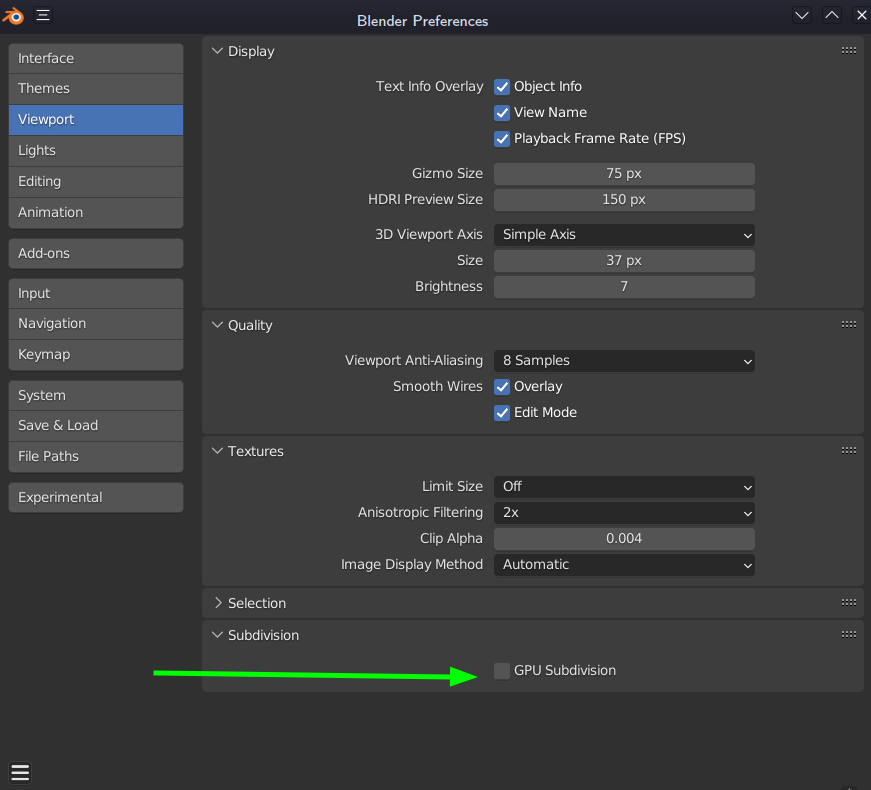
          Hi Ross, could be an issue with the (relatively new) GPU Subdivision.

          This is on by default. Try unchecking the box in your Preferences:

          GPU.png

          #75888
          sheila5
          Participant

            thanks for that tip Martin. Do I need to reactivate that for every other file again though? Is that GPU Subdivision necessary

            #75889
            Martin Bergwerf
            Participant

              Hi Sheila @sheila5 ,

              That GPU Subdiv is not necessary; I leave it off.

              If you have a Subdivision Surface Modifier at the bottom of your Modifier stack, it will be a bit faster (depending on your GPU). In a heavy Scene, with lots of Subdivs (at the bottom of the stacks!), that GPU Subdivision can speed things up, but I don’t think it’ll make much difference with only one or two Subdiv Modifiers (don’t have any numbers/statistics).

              #75890
              Martin Bergwerf
              Participant

                Actually, it seems I was wrong, the Modifier doesn’t have to be at the bottom of the stack.

                Still it doesn’t always use the GPU, when it is enabled in the Preferences (the Manual says: “Under certain circumstances, the GPU will be used to subdivide…”).

                #75891
                sheila5
                Participant

                  Thanks Martin. I’ll leave it off for now. 

                Viewing 7 posts - 1 through 7 (of 7 total)
                • The topic ‘Texture Painting – Paint Mask vs Subdiv Display’ is closed to new replies.