Struggling to paint/layer on different textures… what am I doing wrong?

Forum Archive Struggling to paint/layer on different textures… what am I doing wrong?

Viewing 3 posts - 1 through 3 (of 3 total)
  • Author
    Posts
  • #20852
    Charles
    Participant

      So I’m now realising that I have painted on to the main base colour texture when I thought I was painting into the Wood Details texture.

      re Node Selected.png

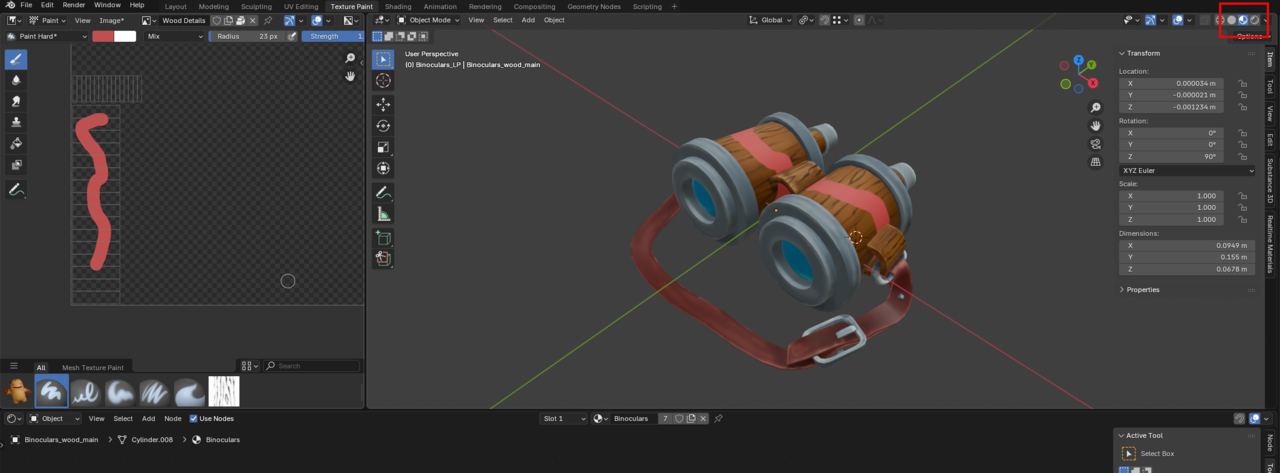
      The behaviour I am confused by is that when I select the Wood Details texture in the image editor and add a stencil texture… I see the results in the Wood Texture in the Image Editor but it doesn’t show on the model.

       in image editor.png

      In the Shading Editor if I select the Wood Texture texture node then the model disappears even though I’ve not changed any of the input / output connections and I see the Wood Details texture which look like they’ve conformed to the shape of the model.

      model disappears.png

      How do I paint onto the different textures and layer them together via the Shading Editor? What am I getting wrong here?

      #97381
      Charles
      Participant

        So looks like the problem is because I am in Solid mode and even though I’ve set it to Texture it seems I HAVE to use material preview to see the results of a layered set-up.

        ring - use Eevee.png

        #97382
        Martin Bergwerf
        Participant

          Yes,

           ‘Texture’ in Solid Mode shows the Active Image Texture Node, using the Active UV Coordinates. It doesn’t care how Nodes are connected in the Material.

        Viewing 3 posts - 1 through 3 (of 3 total)
        • The topic ‘Struggling to paint/layer on different textures… what am I doing wrong?’ is closed to new replies.