Something fishy with the 1/16 measurements

Forum Archive Something fishy with the 1/16 measurements

Viewing 6 posts - 1 through 6 (of 6 total)
  • Author
    Posts
  • #18884
    Andreas Pedersen
    Participant

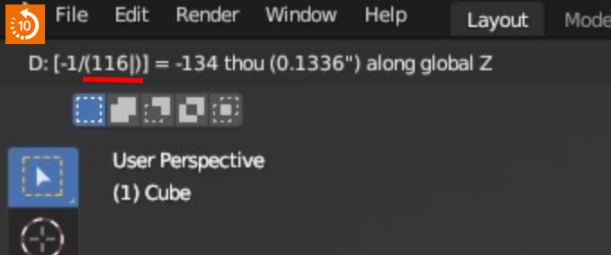
      At the 5:55 time stamp, we try to use the -1/16 measure directly in the move operation, but both in the video and inside my Blender 4.2.1 this gives me a -.13362″ measurement. While the -1/16 measure when using the Move window gives me -0.0625″. I am not used to the Imperial system, and I might have confussed myself. But this seems like it is not the intended behavior/measure ?

      #90007
      Martin Bergwerf
      Participant

        Hi Andreas @Andreassigcg ,

        Well spotted!

        That seems to be a Bug in Blender; when you start typing a Division in the Move (with G), it writes 1/ as 1/1 and then 1/16 becomes 1/116:

        Piano.png

        #90008
        Andreas Pedersen
        Participant

          Thank you Martin! 

          It was bugging me that I couldn’t understand why it behaved like that. 

          #90009
          Martin Bergwerf
          Participant

            Actually, Andreas,

            it is apparently not a Bug. The Manual says:

            Slash.png

            So the correct input would have been: G, Z, 16, /, -. Or: G, Z, 16, -, /.

            More than 12 years of using Blender and I learn that now 😃

            #90010
            Dwayne Savage
            Participant

              If you want to use fractions in blender I always tell them to use advance mode. To switch to advanced mode just press = after you start your transforms. So for 1/16 would be GZ=-1/16. Also advance mode allows math operations. 

              #90011
              Sascha Feider
              Participant

                I agree with Dwayne. The advanced mode is so powerful yet it seems to be so underappreciated.

              Viewing 6 posts - 1 through 6 (of 6 total)
              • The topic ‘Something fishy with the 1/16 measurements’ is closed to new replies.