[SOLVED]Tail Double Rotation not working as intended

Forum Archive [SOLVED]Tail Double Rotation not working as intended

Viewing 6 posts - 1 through 6 (of 6 total)
  • Author
    Posts
  • #7831
    Luke Jarrett
    Participant

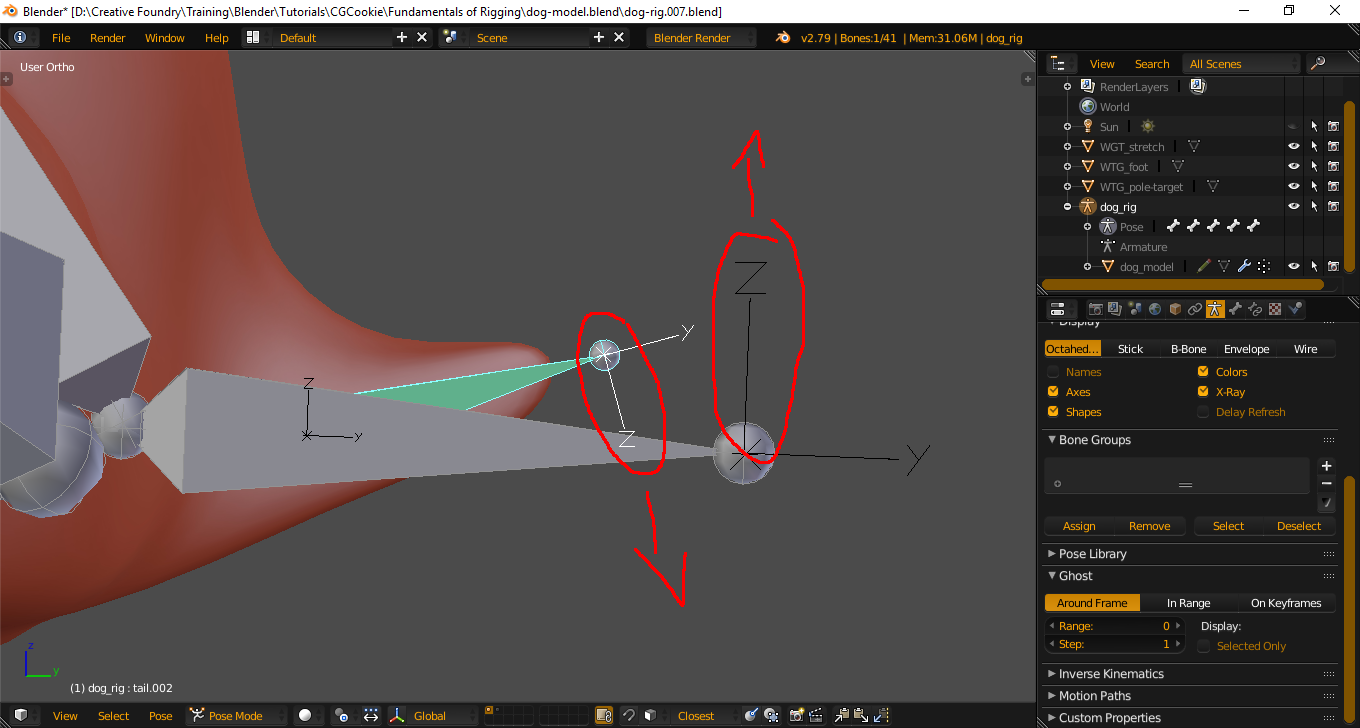
      Hi Kent, when I rigged the tail with the double rotation as you did, it didn’t work as no rotation was applied when i rotated the tail ctrl.  However after playing around with the settings, I checked ‘invert’ under each of the axis in the copy rotation modifier and it worked.  But I don’t understand why??

      #27719
      Kent Trammell
      Participant

        I wonder if your deformation bone’s axis is opposite of the control bone. That could explain why inverting it would be a solution. You can turn on bone axes visibility in the Armature data properties under display.

        #27720
        Luke Jarrett
        Participant

          Yep, you’re right, the axis were opposed to each other.  Thank you I understand now.

          #27721
          Kent Trammell
          Participant

            Awesome! Usually my rigging fix suggestions have only a 5-ish% success rate 🙂

            #27722
            Derek Chestnut
            Participant

              I encountered this problem as well during this exercise; how is it that I would be able to manually align these axis?

              #27723
              Kent Trammell
              Participant

                @dbchesties I believe you want to “roll” the bone with CTRL + R in armature edit mode. You can hit CTRL + R + 9+ 0 if you want to roll it 90 degrees specifically, and so on.

              Viewing 6 posts - 1 through 6 (of 6 total)
              • The topic ‘[SOLVED]Tail Double Rotation not working as intended’ is closed to new replies.