Silly bug? Please heelp

Forum Archive Silly bug? Please heelp

Viewing 5 posts - 1 through 5 (of 5 total)
  • Author
    Posts
  • #14558
    jonaskiste
    Participant

      Hi!

      I thought I got away with the “silly bug” issue, until now.  I tried the fix explained in a previous video with no luck.

      I’m using Blender 3.0 and I don’t know if they made some new changes to the issue, or maybe I just did something wrong.

      I was wondering if this is fixable at this point or if I need to start all over again with the stamping process? 

      Here is a link to the .Blend file:
      https://drive.google.com/file/d/1K7xVI9-aeeH_8fKZDUkSYBzQDgtzkhEW/view?usp=sharing

      Thank you for an amazing course so far! 🙂 

      #71695
      naiad
      Participant

        I guess that it is related to:

        https://cgcookie.com/questions/15185-ideal-value-for-the-quality-to-sculpt-the-skin-pores-and-wrinkles

        Also, please check the following video at the time stamp 16:05 :

        https://cgcookie.com/lesson/multires-2-8

        #71696
        jonaskiste
        Participant

          Thanks for the info! I will look into that 🙂

          #71697
          Kent Trammell
          Participant

            My apologies for the late reply @jonaskiste – I hope this isn’t too little, too late. I’ve seen several issues that seem to be related to multires data which appears to be prone to bugs, including baking artifacts.  In such cases, my recommendation is to “reset” the multires data:

            Method 1: Apply the multires data at the highest level. This will slow down your scene tremendously so be patient and methodical. Once applied, add a fresh multires modifier and click “Rebuild Subdivisions” under the Generate tab of the modifier UI.
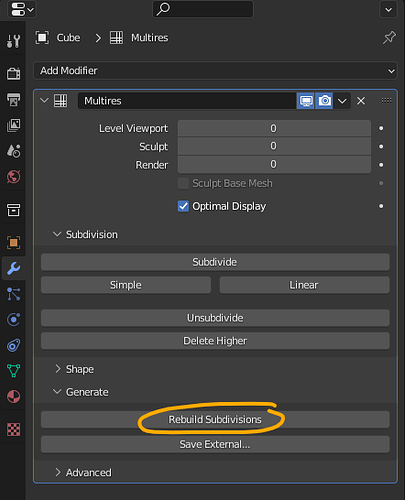
            image

            This will create all your lower levels of subdivision back down to the base (when it can’t mathematically unsubdivide any more). This will take a long time given the high polycount. I’ve seen it take 10, 30, 60+ minutes. But once it finishes try baking again as usual. Hopefully this “refresh” solves it.

            Method 1b: If the above doesn’t work, sometimes I will export the mesh and re-import it as an additional measure of “refreshing”. So it’s the same process as above except I will export as an .OBJ file after applying the original multires modifier. I.e. export your highest resolution sculpt. Of course be patient with this as well. Once it’s exported, re-import it into your scene and continue with the fresh multires + rebuild subdiv process.

            #71698
            Aleksa Bugarski
            Participant

              Greetings! I have similar problem :/

              I used Silly bug solution with eyes and everything was fine but now with ears and 3 shape keys I just can’t do it.

              I also tried Rebuild Subdivision but I cant apply multires with shape keys.I will send you my file and I would be super thankful if you can help me with it. I’m just stuck there and afraid if I let it go it might be a problem later.

              Thank you in advance!

              File link:

              https://drive.google.com/file/d/1rGgvFqIiQhFznAZ9mBa3PG9CHt5_pCMc/view?usp=sharing

            Viewing 5 posts - 1 through 5 (of 5 total)
            • The topic ‘Silly bug? Please heelp’ is closed to new replies.