Shortcuts for weight painting

Forum Archive Shortcuts for weight painting

Viewing 6 posts - 1 through 6 (of 6 total)
  • Author
    Posts
  • #17984
    Nathi Tappan
    Participant

      I don’t use a mouse because of my wrists and carpal tunnel (I use a drawing tablet 100% of the time) so I’m always navigating with shift/cmd/opt keys. That sometimes makes me stumble into shortcuts and hotkeys I didn’t know about lol.

      I learned we can actually swap between add / subtract / and blur by using those keys. Cmd will choose the inverse of the active brush, and shift will use the blur brush (somewhat like sculpting I’d say). Is there a disadvantage to using this that you guys can point out?

      #86079
      Dwayne Savage
      Participant

        You may work faster and can’t bill clients for as must time. 🙂 Also shift+a for gradient and Shift+Alt+a for Radial Gradient are helpful too. Just note that you do have to switch to the blur brush to change the blur settings like strength. Note: Use a mouse. If you have pressure set to be used by strength then that’s not really a problem for you. 

        #86080
        Nathi Tappan
        Participant

          Lol 😅 I’ll keep that in mind.

          Nice! I haven’t played with the gradients yet. And I thought the blur brush would follow along as long as I had those toggles for keeping the brush consistent on. Good to know. Thanks Dwayne!

          #86081
          Dwayne Savage
          Participant

            I have a question: where is this option to keep brushes consistent? I haven’t used it 

            #86082
            Nathi Tappan
            Participant

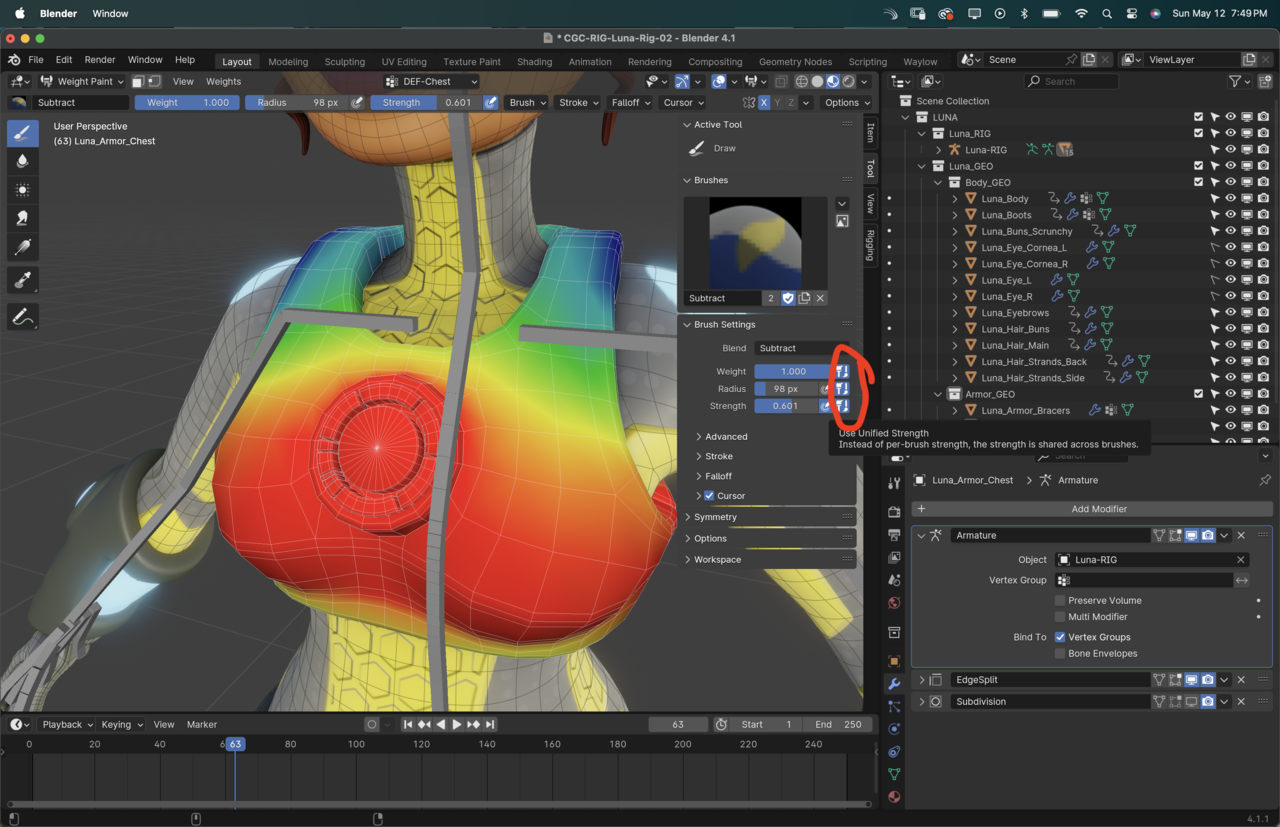
              These toggles @dillenbata3 . I first heard of them on Kent’s Fundamentals of Sculpting. Sometimes it’s a bummer to have to swap them every time, but depending on what I’m doing I toggle them just to be able to move a little faster without swapping brushes.

              Hopefully I understand their use correctly. It’d be nice to be able to return a tip after so many good ones you threw out there… 😅

              12 at 7.49.01 PM.png

              #86083
              Dwayne Savage
              Participant

                @nathitappan I’ll have to play around with this. Thanks.

              Viewing 6 posts - 1 through 6 (of 6 total)
              • The topic ‘Shortcuts for weight painting’ is closed to new replies.