Rendering the Viewport without the Rig – Blender 3.1

Forum Archive Rendering the Viewport without the Rig – Blender 3.1

Viewing 2 posts - 1 through 2 (of 2 total)
  • Author
    Posts
  • #15625
    Daemeon Henry
    Participant

      Correct me if I am wrong, but in newer versions of blender, you go to the view menu in the 3D viewport and render viewport (because I don’t know where this opengl button that looks like the little clacker is). Then you can choose “view animation” from the render menu.

      Also, to hide the rig, I think you go to the N-menu and view – collections and hide the collection with the rig. You know me, the menus and stuff are quite different now, and I am always just trying to help people out. But I am not an expert.

      #76300
      Omar Domenech
      Participant

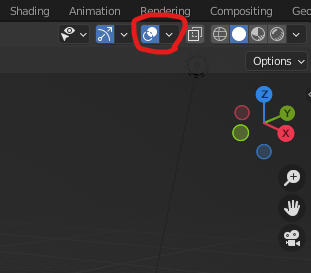
        That’s right, the Open GL clacker thing no longer exists, so as you correctly point out, now it’s all about the render viewport option. If you don’t want stuff like rigs to appear, you can always turn off the overlays:

        Overlays.png

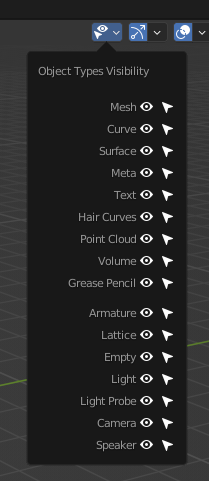
        You can also turn on or off any object type from these options here:

        esh Type Visible.png

      Viewing 2 posts - 1 through 2 (of 2 total)
      • The topic ‘Rendering the Viewport without the Rig – Blender 3.1’ is closed to new replies.