
Rendering – a lack of clarity
Forum Archive › Rendering – a lack of clarity
- This topic has 15 replies, 6 voices, and was last updated 8 years, 11 months ago by
stephensamuels.
-
AuthorPosts
-
September 14, 2017 at 4:16 pm #9167
I’ve just worked through the rendering and compositing learning flows under Blender Basics and am unclear on one thing.
In the tutorials, it recommended that animations are not rendered as movies but are output as single frames, one .png file for each. Presumably, these are all then stitched back together in something like Lightworks to create a movie file.
So when it comes to using render layers, passes, compositing and treatment of animations, do you have to go through the whole process with every frame individually?
I can’t believe this is the case and would appreciate some explanation of how this workflow is actually completed.
Thanks
September 14, 2017 at 6:38 pm #31462Yes you are corrrect , basically you render out an animation as individual .Png frames, this way if your computer crashes , it is easy to begin rendering where you left off. It also means you can render out parts of animations if you make changes or just want to do a bit of rendering at a time. You can then use Blenders VSE (video sequence editor) to merge all of your frames together into a video file.
As for compositing and render layers, if you have it set up correctly in the compositor node editor, then the Blender will render out each frame, composite it and save it in a sequence in your chosen folder 🙂
I first learnt about the basics of this whole process during the animation bootcamp from Wayne Dixon . If you watch this video , it will give you a good insight into what you need to do :
https://cgcookie.com/lesson/stomp-walk-cycle-multi-angle-render
Watch the whole vidoe, its only 6 mins long.
As for a node setup for compositing, here is how I render out a walk cycle which then gets run through the compositor to sharpen and brighten it, and then save it as the filename chosen in the folder highlighted in the file output node :
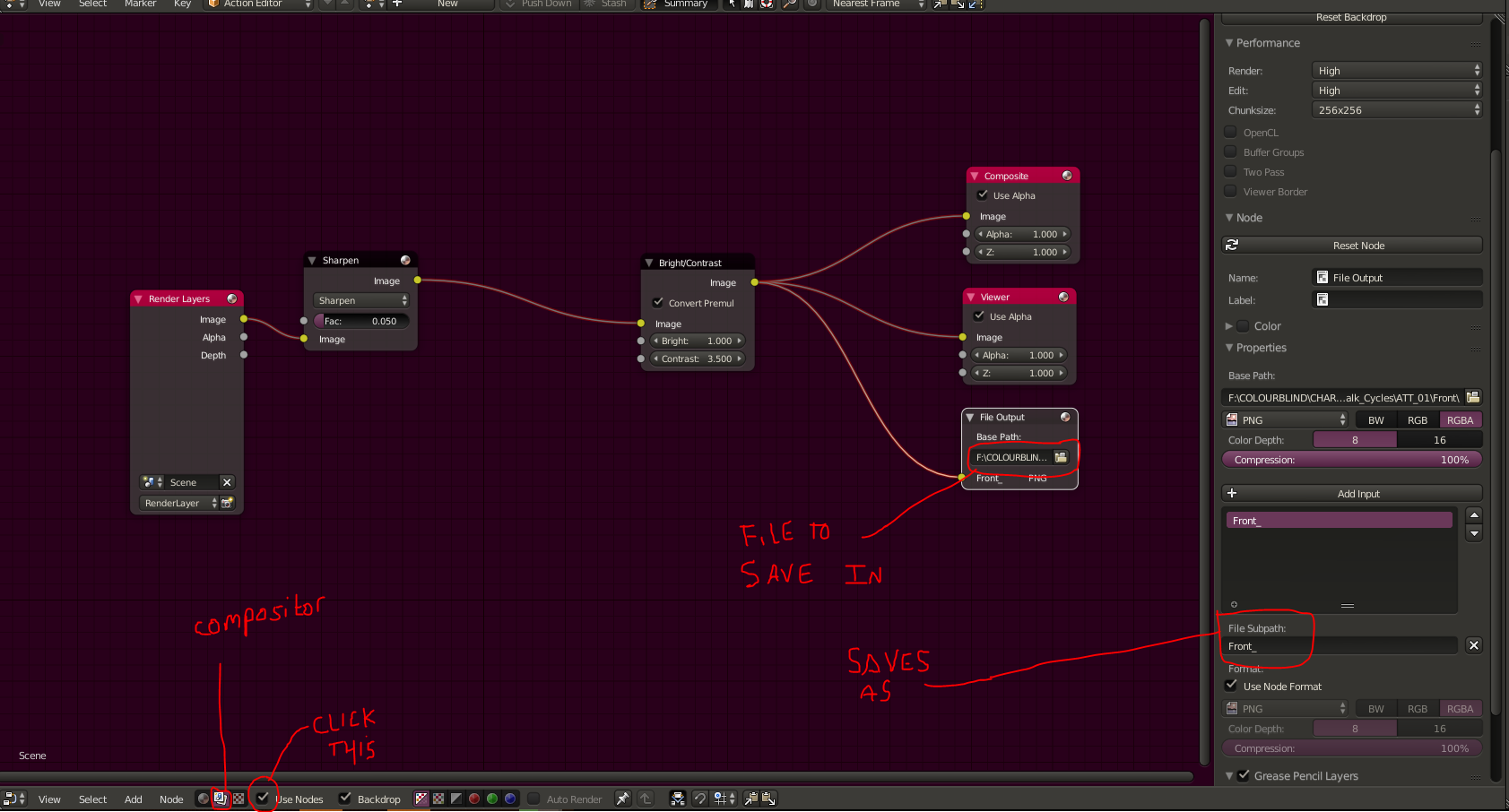
Right click – open in new tab to view full size.
So basically above , the file subpath (highlighted) will mean each frame saves as Front_(frame number) , so frame 1 would be saved as Front_01 , and then 2 would be Front_02 and so on. Once you have a sequence of images like this, you can add them into the VSE and convert them into a video file. The VSE also allows you to add effects, multiple shots etc.
Hope this helps 🙂
September 15, 2017 at 3:19 am #31463Hi Matthew and thank you for your reply. I’m afraid I still don’t get it though!
In Wayne’s video, he takes a whole sequence of .png files and sucks them up into the video editor to create the final output. But my issue is still around the compositing stage which he doesn’t touch upon.
In my mind, the work flow is:
- create the animation
- render out a sequence of .png files, one for each frame
- composite – colour, motion blur etc etc
- create final video.
Where I get stuck is, how do I composite my sequence without having to apply the node tree to every frame individually?
I must have the sequence above wrong somehow but I can’t see how you can render “through” a pre-configured compositor set up because you don’t know what adjustments are required until you have completed the render and can see what the final output looks like.
Or is the ‘image’ output of the Render Layer node the whole sequence not just one frame?
I’m sure there’s a simple explanation but it’s escaping me at the moment!!
Many thanks again, i appreciate your time.
Stephen
September 15, 2017 at 11:06 am #31464fwiw there is a viewer in the compositor to see the changes as you make them…
I’m afraid I don’t have anything for you other than that hint…
hope this helps…
😀
September 15, 2017 at 1:20 pm #31465Hey Stephen, the workflow can definitely be a bit tricky but hopefully we can help clear things up. The workflow that I have is:
1. Create the animation
2. Render out a single test frame (could be lower quality than the final render, and you don’t need to save it outside of blender)
3. Composite based on the test frame
4. Render out the image sequence (your compositing will be applied to every frame)
4. Combine sequence to create a final video
The compositing will be applied to every single frame before it’s saved to your computer, so in a way you are running it through a pre-configured setup. The one or two single frame test renders will be enough to tell you what adjustments are needed.
Does that help?
September 15, 2017 at 1:55 pm #31466Exactly what Jonathan said, I should have mentioned that earlier sorry. Yes, as he said, do a single frame render and set up the compositor to your liking on a that single frame. Once you are happy, render the whole animation and each frame will be ran through the compositor and then saved as a png , then once you have your image sequence you can make the movie with the VSE
September 15, 2017 at 1:59 pm #31467That’s a lot clearer, thank you.
Just one more question – once i’ve set up the compositor, do I press ‘animation’ on the render properties or ‘render’? And does Blender automatically find the compositor or do i have to point it in the right direction? (that’s two questions!)
Apologies for being thick but this is all very new to me.
Appreciate everyone’s help.
Stephen
September 15, 2017 at 5:00 pm #31468Apologies for being thick but this is all very new to me.
No worries! It’s a lot to take in at once, and definitely takes time to get used to.
Once you’ve set up your compositing the way you’d like it, then hit ‘Animation’ in the render properties. The compositing will be automatically applied, so no need to set up anything else.
September 16, 2017 at 2:51 am #31469OK, thanks Jonathan, I think i’ve got it. I’ll give it a try and come back if I get stuck.
Appreciate your help.
September 16, 2017 at 7:05 am #31470OH , one thing I think we forgot to mention is that you need to have compositing checked in your render panel , its under post processing shown below :
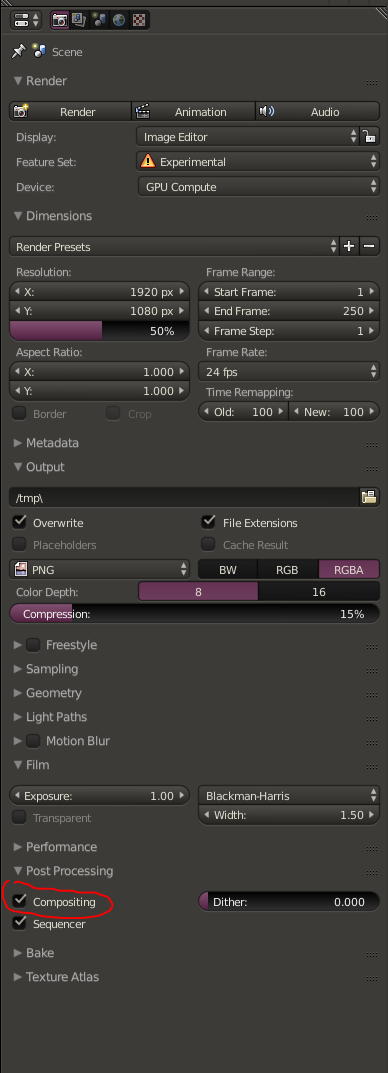
If you don’t have that checked then Blender wont run the render through the compositor nor will it save the files to where you have chosen in the file output node.
September 19, 2017 at 4:38 am #31471Very helpful Matthew, appreciate you pointing that out. Thank you.
September 20, 2017 at 1:39 am #31472Hello I’m going to add to the discussion. Yes rendering each frame as an individual file. If you’re using individual render layers for later tweaking that can get a little crazy with the files. There is a file that was invented to cope with the problem you have naturally discovered:
OpenEXR
The good news is that it is already supported in Blender. I personally don’t know enough about it to teach you anything specifically. But that is the file format to use when creating animations and rendering each frame individually while preserving each individual render layer.
Good luck in your googlings.
September 21, 2017 at 7:31 am #31473Usage of OpenEXR is covered in the Fundamentals of Compositing course (Render Layer Node VS Image Node). [OpenEXR for a single still image is pretty simple; for animation it’s trickier and I’m still learning.]
September 21, 2017 at 9:58 am #31474OpenEXR for animation is fairly straighforward, but requires a few extra steps.
Generate raw animation
1. In node editor (compositor), delete Composite output and replace with File Output.
2. Change File Output format to OpenEXR. Set the folder and file name base.
3. Add/rename inputs to match render layers.
4. Connect render layers to File Output. Render.

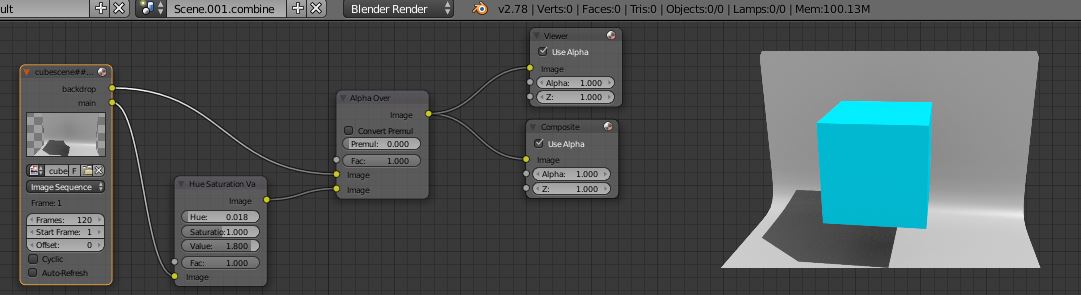
Combine and process layers (in another scene or blend file)
1. In node editor (compositor), replace Render Layers input with Image Sequence. Select OpenEXR images generated above.
2. Add processing nodes as required. Connect processed image to a Composite or File Output node.
3. Render processed animation.
 September 22, 2017 at 8:24 am #31475
Of course you can do the “generate raw” part without using the compositor at all (probably better). Just set up render layers as needed and select “OpenEXR MultiLayer” as the output format in the Render tab. Otherwise it works exactly the same. [There is a general description of animation + compositor in Manual : rendering animations , not a lot of details. I’ve not seen specific training on this – maybe it exists.]
-
AuthorPosts


- The topic ‘Rendering – a lack of clarity’ is closed to new replies.