Render problems

Forum Archive Render problems

Viewing 15 posts - 1 through 15 (of 16 total)
  • Author
    Posts
  • #11539
    Fabio Tessitore
    Participant

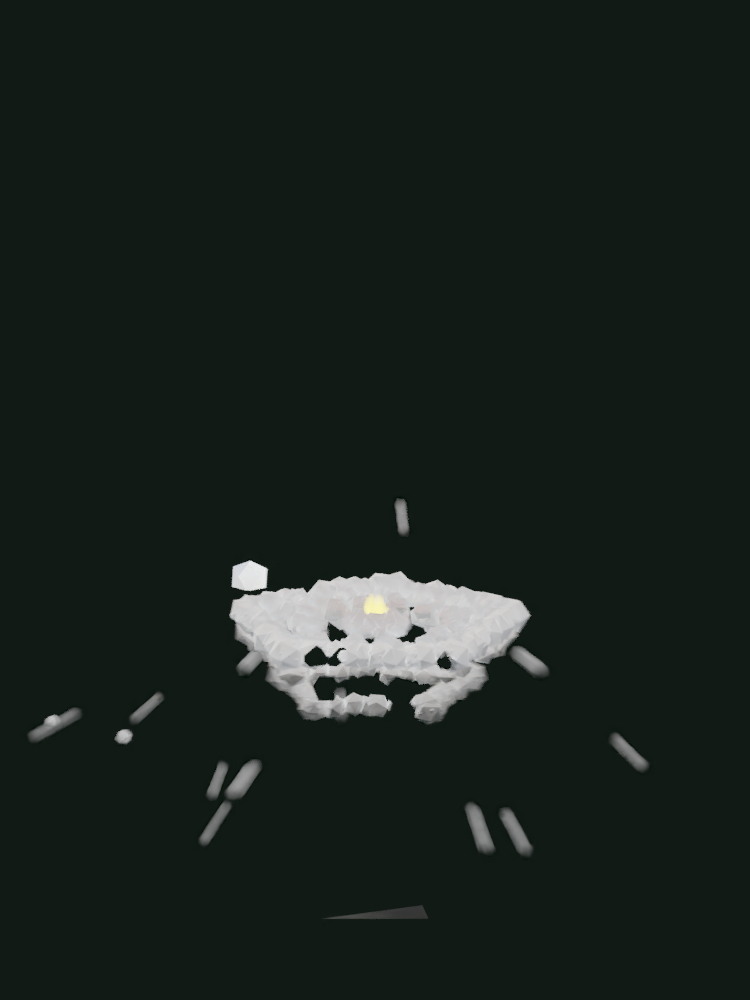
      Frame 70

      Frame 121

      In my viewport is all ok. Also, I noticed that this kind of things do not happen when I remove the plane

      Any ideas?

      Thanks

      #55217
      shan jay
      Participant

        Ok this make me confused this shouldn’t look like this

        #55218
        Fabio Tessitore
        Participant

          Update: the problem is not the plane, but the smoke emitter. If I disable the render of the smoke, it works

          #55219
          shan jay
          Participant

            huh this must be a glitch. try this 

            #55220
            Fabio Tessitore
            Participant

              Update: the number of particles is too big, with less particle it works

              #55221
              shan jay
              Participant

                (the number of particles is too big, with less particle it works) 

                Well I think this should be not a thing but it is.

                How many particles does it need in order to work ?

                maybe your computer rendering system is not very good

                #55222
                shan jay
                Participant

                  ops the bullet was a mistake

                  #55223
                  Fabio Tessitore
                  Participant

                    My computer has an i7-8750H, 16G RAM, NVIDIA GTX 1050 4G

                    With 5000 particles works. With 7000 breaks. Same result with more than one emitter, the total must be not greater than 5000

                    #55224
                    Fabio Tessitore
                    Participant

                      Update: Disabling Motion Blur (Render Properties -> Motion Blur) I’am able to render 3 smoke emitter with 5000 particle each

                      #55225
                      shan jay
                      Participant

                        Can you send me the  blend file

                        #55226
                        Fabio Tessitore
                        Participant

                          Google Drive link

                          see frame 188

                          and thanks!

                          #55227
                          spikeyxxx
                          Participant

                            Hey Fabio, can you see if this works for you (it renders fine now on my pc…):

                            https://drive.google.com/open?id=1JrSws4NRLMj5BpcomNl3LA_3h5w3N4zO

                            #55228
                            Fabio Tessitore
                            Participant

                              Hi, it works. Please, tell me what have you changed

                              #55229
                              spikeyxxx
                              Participant

                                O.k., first of all, you didn’t do anything wrong, it’s a bug. I think it has already been reported (at least an other bug that is probably the same issue). I don’t know what is causing it, but I’m guessing that somewhere in the calculations of the Motion Blur, there is a division by the size or scale of the objects in the scene. When there are objects with size 0, that yields infinity and computers don’t like that and start misbehaving;)

                                You used a Colorramp in the Texture to control the Size of the Particles. The Colorramp had a black flag, and black means 0.

                                Being a genius, I changed the Value of the black color from 0 to 0.0001.

                                That is all! No more dividing by 0 and therefor no more infinity! Computer happy, we happy.

                                Took me quite some time to figure it out though, so maybe I’m not that much of a genius after all…:(

                                #55230
                                Fabio Tessitore
                                Participant

                                  OK, thank you very much. I’ll never use zeros 🙂

                                Viewing 15 posts - 1 through 15 (of 16 total)
                                • The topic ‘Render problems’ is closed to new replies.