Removing the cursor while drawing with grease pencil and sculpting

Forum Archive Removing the cursor while drawing with grease pencil and sculpting

Viewing 4 posts - 1 through 4 (of 4 total)
  • Author
    Posts
  • #10986
    Anthony Roberto
    Participant

      Just wondering something that seems to me to be pretty basic.  I would love to disable the cursor when I begin to draw with grease pencil or sculpt in sculpt mode.  Anyone know how to do this in settings or even an add on?  Thanks for your time.

      #51940
      Wayne Dixon
      Participant

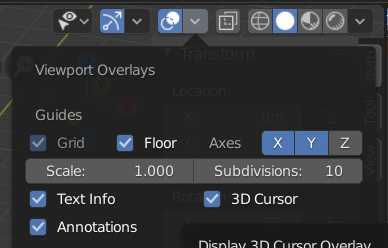
        Uncheck the 3d cursor in the overlays menu

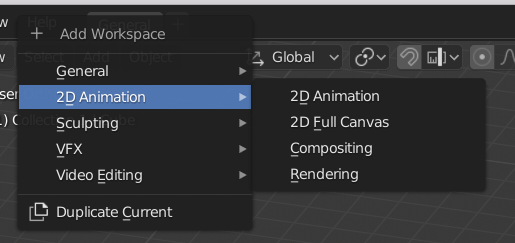
        You can also switch to a “2d animation” workspace which is optimized for drawing (meaning all the irrelevant stuff is turned off)

        Hope that helps.

        Happy drawing.

        #51941
        Anthony Roberto
        Participant

          Thanks for the reply.  The 3d cursor doesnt bother me, in fact I find it really useful for grease pencil drawing.  My question was aimed at eliminating the arrow of your mouse cursor while GP drawing or sculpting.  I am using a pen display and having the white arrow between me and my subject matter is really annoying. Ideally if it disappeared once the pen was engaged would be best.  Even minimizing the mouse cursor while drawing or sculpting would be amazing.  Like I said it seems like a simple UI toggle, and one that other programs seem to have dealt with, I just cant seem to find it in blender.

            All the same, thanks.

          #51942
          Wayne Dixon
          Participant

            Oh, try this

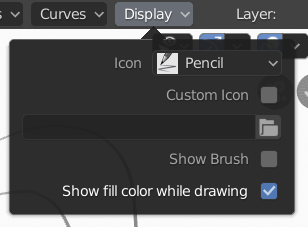
            Uncheck the “Show Brush” in the display.

            On my system this doesn’t work with the official 2.80 release but it does with the current builds.  (which means it should work for 2.81 which is meant to be released any day now)

          Viewing 4 posts - 1 through 4 (of 4 total)
          • The topic ‘Removing the cursor while drawing with grease pencil and sculpting’ is closed to new replies.