Random Pixels in the Texture Paint/UVs

Forum Archive Random Pixels in the Texture Paint/UVs

Viewing 3 posts - 1 through 3 (of 3 total)
  • Author
    Posts
  • #15506
    Daemeon Henry
    Participant

      Hey. It’s ok because I went over to the UV editor/Image editor window and found all of the pixels and either did a fill on them or painted them out if they were on the edge, but my UVs (some of them) had these random pixels in them here and there that were the base brown color we used at the beginning. I noticed the odd wrong colored pixel here and there when I was texture painting and the only way I could get rid of them was in the image editor. Painting over them in the texture paint window did nothing. Is it just sloppy seams on the UVs or does something sloppy with my modeling? 

      #75798
      Daemeon Henry
      Participant

        If you’ve got a problem, YO, I’ll solve it. Check out the hook while my DJ revolves it.

        #75799
        Omar Domenech
        Participant

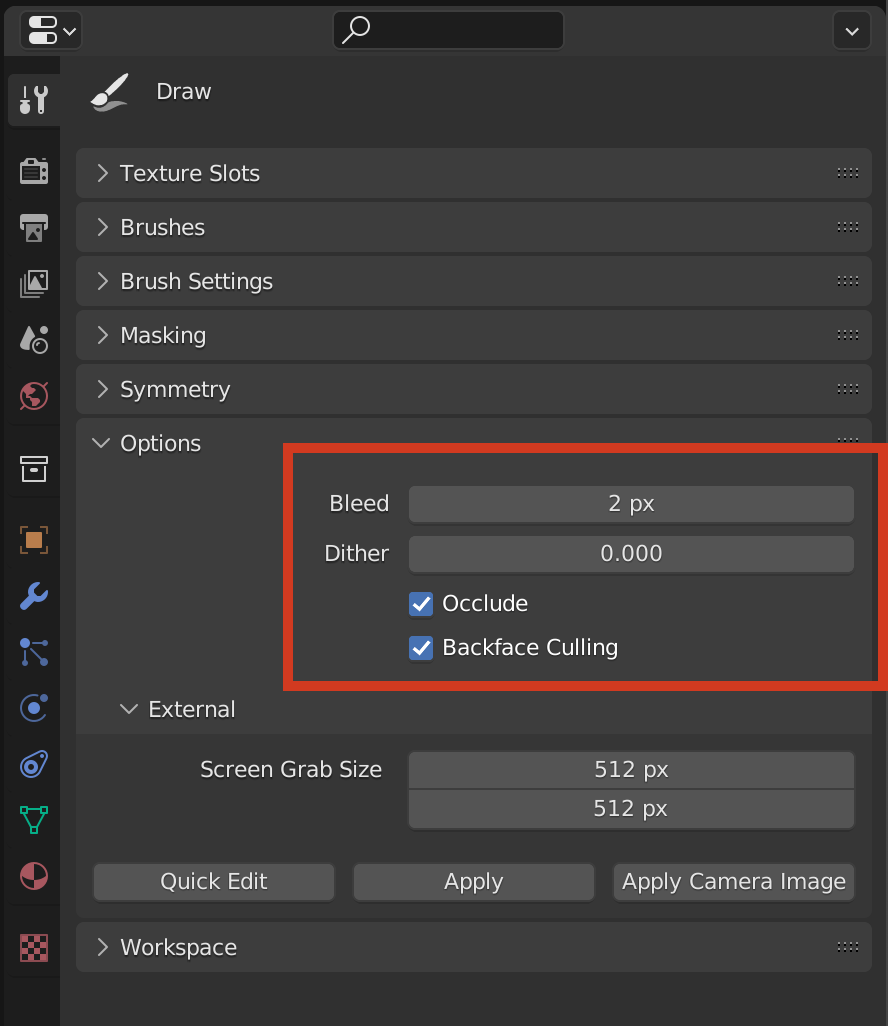
          I think it’s just the texture painting mode being wonky. If I Remember correctly, in the option tab of texture paint mode, there are a couple of options that will let your mouse strokes be more piercing.If you disable Occlude and Backface Culling, I think you’ll find your stroke goes all the way through your object much easier, but be careful, you can paint the back of your model without noticing it.

          TP Option.png

        Viewing 3 posts - 1 through 3 (of 3 total)
        • The topic ‘Random Pixels in the Texture Paint/UVs’ is closed to new replies.