Question on “sharp” vertices, example at 11:16 in the video

Forum Archive Question on “sharp” vertices, example at 11:16 in the video

Viewing 3 posts - 1 through 3 (of 3 total)
  • Author
    Posts
  • #20344
    Dano Wils
    Participant

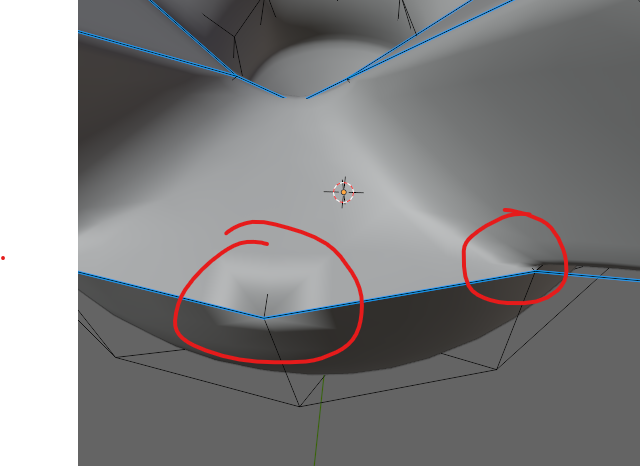
      So at 11:16 in the video, extruding another point from the corner causes the mesh to become “sharp” at that corner. At some point later, it becomes smooth again, but I’m not sure what was done to do that. In the video when “F” is pushed, it seems to solve it, but mine stays “sharp” or rigid, instead of smoothing out, so to speak. I thought I’d followed the same steps, but my vertices circled in red maintain that “sharp” disposition where the mesh seems locked to the control points, as opposed to other areas where the mesh is more “loose” relative to the control points. Any ideas about what’s going on here? I’m using Blender 4.3.0, and have good fidelity with all the extensions, plugins, etc.

      #95546
      Dano Wils
      Participant

        Actually figure it out myself – it turns out there were multiple vertices at each position. Once I selected them and merged them manually, the “sharp” topology problem went away. Maybe it’s useful for someone else, I’m personally going to enable the auto-merge vertices option as the tutorial shows.

        #95547
        Martin Bergwerf
        Participant

          HI Dano @dwillies ,

          My guess is, that you have ‘double Vertices’, and/or inconsistent Normals.

          (A, to Select ‘All’, M > Merge > By Distance, followed by SHIFT+N; this solves more than 90% of al your modeling problems.)

          Could of course be something else, but I can’t tell much from this screenshot.

        Viewing 3 posts - 1 through 3 (of 3 total)
        • The topic ‘Question on “sharp” vertices, example at 11:16 in the video’ is closed to new replies.