Question about edge distortion

Forum Archive Question about edge distortion

Viewing 7 posts - 1 through 7 (of 7 total)
  • Author
    Posts
  • #18204
    Andy Kynerd
    Participant

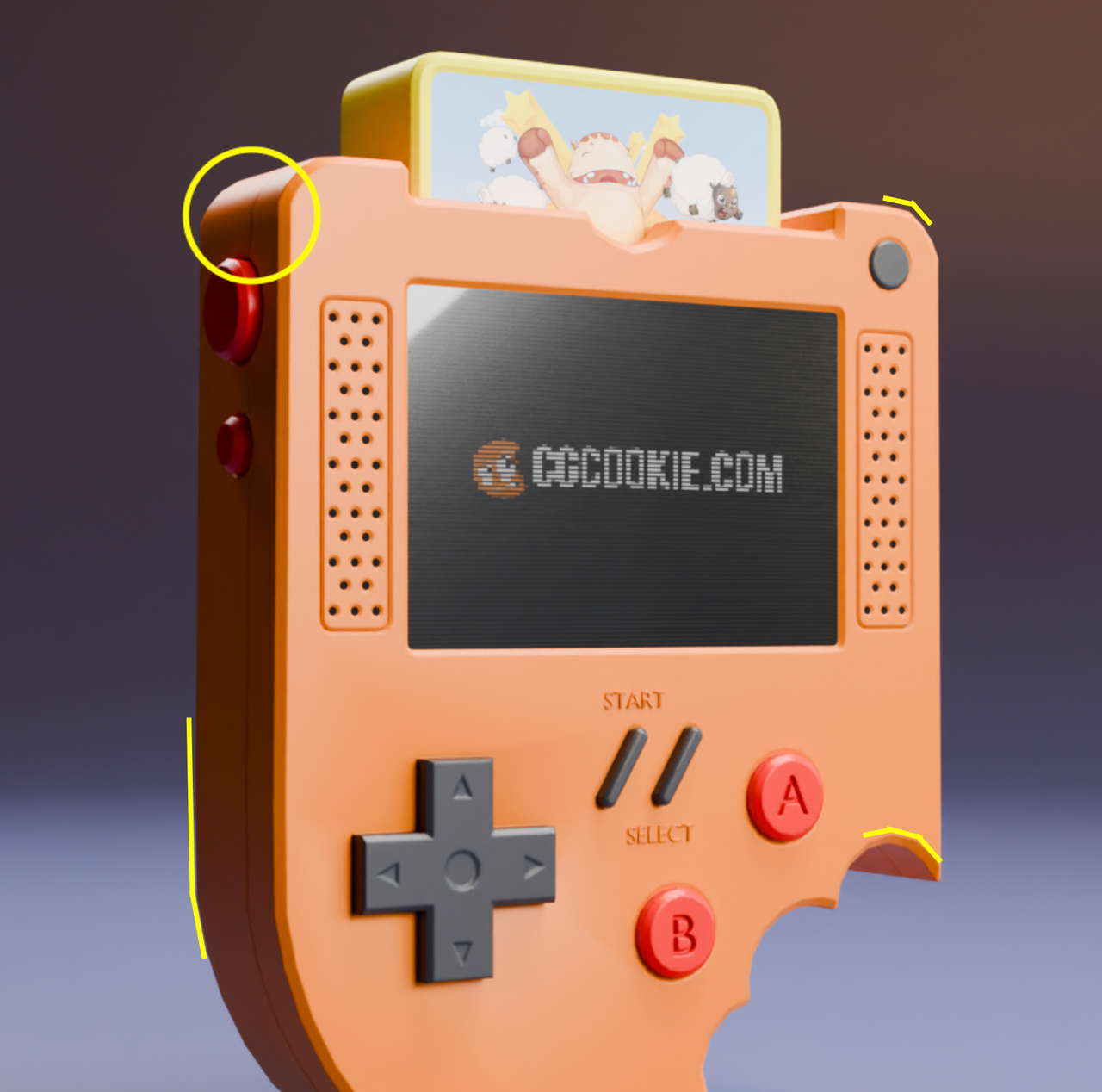
      I finally finished! Quick question though, if anyone can help me with this. I’m curious why this edge detail (see image attached) appears slightly warped at this angle in the final render. If I go into my scene and inspect the edges from different angles they seem perfectly fine. Is this some sort of lens distortion or something else? 

      #86980
      Andy Kynerd
      Participant

        ender-screenshot.png

        #86981
        Martin Bergwerf
        Participant

          Hi @AhtfulDodja ,

          No , that is not some kind of Lens Distortion effect. That is how you modeled it. It’s a relatively Low-Poly model and you can see this all over the place:

          Console_01.png

          Due to Smooth Shading, you don’t notice this too much, apart from certain viewing angles.

          The Beveling on the top corners is also not ‘perfect’ in your case, but I wouldn’t worry about that too much, you did well and made a great model, that you can be very proud of!

          #86982
          Omar Domenech
          Participant

            Yeah I agree, your result is great and the jaggedness is due to the low poly nature of the model, nothing to worry about. Try seeing the model from the camera perspective in normal viewport shading, it’ll most likely match with your render. 

            #86983
            Andy Kynerd
            Participant

              Thanks Martin! I figured it out. At some point, I somehow got the vertices out of alignment with the others on that side of the console. Not quite sure technically how to get them aligned with the others at this point. As for the smooth shading, I am using the Smooth by Angle modifier in Blender 4.1, set at 30 degrees. I couldn’t figure out how to get this to a better smoothness sweet spot otherwise, on those edges with limited vert counts.aligned-vertices.png

              #86984
              Blaine Jensen
              Participant

                You can set your snapping to face or vertices, when you G to move, hold Ctrl and hover over the vert you want it to align with and that should straighten it out. You might need to move a couple for it to straighten out.

                There might be an easier or more correct way but that’s how I would do it at least.

                #86985
                Omar Domenech
                Participant

                  If you want more smoothness, you’ll later get into modeling with Subdivision Surface Modifier. You can watch the Pothead course for that:

                  https://cgcookie.com/courses/pothead-create-a-hard-surface-character-in-blender

                Viewing 7 posts - 1 through 7 (of 7 total)
                • The topic ‘Question about edge distortion’ is closed to new replies.