
Pattern not showing in Blender 2.8

Forum Archive Pattern not showing in Blender 2.8

Viewing 5 posts - 1 through 5 (of 5 total)
  • Author
    Posts
  • #8379
    garethgr
    Participant

      Hi there,
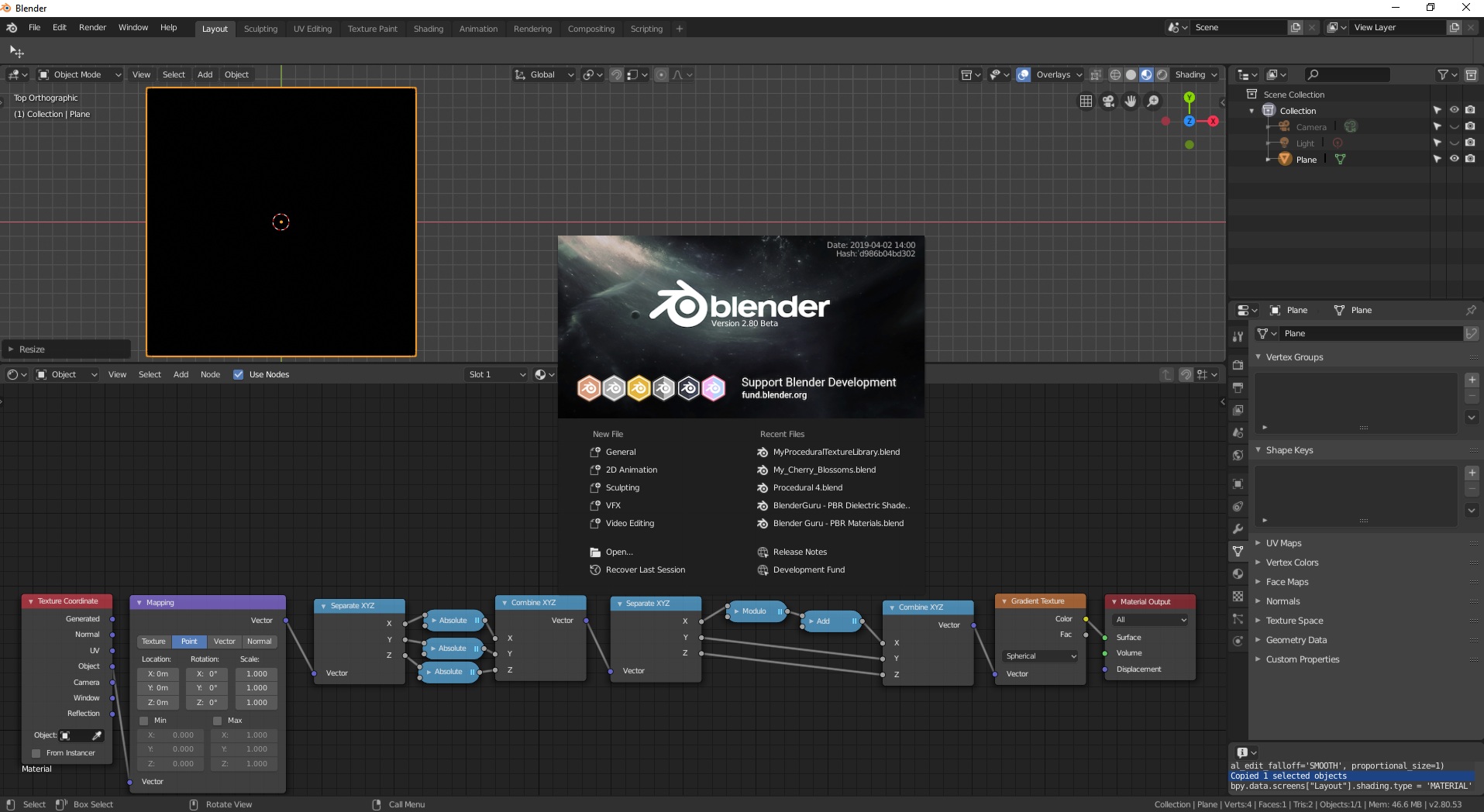
      I am trying to follow the tutorial however I don’t seem to get any shapes as you have.
      I have gotten this far in the video, still nothing.
      Am I doing something wrong?

      I have tried both eevee and cycles, both show this black material
      I opened a new file to start from scratch, just in case.

      #28637
      Thibaut Bourbon
      Participant

        Hi @garethgr  , your node setup is looking good so far 🙂

        If you didn’t scale the plane up in the edit mode, select it, hit Ctrl+A and apply the scale. Alternatively, you can also change the X,Y and Z scale of your mapping node. The plane you’re using seems to be smaller than the spacing so hopefully this will fix your issue, let me know!

        /Thibaut.

        #28638
        garethgr
        Participant

          Awesome, thank you for the info I will try again and let you know where I get to 😉

          #28639
          garethgr
          Participant

            I got  it working thank you, instead of the subtract, I added an Add by accident.
            All working now on a flat plane with scale applied 😉

            #28640
            Thibaut Bourbon
            Participant

              Great that you figured it out ! Have fun with the remaining of the tutorial 🙂 the Add operation would work as well, it’s just a matter of preference : with Substract, the positive value shift the texture to the right, which is to me more intuitive.

            Viewing 5 posts - 1 through 5 (of 5 total)
            • The topic ‘Pattern not showing in Blender 2.8’ is closed to new replies.