Option box visible in basic translations

Forum Archive Option box visible in basic translations

Viewing 4 posts - 1 through 4 (of 4 total)
  • Author
    Posts
  • #19868
    Daniel Widemark
    Participant

      Hi!
      When performing standard translations, I notice that you have the “options box” at lower left corner, with available options (local, global etc). I do not see that box myself. Is it a settings within Preferences?

      #93790
      Daniel Widemark
      Participant

        Sorry I found it!
        I used the shortcuts G, S myself, while you were using the Move and Scale tools from the left toolbar.
        Lesson learned: the tools on the left triggers the options box, while using hotkeys for move and scale does not (instead all the hotkey alternatives shown at the bottom)

        #93791
        Martin Bergwerf
        Participant

          Hi @dawid ,

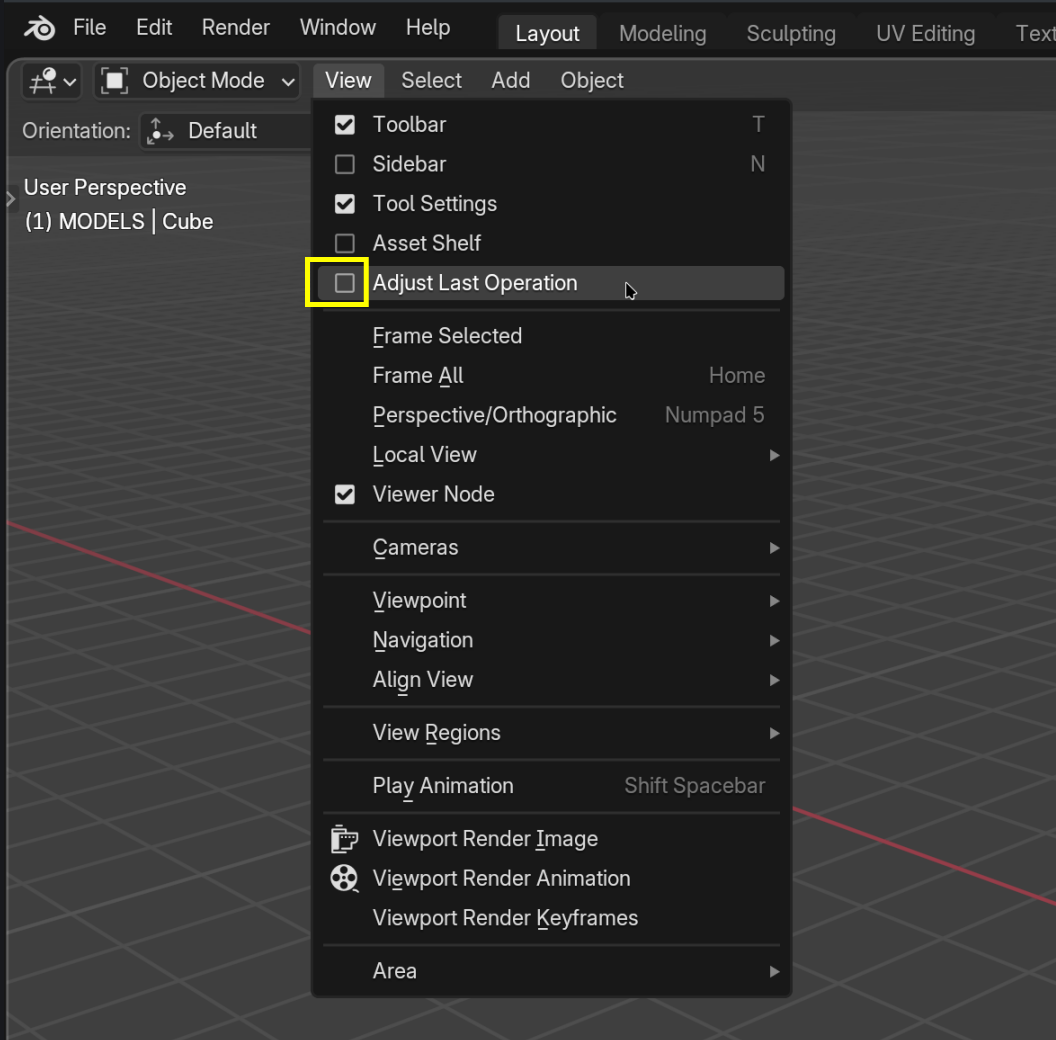
          That doesn’t sound correct; whether you see that ‘Options box’ as you call it, is controlled by this checkbox:

          ALO.png

          You can also bring it up with the F9 Key, then it will appear where your Mouse Pointer is.

          #93792
          Martin Bergwerf
          Participant

            I highly recommend to watch the Basics Course first (or again): https://cgcookie.com/courses/blender-basics-an-introduction-to-blender-4-x 

          Viewing 4 posts - 1 through 4 (of 4 total)
          • The topic ‘Option box visible in basic translations’ is closed to new replies.