
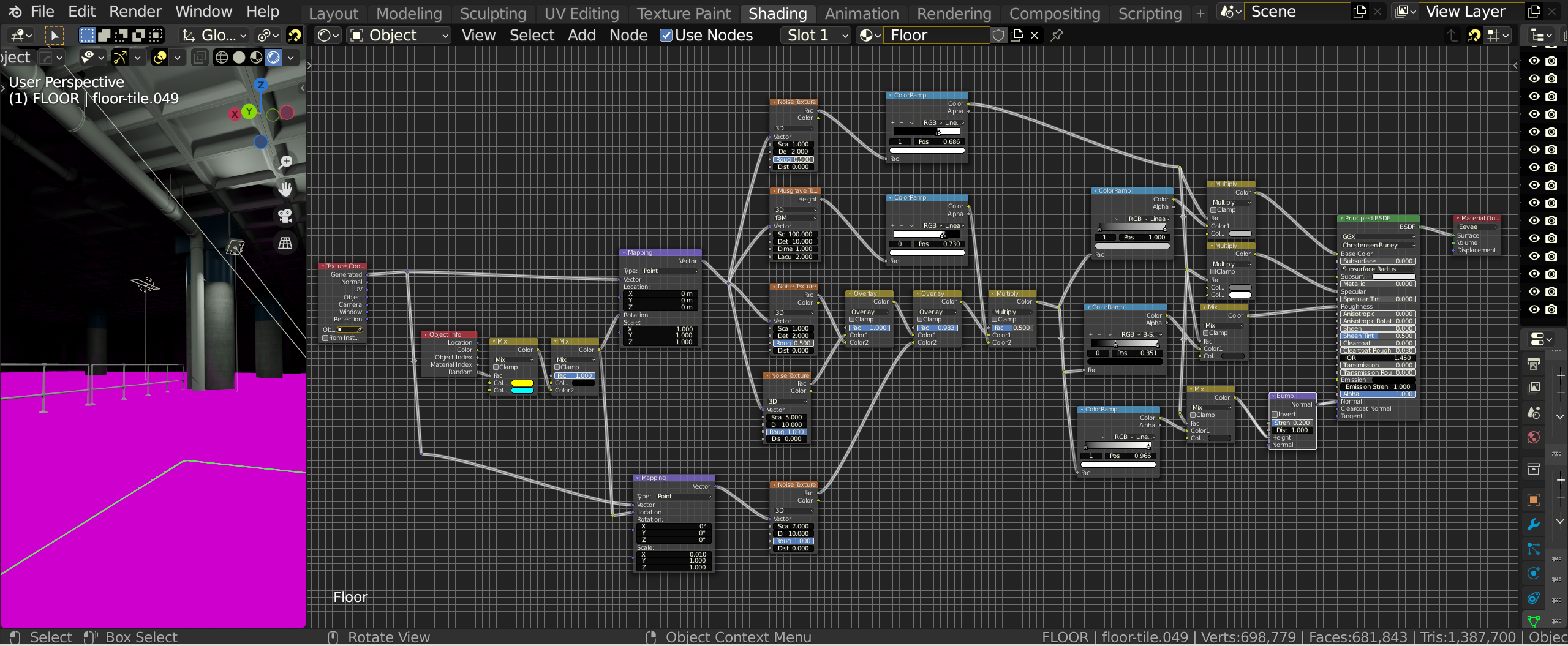
On the floor material everything looks fine until I connect the bump node into the normal socket on the Principled BSDF, and it goes pink, why?

Forum Archive On the floor material everything looks fine until I connect the bump node into the normal socket on the Principled BSDF, and it goes pink, why?

Viewing 3 posts - 1 through 3 (of 3 total)
  • Author
    Posts
  • #14273
    Matt Dickun
    Participant

      #70063
      Adrian Bellworthy
      Participant

        Hey @az93 , I can’t see anything wrong with your nodes. The pink would normally indicate a missing texture.

        I can see you have Eevee selected in the material output node, make sure you also have Eevee selected in the render properties. I normally leave the material output at the default , All.

        Double check your nodes, make sure you don’t have duplicates, one on top of the other.

        Try saving your work, close Blender, and then open up the file again in Blender. It may be a hardware issue, memory probably if it is. Saving, closing and reopening Blender will clear out anything being held in the memory.

        #70064
        Kent Trammell
        Participant

          I believe another member experienced a similar issue which came down to hardware capabilities. I know Eevee supports a finite number of nodes in material networks and will turn pink once that threshold is crossed. But I think I remember @duerer discovering that it can even turn pink sooner depending on PC hardware.

          Am I right about this @duerer?

        Viewing 3 posts - 1 through 3 (of 3 total)
        • The topic ‘On the floor material everything looks fine until I connect the bump node into the normal socket on the Principled BSDF, and it goes pink, why?’ is closed to new replies.