
Office Hours – Kent’s Office – Tuesday, April 18, 1 pm (US Eastern Time)
Forum Archive › Office Hours – Kent’s Office – Tuesday, April 18, 1 pm (US Eastern Time)
- This topic has 20 replies, 9 voices, and was last updated 3 years, 2 months ago by
Wes Burke.
-
AuthorPosts
-
April 13, 2023 at 3:09 pm #16210
Greetings Citizen Members! I will be opening my office via Discord on Tuesday, April 18th, at 1 pm US Eastern Time. That translates to:
- 10am Los Angeles time
- 6pm London time
- 9pm Dubai time
- 3am Sydney time (ouch)
It’s hard to pick a time that works for everyone, but I’ll also record the session for anyone that can’t make it live. Assuming I don’t forget again 🤦♂️
Have a question for me?
Ask me anything you’d like related to Blender, CG Cookie, my courses, troubleshooting a project issue, etc! If your question involves a project you’re working on, please provide a download link so I can take a closer look.
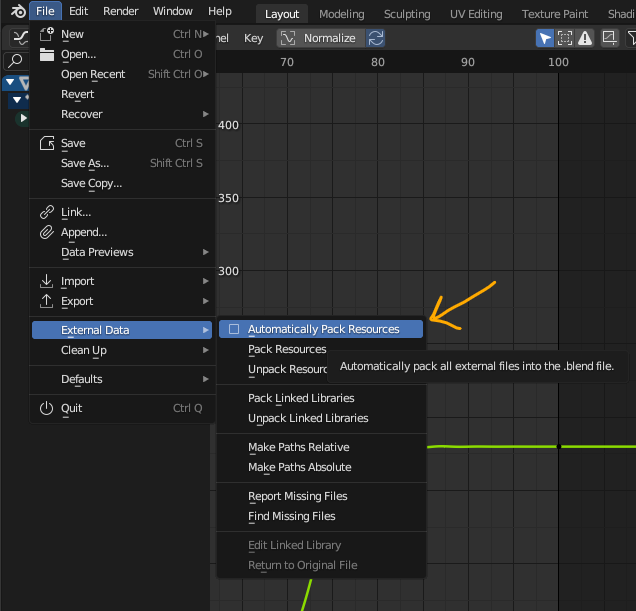
The best way to do this is by uploading your .blend to Dropbox, Google Drive, Mega, or equivalent file hosting service then copy + paste the share link here. If your project involves image textures please pack your .blend before saving and uploading by going to File > External Data > Automatically pack resources:
NOTE: Active CG Cookie members get first priority, but we’re happy to help out anyone. For more information about Office Hours, check out Amber’s recent blog post.
April 17, 2023 at 12:27 am #78550Hallo Kent
I hope you can help me with the Asset Browser on v3.5. I am starting to understand it… but I still have issues with understanding the differences between Link, Append, Append (Reuse Data)
And how could I make my Asset Browser available in a “cloud” so I could share it with other people? I do have a Synology NAS and I sync my datas with a drive client. Do you have any experience with that?
I think Asset Browser is about a to become a big thing in Blender.
thank you and I hope you have the time to answer this. I set a reminder to attempt you office Hour.
Best
martin
April 17, 2023 at 2:59 am #78551My question that I already asked on discord was about the export of the cubicity city. I’ve exported it as glb (gltf) because I want to use it in a three.js file, but the blender procedural textures don’t get exported, only the color information. So no brick texture is shown or emissions etc. So I wonder if we could bake the materials to textures and how to do that the best way, each item one by one or the city in totality with the light also baked in?
April 17, 2023 at 5:27 am #78552another question is about the first part of the new sessions course. If I want the stars only to be clearly visible in a certain part of the picture and not in others. And I don’t want to get weird artifacts on the planet and rings. How to do that?
April 17, 2023 at 9:44 am #78553@sheila5 Can you post a screenshot of the weird ring artifacts you’re seeing?
April 17, 2023 at 9:52 am #78554Will do later this evening
April 17, 2023 at 11:47 am #78555what i wanted was seeing more stars near the top and not where I put the elipse mask (at the bottom). I tried that by changing add to subtract. But it gave me an reddish band around the ‘orange’
 April 17, 2023 at 12:36 pm #78556
@sheila5 Could upload your .blend to dropbox / google drive / etc and post a download link for me? I’d like to use your file to answer your question
April 17, 2023 at 1:11 pm #78557Hello Mr.Kent,
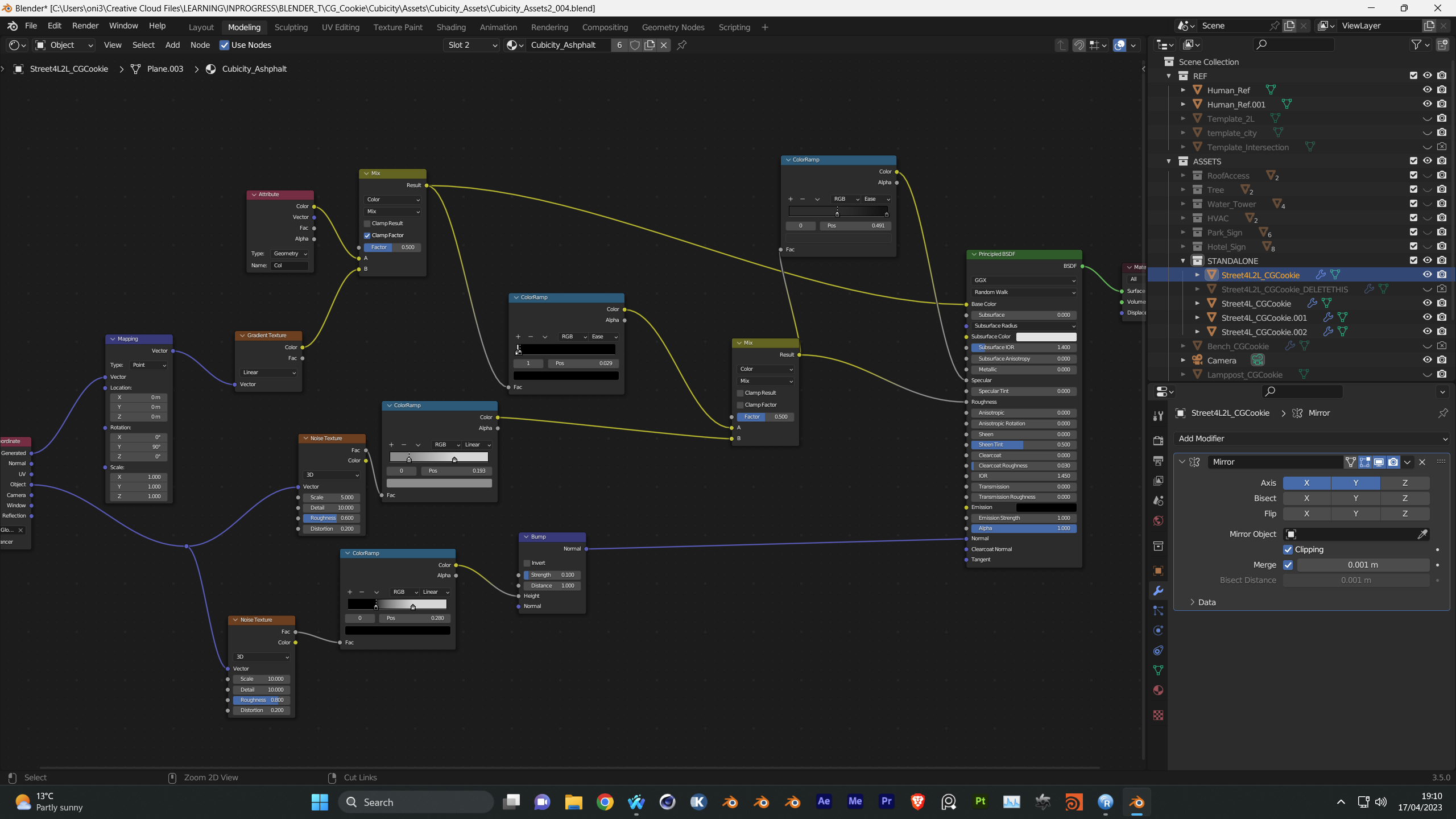
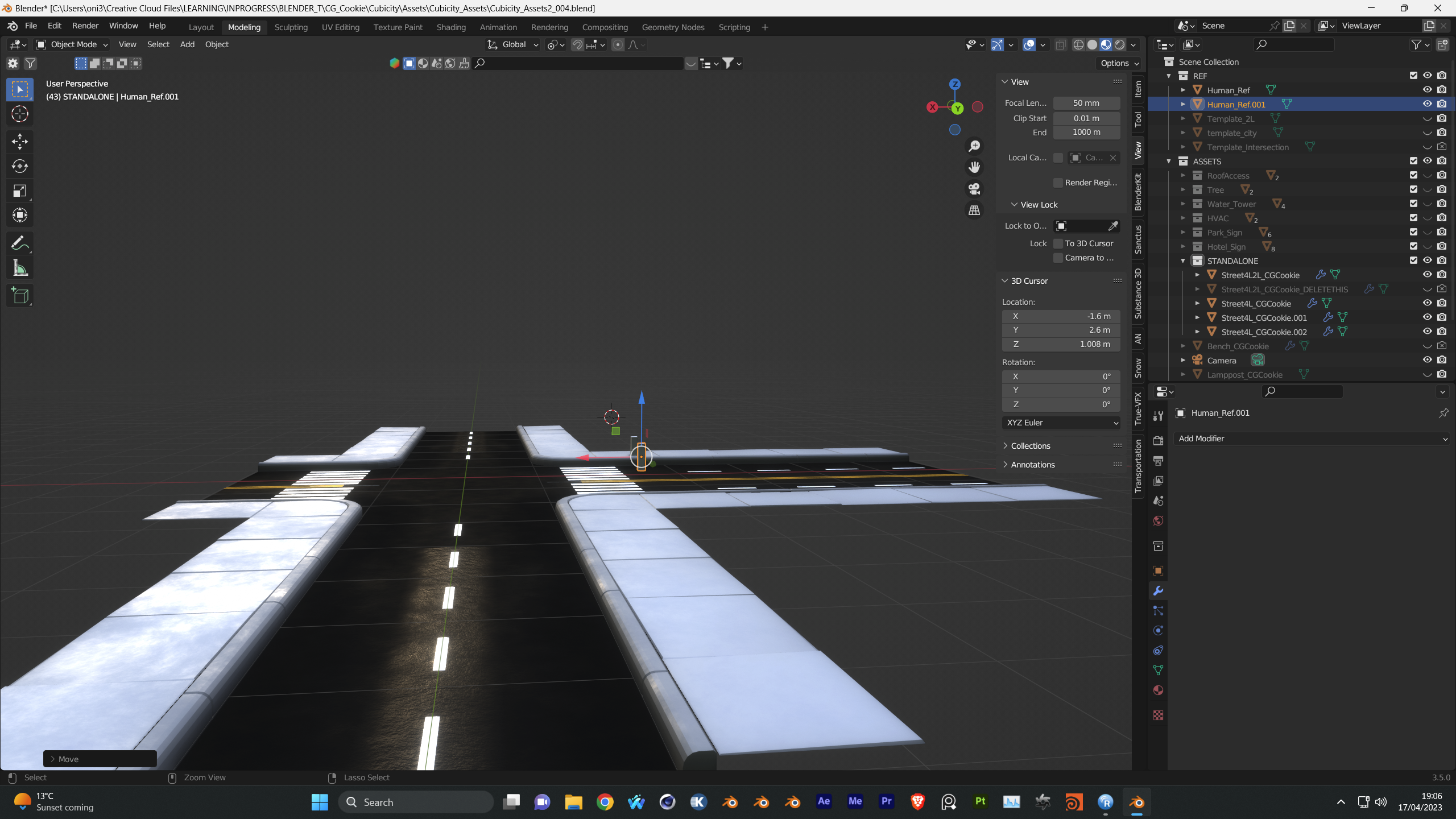
I have a question regarding the textured road intersection in Cubicity. My road looks a bit strange and the Mix Transfer mode does not seem to be having as good an effect as it does on the road you are working on. I have posted node setup here. What could I be doinbg wrong please? Thank you Sir 🙂
 April 17, 2023 at 2:39 pm #78558
I’ve put it in our old collab folder
https://drive.google.com/file/d/1Ff0pTSq2nJ2_iXSd–RmrrgigCo8v43a/view?usp=share_link
was thinking later that I might have to put the elipse mask in the top half of the picture, but I still don’t know how to get the effect of seeing lots of stars there and not in the rest of the picture. Would also love to have a mars effect with procedural (so the stripes from the poles and the ice
April 18, 2023 at 3:22 am #78559Hi i was wondering if anyone could help me im following along the minimalist course and am on the second lesson the looping blob excersice and I have a issue that my frame 251 and 1 don’t match, hence my animation does not loop. I believe I am having some issues when I copy and paste the noise and mapping node and I copy and paste the key frames. On the graph editor the little arrow on the tool bar to toggle on/off only selected does not match the instructors and I don’t think its copy and pasting correctly how can I fix this ? Thanks.
April 18, 2023 at 8:32 am #78560@fhyio123 Absolutely! It’ll probably be best if I can troubleshoot your .blend file. The best way to get yours to me is by uploading your file to Dropbox, Google Drive, Mega, or equivalent file hosting service then copy + pasting the share link here.
@sixset Sure, happy to help! Could you provide a download link to your .blend so I can troubleshoot? (Same instructions earlier in this reply)
April 18, 2023 at 2:28 pm #78561the stream went a bit too quick to remember what you did exactly. I can’t remember what else it was you added

 April 19, 2023 at 10:00 am #78562
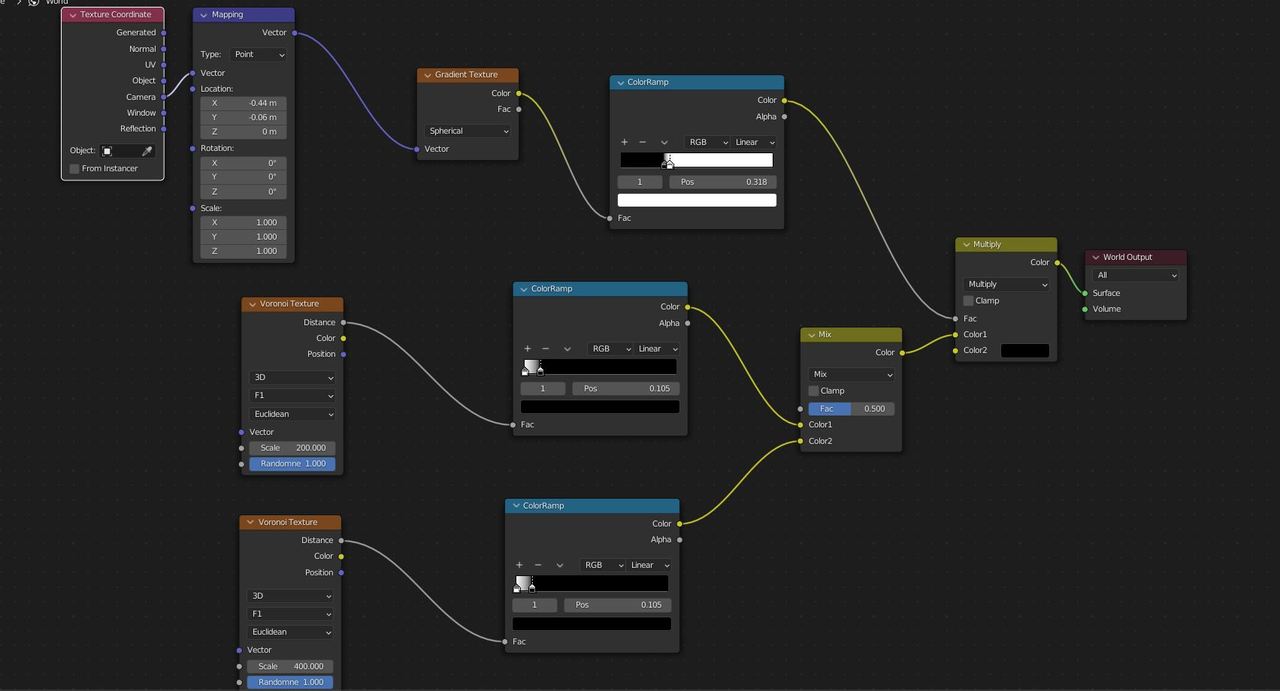
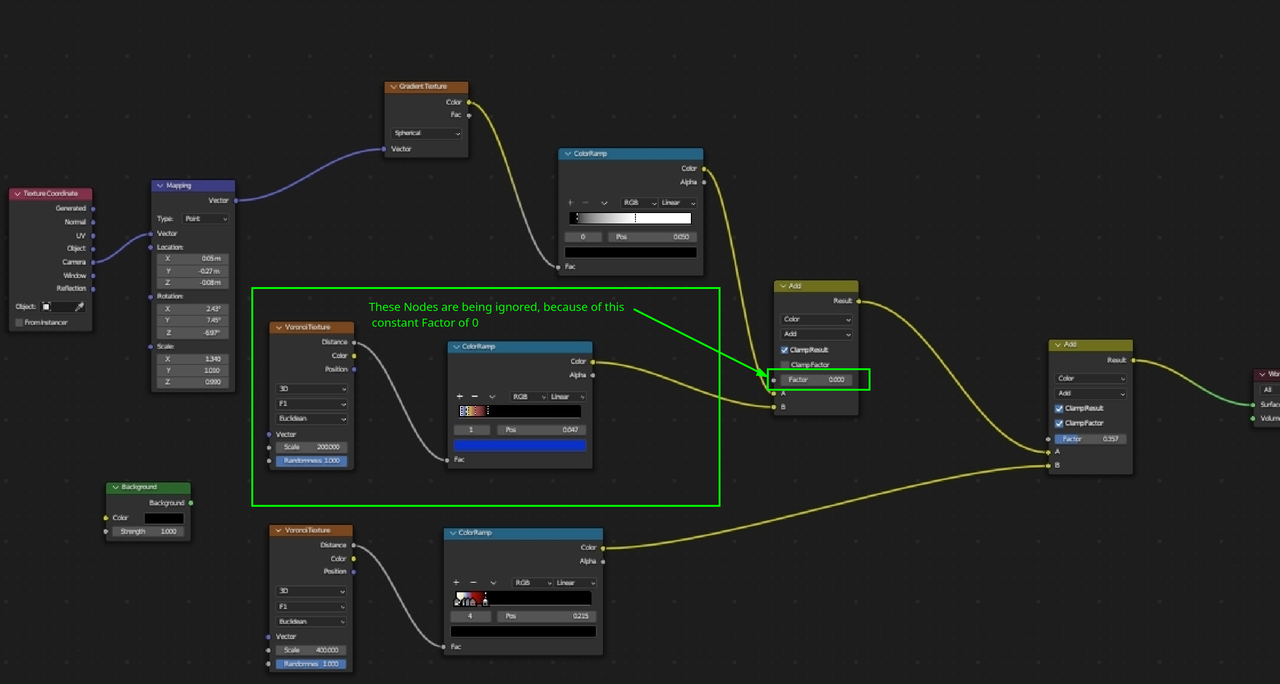
I think you want to use that sphere gradient as the factor for the stars.
If you set the gradient to be white where you don’t want the stars, and black where you do want the stars, you can use a MixRGB set to Multiply, using the gradient as a factor, and multiply your stars map in color1 and black color in color2.
That means that the color1 will be afected only in the area where the factor is white, and not affected where the factor is black.
Then, the area afected will be multiplied with color2, but as color2 is set to black, that reads as “0”, and everything that you multiply by 0, will result in 0 too, so it will remain black.
I tried to replicate your nodes, you can try if something like this works, it’s a quick replicate, so dont use my values on the maping and color ramps 🙂
 April 19, 2023 at 12:10 pm #78563
 -
AuthorPosts


- The topic ‘Office Hours – Kent’s Office – Tuesday, April 18, 1 pm (US Eastern Time)’ is closed to new replies.