Nothing works for me.

Forum Archive Nothing works for me.

Viewing 7 posts - 1 through 7 (of 7 total)
  • Author
    Posts
  • #20445
    Maiil Tahiiev
    Participant

      I conspect every lesson and I try to rewatch and follow as much as possible to understand more, but on this stage with caustics, nothing works. Probably because I made my own glass but I don’t understand why it doesn’t work with water cause I copied settings from the video. I used cycles.

      #95826
      Martin Bergwerf
      Participant

        Hi Mail @ThatsHim ,

        Could you upload your .blend file (to Googledrive, Dropbox, or so) and post a link here, so we can have a look?

        #95827
        Omar Domenech
        Participant

          Yes, the blend file or screenshots, preferably the blend file. And don’t worry, this is super normal when working with 3D, things become a Sherlock Holmes movie with you trying to get to the bottom of a mystery all the time. Things always go wrong and you are left clueless, even when you’re a Blender expert with 15 years of practice. 

          #95828
          Dwayne Savage
          Participant

            2 things.

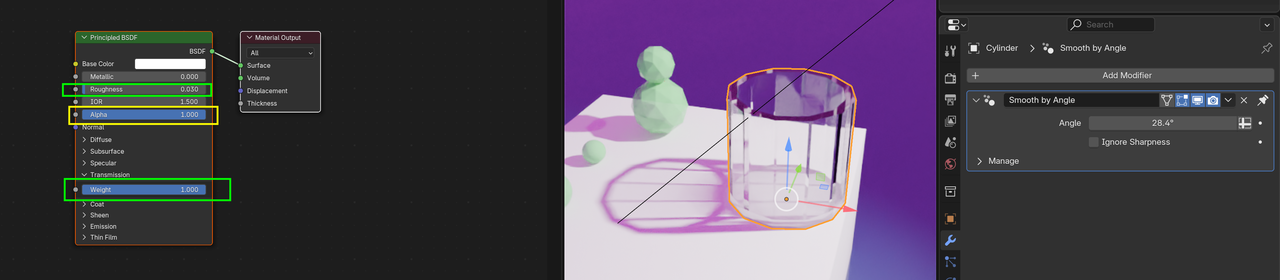
            First, you need to set the objects to shade smooth or shade auto smooth. On the cup I’d recommend auto smooth and set the angle on the modifier to something like 15 degrees. On the gem looking spheres I’d use auto smooth set to 5. The single sphere just shade smooth.

            Second, you need to set the transmission weight. I’d start with 1 for full effect. Also set the Alpha back to 1, but you don’t have to. 

            #95829
            Martin Bergwerf
            Participant

              And reduce the Roughness to something less than 0.1 . So, you get something like this:

              Caustics.png

              I’ll have to watch the Lesson to see what is happening with the water. 

              #95830
              Martin Bergwerf
              Participant

                Okay Mail @ThatsHim ,

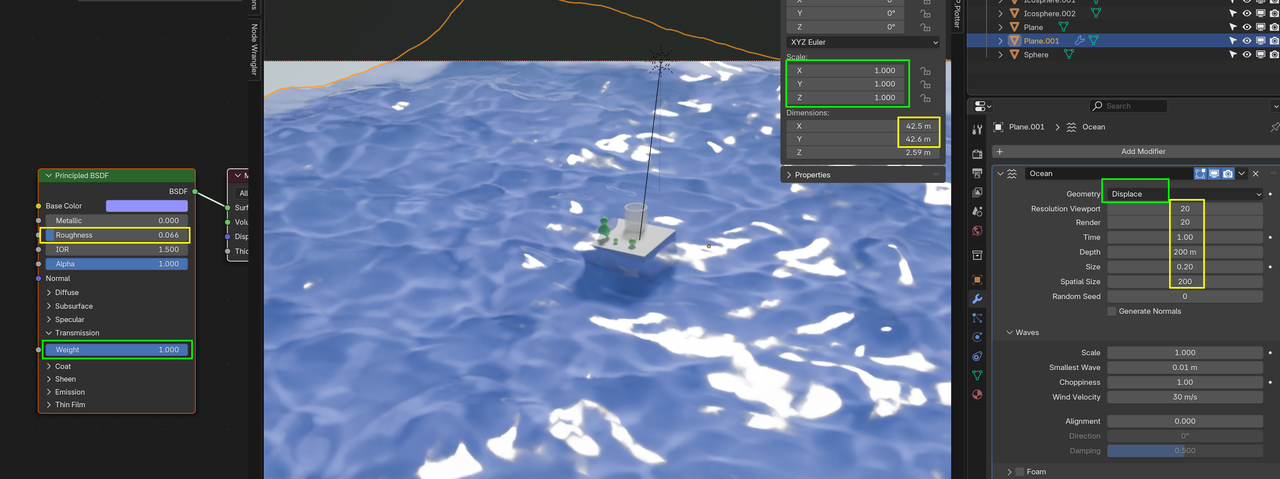
                Scale the Plane (that becomes the ocean) in Edit Mode (so it becomes about 40 m x 40 m), Subdivide it a lot; like 100 or 200 Cuts. Set the Geometry to Displace and up the Resolution. Shade Smooth and adjust the Shader (I also changed the Light here to Sun, but a Spot Light works:as well.):Ocean_00.png

                #95831
                Maiil Tahiiev
                Participant

                  Thank you all, guys! Love your courses!

                Viewing 7 posts - 1 through 7 (of 7 total)
                • The topic ‘Nothing works for me.’ is closed to new replies.