Not sure what’s going on…

Forum Archive Not sure what’s going on…

Viewing 6 posts - 1 through 6 (of 6 total)
  • Author
    Posts
  • #7438
    Fenes Octavian
    Participant

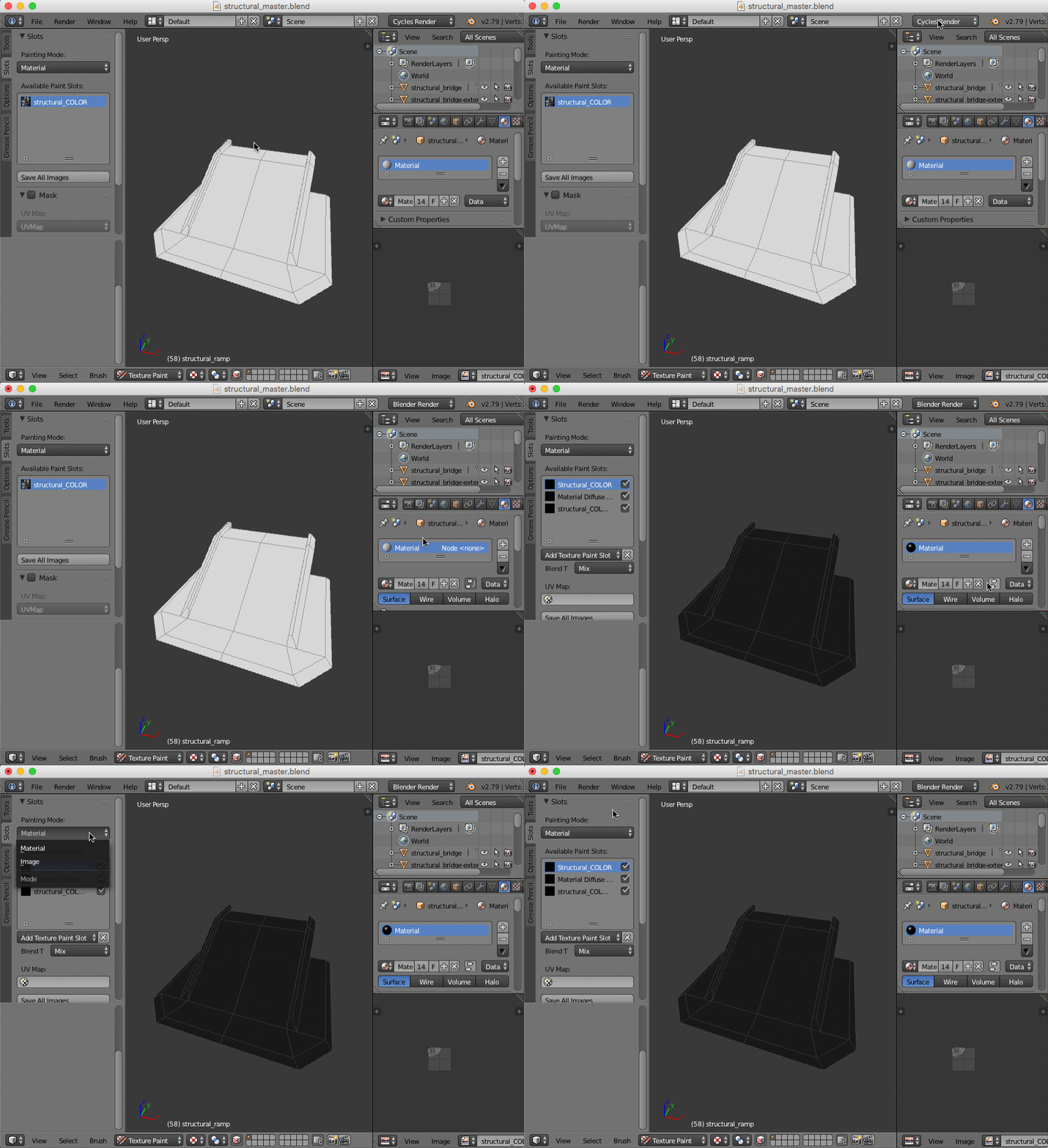
      I can’t for the life of me figure out why there is no Add Texture Paint Slot button on my end. It’s driving me crazy. I also don’t get why there isn’t a Substance Painter version of this part of the tutorial. I mean I get it that not everyone has it but some of us do and it’s what is used to make game textures. 

      Here is the blend file. Can you take a look at it?

      https://drive.google.com/open?id=1zqVTXV-EnvEpsK3tJvCxIw0j36t-HJkV

      #27069
      Kent Trammell
      Participant

        You must have “Cycles” set as the render engine. Cycles doesn’t support the texture paint slots UI – Only “Blender Render” does (until 2.8 is released). It’s pretty frustrating, honestly. The texture paint UI has always been a cumbersome part of Blender in my experience. But what are you gonna do, right? “Cumbersome” doesn’t mean “unusable”.

        I don’t use Substance and thus don’t teach it. Jonathan Lampel has taught some material with Blender + substance. You can learn from him and apply it to this course if you’d like:

        #27070
        Fenes Octavian
        Participant

          Already tried switching Blender Render. It doesn’t show up in Blender Render either.

          Would you mind taking a look at the file?

          #27071
          Kent Trammell
          Participant

            Sure I can take a look at the file. Just upload it to dropbox, google drive, or the link and post a link for download.

            Are you using the official version of Blender 2.9?

            #27072
            Fenes Octavian
            Participant
              #27073
              Kent Trammell
              Participant

                I see what’s happening now – thanks for the .blend file! Here’s the steps:

                1. Change from “Cycles” to “Blender Render”
                2. Disable the “node” option on your material
                3. Texture slots UI should be visible at this point. If not, make sure you have “Material” mode selected in that UI rather than “texture”
              Viewing 6 posts - 1 through 6 (of 6 total)
              • The topic ‘Not sure what’s going on…’ is closed to new replies.