
Noise Texture is not producing same results.

Forum Archive Noise Texture is not producing same results.

Viewing 6 posts - 1 through 6 (of 6 total)
  • Author
    Posts
  • #16110
    ianperezbaez
    Participant

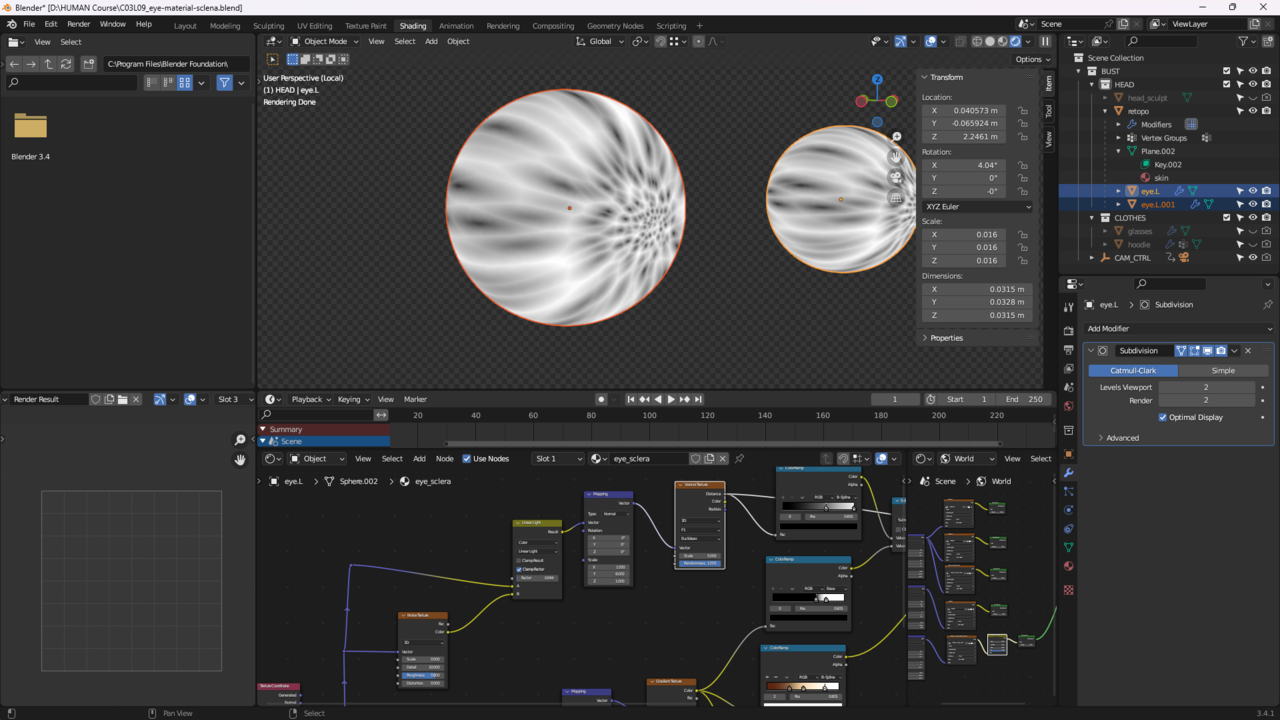
      I’ve been following the course as close as possible but I’m stuck at the 15 minute mark, for me when I added and adjusted the noise texture it creates small noise patterns that are barely visible instead of curving the veins. What could I do to fix this? 

      #78187
      ianperezbaez
      Participant

        The screenshot is my scene opened with the Voronoi Texture selected that comes after the Noise Texture and it seems completely unaffected by it. I opened your scn file to see if I could spot anything in the nodes but I couldn’t see any major differences. Texture Selected.png

        #78188
        Martin Bergwerf
        Participant

          Hi Ian @ianperezbaez ,

          Your screenshot is a bit hard to read (too much space taken up by unimportant things), but it looks like your Noise Detail Size is 10 or more, together with a high Distorion (of that Detail); that is way too much, use a Detail Size of 2 or 3 (definitely not more than 5 or 6) and then adjust the Scale and Linear Light Factor.

          #78189
          Omar Domenech
          Participant

            The scale of your object is 0.016, it is very tiny and it’s probably throwing off all the values and parameter. Apply the scale of your object and try again.

            #78190
            ianperezbaez
            Participant

              Applying the scale fixed it! Thank you so much for your help!

              #78191
              Martin Bergwerf
              Participant

                Applying the Scale might get you into trouble later on. This is one of the very few cases where you do not want to Apply the Scale. It is not desastrous, but still…

              Viewing 6 posts - 1 through 6 (of 6 total)
              • The topic ‘Noise Texture is not producing same results.’ is closed to new replies.