node framing

Forum Archive node framing

Viewing 6 posts - 1 through 6 (of 6 total)
  • Author
    Posts
  • #17631
    Csüllög György
    Participant

      9:03 hit shift key?  sorry i dont understand that part what do i need to press to frame it up? 

      #84666
      Omar Domenech
      Participant

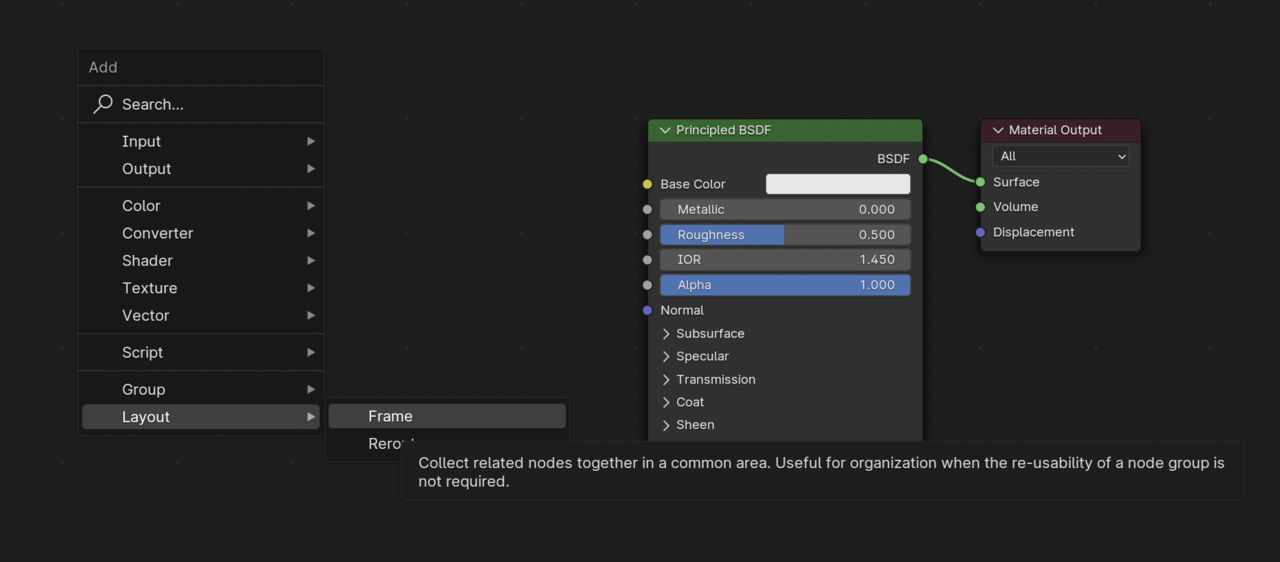
        Inside the node editor you can add a frame with Shift + A, it’s just a way to keep things more organized.

        Frame.png

        #84667
        Csüllög György
        Participant

          ah thank you thats it but how does he adds it automatically?  so i dont need to play with the sizes?

          #84668
          Martin Bergwerf
          Participant

            And if you have the Node Wrangler Addon enabled, you can use the hotkey SHIFT+P to Frame Selected.

            #84669
            Csüllög György
            Participant

              ah  super thats it . Thanks , both of you. 

              #84670
              Dwayne Savage
              Participant

                It’s Ctrl+J to frame selected. If you have node wrangler addon turned on then you can also use Shift+P, which a lot of people prefer since alt+p removes selected nodes from the frame. 

              Viewing 6 posts - 1 through 6 (of 6 total)
              • The topic ‘node framing’ is closed to new replies.