
No Cloth Brush/Filter
Forum Archive › No Cloth Brush/Filter
- This topic has 12 replies, 3 voices, and was last updated 5 years, 7 months ago by
dano50.
-
AuthorPosts
-
January 11, 2021 at 9:04 pm #13333
I’ve downloaded the latest Blender twice, the last Sunday 10th, and still no Cloth brush/filter shows up.
Do I have to enable an addon or something?
January 11, 2021 at 11:36 pm #62440There are many brushes so it might be hard to find, but in 2.91 it’s here and there even is a Collision checkbox:
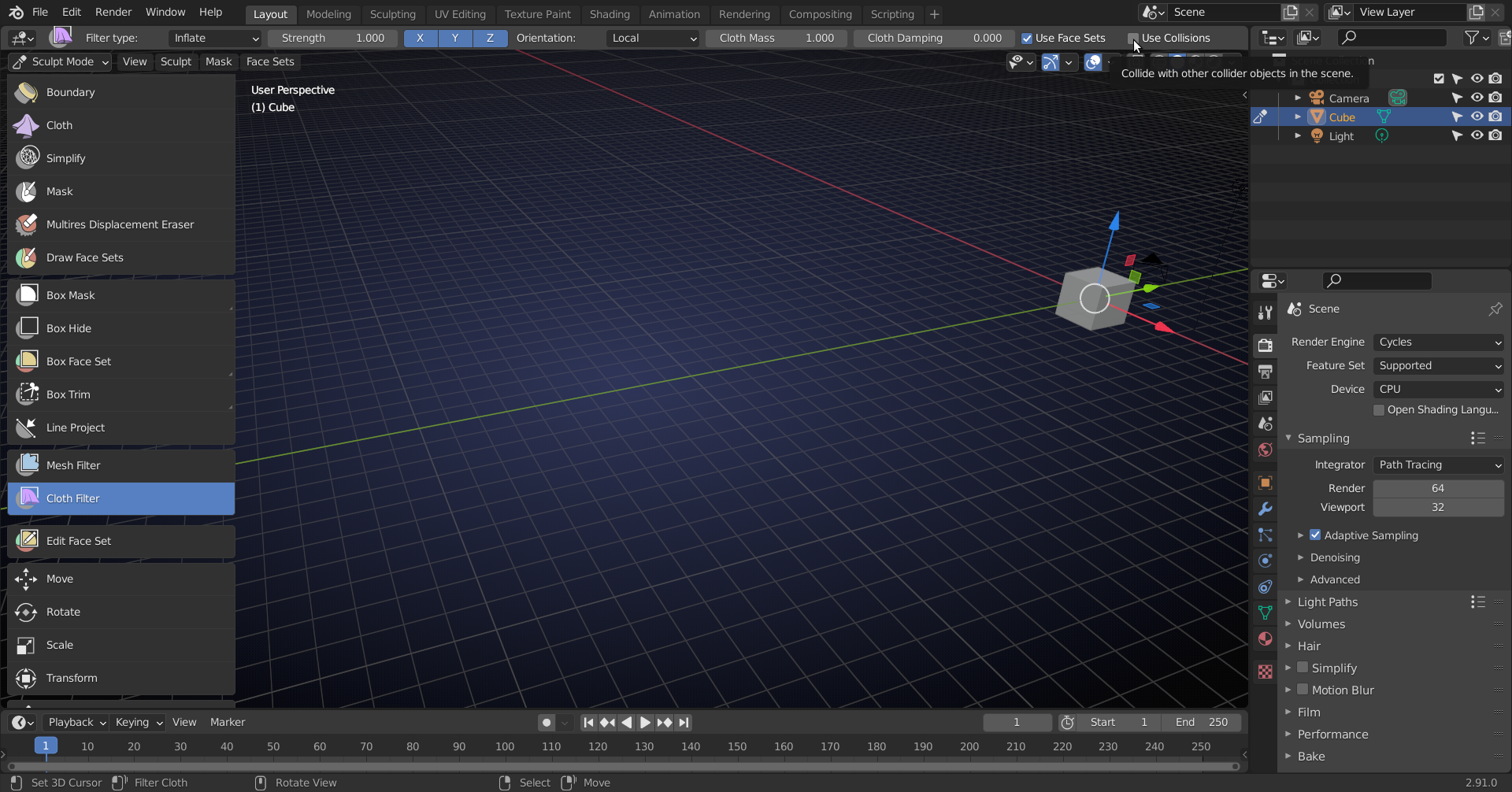
(You have to be in Sculpt Mode of course….)
January 12, 2021 at 12:11 am #62441No.
I know where it’s SUPPOSED to be, and know the icons to look for….
But they aren’t there.
Nada.
Nyet.
No where.
I’m doing the snowman tutorial and, regarding the scarf part, everything’s gone perfect.
Until going into sculpt mode.
The Mesh Filter is there, but NO cloth filter button.
Same with the “Cloth” button. It just isn’t there.
Looking closer to your screen, I can see the Mask, Simplify, Box Hide, Box Mask, Mesh Filter, and move/rotate/scale/transform, on both mine, but nothing else.
No Boundary, Edit face set, Line project, Box trim, Box face set, Draw Face set, Displacement Eraser.
January 12, 2021 at 12:56 am #62442Can you show us a screenshot?
January 12, 2021 at 1:07 am #62443Last version I know of that didn’t have a Cloth Brush was 2.82
 January 12, 2021 at 9:15 am #62444
Oh, very weird! I know initially the Filter brushes did not have an icon which made it harder to find, but I’ve never personally run into an issue where they simply weren’t there (when they should have been). By default, those brushes should be enabled and there isn’t any extra steps you need to take in order to see them either.
Do you still have an older version of Blender saved on your PC? Sometimes I open Blender and it opens an older version, which may be your case. I’d look at removing any older versions you have and when you open Blender make sure that it is the newer version that you’ve downloaded. I can’t think of any other reason why they wouldn’t be there, so I’m hoping that is the issue!
January 12, 2021 at 11:34 am #62445Yeah, I did have older versions on my computer. Didn’t know that was a problem.
And you’re right. My computer is still running v2.81a. I had just assumed, after going through the normal update process, everything was working.
So I deleted all the old versions, and then reloaded 2.91.0.
But opening Blender, it still ran the 2.81 version.
So now the problem is, “Why hasn’t my computer updated Blender since 2.81a despite my having my haveing downloaded several newer versions?
January 12, 2021 at 12:25 pm #62446So to to see if it wasn’t “Operator Error” I updated Blender on my laptop and everything went fine.
New version running, no problem.
So back to the desktop, I completely deleted Blender, downloaded again, went through the set up…
And STILL it ran the 2.81 version
%^^&*&$$%^%^$$%%$^%$%^&^&$***
Oh and “Aaaaaaaagh!”
I HAVE downloaded some other addons for Blender, like the tree modular, Blender 2.8 animation boot camp, and most likely a few others somewhere.
Could these be messing things up?
January 12, 2021 at 12:28 pm #62447What Operating System are you using?
January 12, 2021 at 12:43 pm #62448Windows 10,
But it LOOKS like I found the problem.
I have Blender pinned to the task bar, AGAIN assuming it would update to open the new version.
This time I went to the Start Menu, and the 2.91 version opened.
So I unpinned the old logo from the task bar, repinned 2.91, and now it opens fine.
Of course…
I’m a firm believer in Murphy’s laws.
So now, opening several old files, materials are missing, nodes are listing “Undefined Sockets.” and I’m sure I’ll find other things.
It’ll be work fixing that, but at least I know where to go from there.
TO THE LIQUOR CABINET.
Thanks for all the help and suggestions everybody.
January 12, 2021 at 12:57 pm #62449Sounds like you had a great learning experience 🙂
Yes, the task bar uses the ‘original’ version you pinned.
Materials missing could be because they’re relative to the Blender path and a different version is on a different place..but I’m sure you will find that out, now that you know what to look for 😉
January 12, 2021 at 4:29 pm #62450Man, a roller-coaster of emotion! I’ve come to blows with the task bar a few times, the very reason I no longer have Blender on there. 😀 Happy it has all been resolved though, thanks @spikeyxxx for your help too!
January 12, 2021 at 8:40 pm #62451Yup, Chunck
As the old saying goes.
That, which does not make us trash our computer in a psychotic rage…
Drives us insane anyways.
Or some cliche or other like that.
Thanks again to all.
-
AuthorPosts


- The topic ‘No Cloth Brush/Filter’ is closed to new replies.