No “Available” keyframe option

Forum Archive No “Available” keyframe option

Viewing 4 posts - 1 through 4 (of 4 total)
  • Author
    Posts
  • #15425
    violetcrystal
    Participant

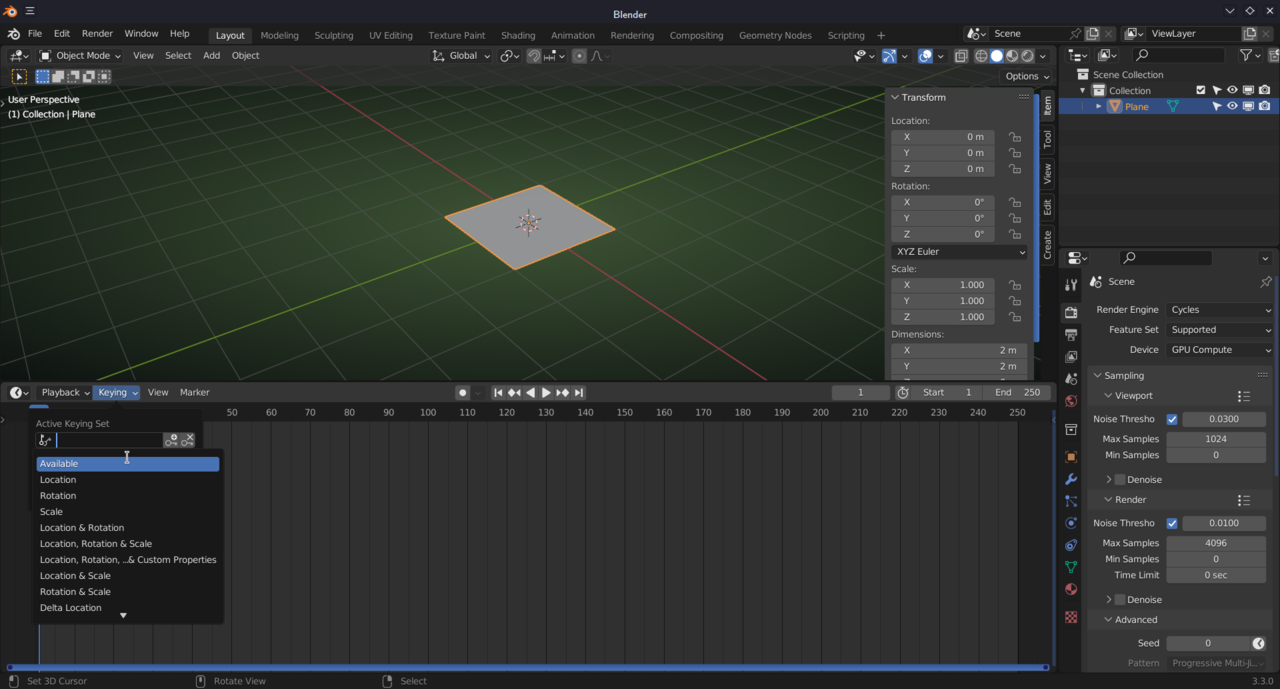
      What should I select for keyframe if there is no “available” option for setting a keyframe in my menu? I’m on Blender 3.3.0.

      #75440
      violetcrystal
      Participant

        Interesting, I pressed “I” key twice, and the “Available” option showed up. Why does that happen?

        #75441
        Martin Bergwerf
        Participant

          That is normal behavior and nothing new; this also happened in the days before 2.80. By pressing I twice, you set a Keyframe. If there are no Keyframes, Blender doesn’t know what to use as Available….

          Curiously enough, even without any Keyframes, you can select Available as the Keying Set in the Timeline (probably a bug/oversight):

          Keying.png

          but Blender will throw an Error (“No suitable context info for active keying set”), when you then actually try to use that by hitting I.

          #75442
          Omar Domenech
          Participant

            Yeah I think basically you first need to have a keyframe in so Blender knows there is stuff available there so you can use the “Available” option. I never use that, maybe I’m getting grumpy and old and I like to do things manually and I insert keyframes with “I” all the time.

          Viewing 4 posts - 1 through 4 (of 4 total)
          • The topic ‘No “Available” keyframe option’ is closed to new replies.