My move tool seems to suddenly be locked to the object center at all time.

Forum Archive My move tool seems to suddenly be locked to the object center at all time.

Viewing 4 posts - 1 through 4 (of 4 total)
  • Author
    Posts
  • #14989
    Ethan Stroupe
    Participant

      So before my move tool would move to the selected face, but now it seems to be locked to the center of my object at all times. It still moves the selected face, but it is annoying because I have to zoom out to use it. Did I press something to lock the move tool in place? I searched around and couldn’t find a way to unlock it. Thanks!

      #73894
      chrislim
      Participant

        Hey there,

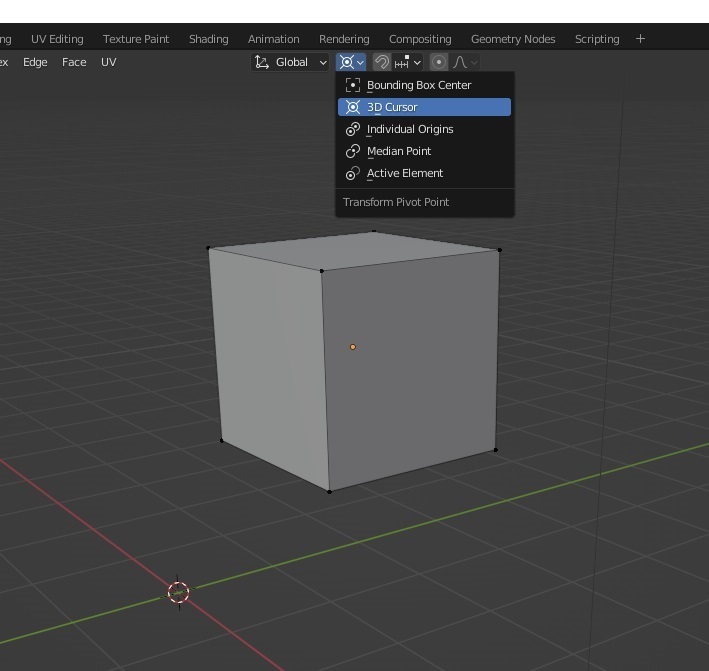
        It’s possible that your pivot point might be set on your 3d cursor, and maybe your 3d cursor is in the center of your object. If you change the pivot point to any of the other options, that might solve the problem.

        pivot.jpg

        #73895
        Adrian Bellworthy
        Participant

          Hey @bartimaeuso,

          I don’t know of an option anywhere to set this to the centre of the object.

          The only way I know of is as @chrislim mentioned, the 3d cursor at the object origin and set as the pivot point.

          #73896
          Ethan Stroupe
          Participant

            Setting the pivot point to Bounding Box center fixed it! I must have accidentally changed this at some point. Thank you both for your help!

          Viewing 4 posts - 1 through 4 (of 4 total)
          • The topic ‘My move tool seems to suddenly be locked to the object center at all time.’ is closed to new replies.