My hotkey ‘F’ does not dissolve all expected edges during Face Merge, on multiple face selection

Forum Archive My hotkey ‘F’ does not dissolve all expected edges during Face Merge, on multiple face selection

Viewing 4 posts - 1 through 4 (of 4 total)
  • Author
    Posts
  • #16301
    Bernard Masika
    Participant

      screenshot of what happened

       the instructor, selected all the faces and pressed ‘F’ which will merge them all into a single shape.

      but with me, that single edge remains, which troubles the intrude of the shape, as the next step, every time i try the hotkey (I) it results into a weird shape.

      what am i do wrong?

      #78905
      Omar Domenech
      Participant

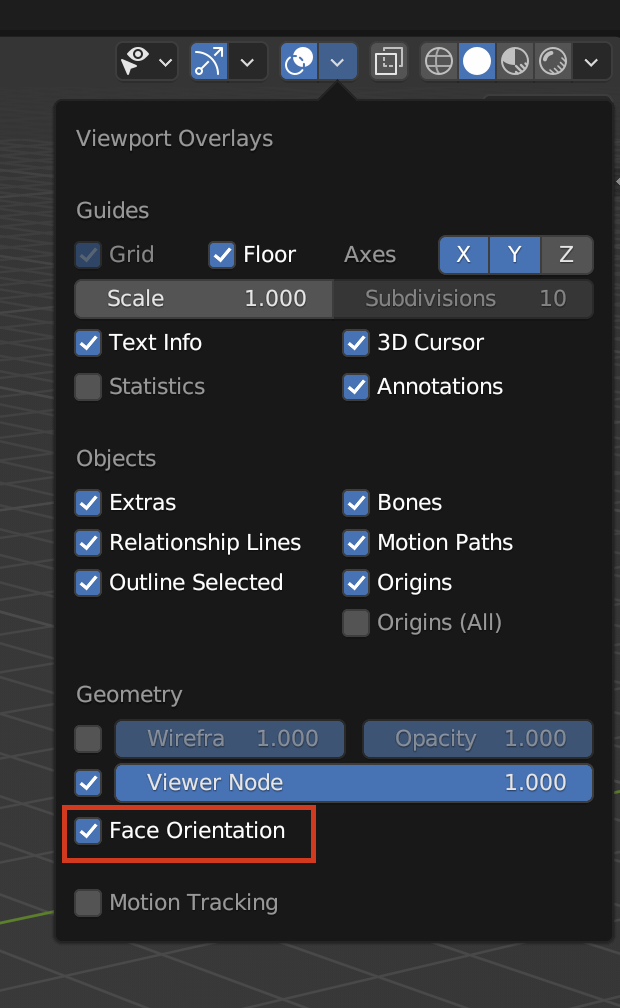
        You might have double vertices, so select everything and M to merge by distance. Or you might have flipped normals, so select everything and Control + N to recalculate normals. If you want to visualize which face you have inverted, you can turn on Face Orientation on the overlays:

        Face Orientation.png

        #78906
        Martin Bergwerf
        Participant

          Omar is right, only nowadays, the Hotkey to re-calculate the Normals is SHIFT+N…It used to be CTRL+N, but it has changed…it’s something you use all the time and it just becomes muscle memory and when someone asks, “what keys did you press?”, you don’t know…you’ll have to re-enact the situation and look at what your fingers are doing..

          Sorry for rambling, remember it’s SHIFT+N.

          #78907
          Omar Domenech
          Participant

            Lol yep, that’s exactly what happened and what I normally do.

          Viewing 4 posts - 1 through 4 (of 4 total)
          • The topic ‘My hotkey ‘F’ does not dissolve all expected edges during Face Merge, on multiple face selection’ is closed to new replies.