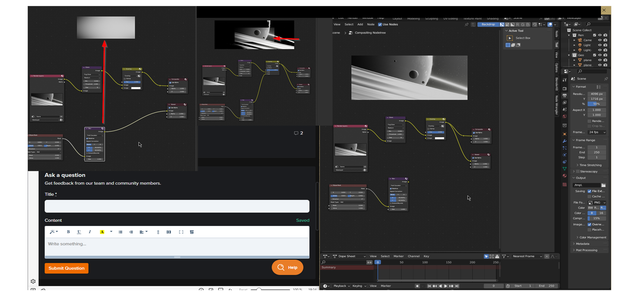
My blur and Elipse mask are too small for my picture size

Forum Archive My blur and Elipse mask are too small for my picture size

Viewing 3 posts - 1 through 3 (of 3 total)
  • Author
    Posts
  • #16668
    Anže Ivakič
    Participant

      My mask and  blur seem to have a smaller resolution than the picture. 

      Any tips on how to fix it. 

      Uploaded picture to hosting site, because if I paste it here it gave an error in posting message. 

      smaller-picture

      #80441
      Adrian Bellworthy
      Participant

        Not quite sure what you mean.
        It looks perfectly fine to me.

        Adjust the mask x and y to position the centre of the mask, and use the height and width to adjust the size. You may want slightly different values than Kent uses in the course, depending o the position and direction of the light source in the scene.

        If you are thinking that the blur looks like a low resolution image, don’t worry, it’s not an image, the intention is to blur the mask so you have a gradient of light to dark, then with the overlay node, darken the rendered image furthest from the light source.

        Don’t forget! Your render is only at 50% resolution too. When you’re done and ready to render a final image, crack it up to 100%.

        #80442
        Omar Domenech
        Participant

          You can also upload your file so we can help with the troubleshooting. You can upload it to Drop Box or Google Drive and copy the link.

        Viewing 3 posts - 1 through 3 (of 3 total)
        • The topic ‘My blur and Elipse mask are too small for my picture size’ is closed to new replies.