
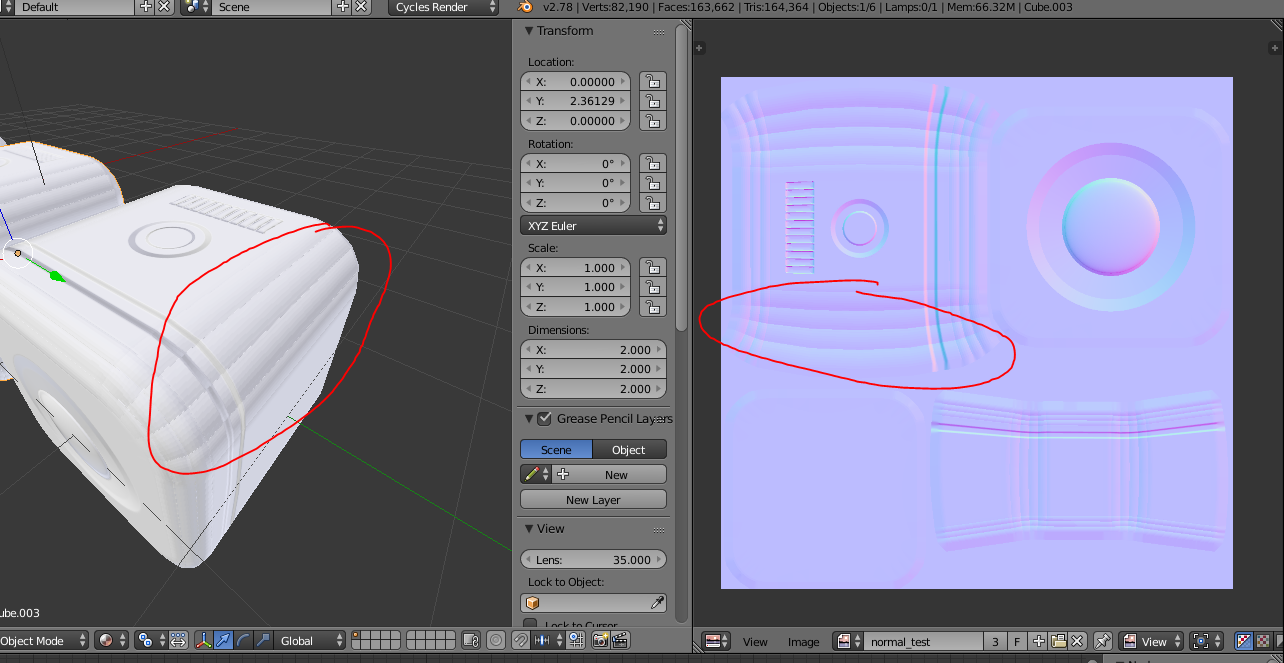
My Beveled Cube creates wrong normal maps – the marked area should be a continuous gradient, but it’s multiple gradients in the wrong direction.

Forum Archive My Beveled Cube creates wrong normal maps – the marked area should be a continuous gradient, but it’s multiple gradients in the wrong direction.

Viewing 6 posts - 1 through 6 (of 6 total)
  • Author
    Posts
  • #7643
    kyl3r
    Participant

      #27418
      Jonathan Lampel
      Participant

        Hey @kyl3r , could you share what the high poly object looks like as well? I can’t find the problem in the screenshot above. 

        #27419
        kyl3r
        Participant

          Hey, the high poly is basically a cube with ctrl+B (and then increase bevel cuts with mousewheel).

          I upadeded 2 images: https://imgur.com/a/EYtFbKL

          #27420
          Jonathan Lampel
          Participant

            Thanks for the extra details, that is interesting indeed. Are you mirroring UV’s at all? Something like that might happen if two islands are overlapping but one needs to be flipped vertically. 

            #27421
            kyl3r
            Participant

              no mirroring on purpose. 

              #27422
              Jonathan Lampel
              Participant

                Hmm, if that’s not it, I don’t know what the answer would be. If you want you can upload the file to: http://pasteall.org/blend/ and I can take a look at it later on in the week. 

              Viewing 6 posts - 1 through 6 (of 6 total)
              • The topic ‘My Beveled Cube creates wrong normal maps – the marked area should be a continuous gradient, but it’s multiple gradients in the wrong direction.’ is closed to new replies.