MTL Files Missing Color Info When Imported To Unity (INFO)[RESOLVED]

Forum Archive MTL Files Missing Color Info When Imported To Unity (INFO)[RESOLVED]

Viewing 5 posts - 1 through 5 (of 5 total)
  • Author
    Posts
  • #9907
    Paul Haynes
    Participant

      This applies to Blender version 2.79b (not sure if it applies to other versions).

      While trying to find the proper way to import .mtl files from Blender into Unity I kept running across the problem that no color was being transferred.  I’ve also seen many others complaining that they were getting no color …  Took a while to find the information, but I finally ran across the file definition for an MTL file (http://www.fileformat.info/format/material).

      Based on what I’m reading and what I’m seeing in the MTL file created by Blender when exporting a Wavefront (.obj) file, Blender is only providing a minimal MTL file and every single material is described in the file as “gray”.  In other words, no color is being recorded in the MTL, so no color is being imported into Unity.

      Example MTL as produced by Blender:

      <code>

      # Blender MTL File: ‘import_demo.blend’
      # Material Count: 1

      newmtl external_PNG
      Ns 96.078431
      Ka 1.000000 1.000000 1.000000
      Kd 0.640000 0.640000 0.640000
      Ks 0.500000 0.500000 0.500000
      Ke 0.000000 0.000000 0.000000
      Ni 1.000000
      d 1.000000
      illum 2

      </code>

      The positive side of this is that the color locations are at least being recorded so that when you redefine the materials from inside Unity, they are at least applied to the correct locations on the model.

      The best workaround that I’ve come up with is to use a texture file as a material, extract the material from the model prefab, and then manually drag and drop the texture file into the Albedo texture slot on the material properties.

      I have created a bug report with the Blender developers and am awaiting their response. It’s possible that this is exactly what they intended but I will wait for a definitive answer from the developers.

      I went ahead and posted a video to YouTube to explain how to implement a workaround: https://www.youtube.com/watch?v=d_BV6VnCdk8

      #38756
      Jonathan Gonzalez
      Participant

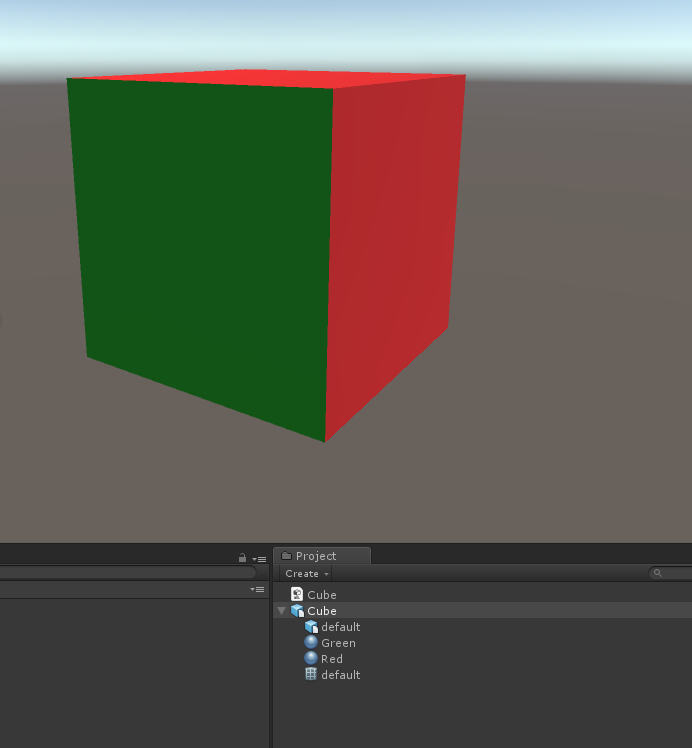
        Maybe I’m not understanding the issue, but I didn’t have any problems using an MTL file exported from Blender myself. I used 2.79 as well, created two materials and gave them names based off the color and assigned it to different faces. Exported the OBJ file which also created the MTL file. Dragged both of them into the project panel in Unity. Didn’t need to do anything else:

        #38757
        Paul Haynes
        Participant

          @jgonzalez That’s interesting that you get the color. Every single material that I create has the same codes in the MTL file as the one that I listed above. Apparently, there are others having the same problem because I’ve seen comments in multiple locations referencing the colors not showing up.  Several youTube videos that I watched also did not show the color. Maybe there are some magic settings that I (and the others) are not using? I’ll look into it further but I do have other things to do and the workaround in my video allows me to apply the colors, so I won’t be spending a lot of time on it. Thanks for the response.

          Any chance you can cut and paste your mtl file so I can see what it looks like?

          Edit: Are you using the B2U add-on?

          #38758
          Paul Haynes
          Participant

            @jgonzalez 

            Information from Blender developers indicates that Cycles is not supported in MTL files. However, my problem was with both Cycles and Blender Internals. The way I resolved this was to select “Load Factory Settings” from the File menu.  Still not sure what caused the error but at least it’s fixed … for now 🙂

            #38759
            Jonathan Gonzalez
            Participant

              @paulhaynes1955 Glad to hear it. I personally rarely if ever use OBJ files. I almost always use FBX files, so I would recommend using that file format instead. Gives you everything you’d get with an OBJ file but it also allows you to keep separate hierarchies within the mesh and also creates the materials properly. If you use animations you can export out an FBX file that contains all that included as well. 

            Viewing 5 posts - 1 through 5 (of 5 total)
            • The topic ‘MTL Files Missing Color Info When Imported To Unity (INFO)[RESOLVED]’ is closed to new replies.