mean bevel weight at 9:10

Forum Archive mean bevel weight at 9:10

Viewing 11 posts - 1 through 11 (of 11 total)
  • Author
    Posts
  • #17863
    Christian Val
    Participant

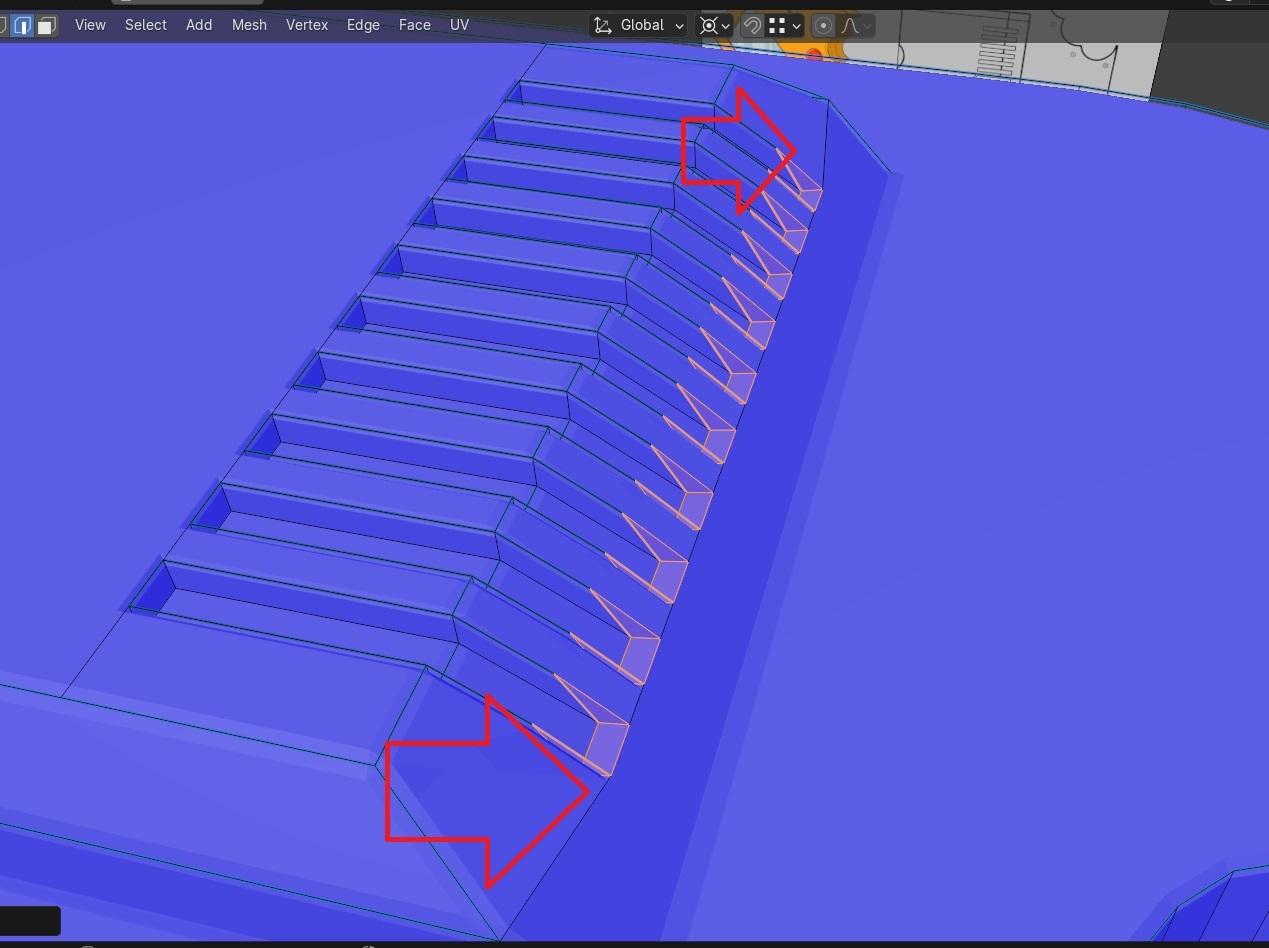
      Hi, so when beveling the groves here (image link) the bottom edges of the grooves skew when I do the bevel. What might I have done wrong? Cheersenly on one side.jpg

      #85592
      Adrian Bellworthy
      Participant

        Hey @cvalley_art
        Have you tried the usual suspects?

        Double vertices – To remove doubles, In edit mode select everything with A, then press M and merge by distance.
        Flipped Normals – To recalculate Normals, In edit mode select everything with A, then press SHIFT+N

        #85593
        Omar Domenech
        Participant

          And another of the usual suspects, apply the scale of your object.

          #85594
          Christian Val
          Participant

            Hey thanks, I have merged by distance, and mostly work with normals view on, for peace of mind as I work, plus I like the blue.

            Apply the scale, that I forgot to try; I’ll test now….
            >looks like the apply all transform did even them out, but the line of extrudes drops downward, or towards screen right of the reference photo

            #85595
            Adrian Bellworthy
            Participant

              Maybe all those vertices are not on an even plane.
              Select all the vertices that are causing the issue (All along your red line in the image), press S, Z then 0 (zero), then merge again just in case.

              #85596
              Omar Domenech
              Participant

                Also can you post a screenshot? To see better what may be going on. It could also be the bevel value, how big or how small is the object matters for how much bevel you’re putting into the edges.

                #85597
                Christian Val
                Participant

                  as seen here, the bevel is now even, but it moves outward instead of in place with the rest of the groove inset,

                  *** Correction– so this image was just a normal bevel, and not the mean bevel weight modifier, when I tried now with mean bevel weight it still warped the same as in my first screenshot, the apply transform didn’t help at all. And again, all the verts are merged/ tested by this point. Curious.apply transforms.jpg

                  #85598
                  Omar Domenech
                  Participant

                    You can upload your file to Drop Box or Google Drive and paste the link for us to download it and do some tests, see what is going on. This is probably one of those weird ones were is something silly somewhere that is throwing things off.

                    #85599
                    Christian Val
                    Participant

                      no biggie, but thanks for the offer, from what I can tell the issue is within the modifier, I had do keep the clamp setting on at some point, where the video has it off. I forgot the reason I turned it on but when I take it off the shapes break quite badly, all over the object. Anyways, no worries, I’ll finish it and may try that part over another time

                      #85600
                      Adrian Bellworthy
                      Participant

                        If it breaks when you disable clamp overlap, you either have double vertices or the scale is incorrect.

                        Try merge by distance again, then increase the distance in the adjust last operation panel, little by little, but not too high.

                        The scale in the sidebar should be 1.000 in the X, Y and Z channels.

                        #85601
                        Christian Val
                        Participant

                          ah alright, cheers !

                        Viewing 11 posts - 1 through 11 (of 11 total)
                        • The topic ‘mean bevel weight at 9:10’ is closed to new replies.