
Map Range
Forum Archive › Map Range
- This topic has 19 replies, 6 voices, and was last updated 2 years, 10 months ago by
Justen Hootman.
-
AuthorPosts
-
August 24, 2022 at 5:23 am #15379
Hi, I still really confused about what the Map Range does. And also what the clamping does. Could anyone explain it? And also, could anyone link to me the video in the course where Jonathan explains its funciton?
August 24, 2022 at 5:49 am #75211Hi @neishy here is that video:
https://cgcookie.mavenseed.com/lessons/bonus-understanding-the-map-range-node
The Clamping clamps the result of the Map Range Node to the interval (To Min, To Max). I believe Jonathan mentions somewhere that it clamps to the (0, 1) interval, but that was a mistake (and yes, he is aware of that).
August 24, 2022 at 5:51 am #75212There is also some extra explanation in the answers to this question:
https://cgcookie.mavenseed.com/community/12267-i-ll-just-have-to-keep-trying
August 24, 2022 at 6:28 am #75213Yikes, yeah, the Map Range node is a doozy one. Spikey, do you remember Adrian also explained it somewhere? I remember he made a short and very easy to understand post with a small graph, but I don’t remember where. I do remember it was a very helpful visualization. Let me try and look for it, if I find it I’ll post it here. I’ll also ask Adrian, since he is the one that made it, perhaps he remembers best where it was.
August 24, 2022 at 6:36 am #75214Unfortunately I don’t remember where Adrian posted that, Omar…I have tried explaining it a few times in the Forum…Probably best to ask Adrian if you can’t find his explanation. It is always good to hear(/read) a few different explanations, in order to better understand it. There are quite a few people that have problems with that Node!
August 24, 2022 at 6:53 am #75215Thanks so much, I didn’t notice there was a video specifically on it at the end of this section. I think it will be really helpful. Cheers guys
August 24, 2022 at 1:46 pm #75216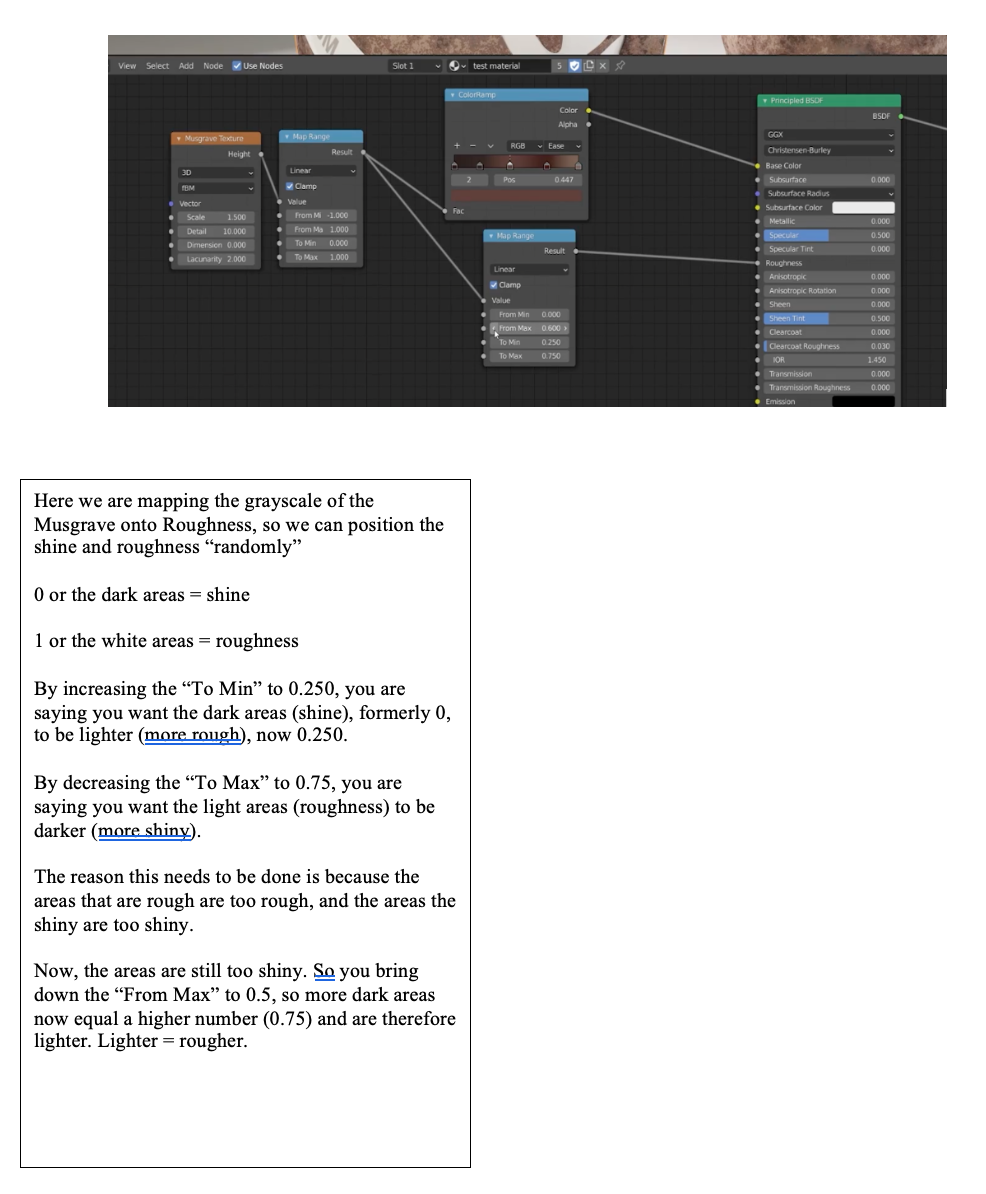 August 24, 2022 at 1:50 pm #75217
I’m getting the hang of it now. I wrote this out to help my brain process what Jonathan was doing. I thought I’d leave it here if anyone else came across this post and felt stuck.
My advice is rewatch the video multiple times, and write down what Jonathan is doing and the reasons why he is doing it. I think that helps.
p.s. not saying my understanding above is perfect, so don’t take it word for word – I’m just trying to point you in the right direction.
August 24, 2022 at 2:40 pm #75218That is a nice summary to help get our brains around it all. Thanks for sharing Neishy.
Probably when Adrian sees this he’ll also post that stuff he made that other time.
August 27, 2022 at 11:11 pm #75219Blender Guru recently published a tutorial,
https://www.youtube.com/watch?v=0YZzHn0iz8U
in which, to create an Earth, he used the Map Range node twice, respectively, at the time stamps 2:20 and 19:48 on the video.
At 19:48 on the video, when he used the Map Range node to determine which side of the Earth is lightened up, my head was spinning. Even the summary from @neishy is not enough to dispel all my confusion about the negative values used on “From Min” and “From Max” from that video.
August 28, 2022 at 6:15 am #75220@naiad did you look at the answers here:
https://cgcookie.mavenseed.com/community/12267-i-ll-just-have-to-keep-trying
and specifically:
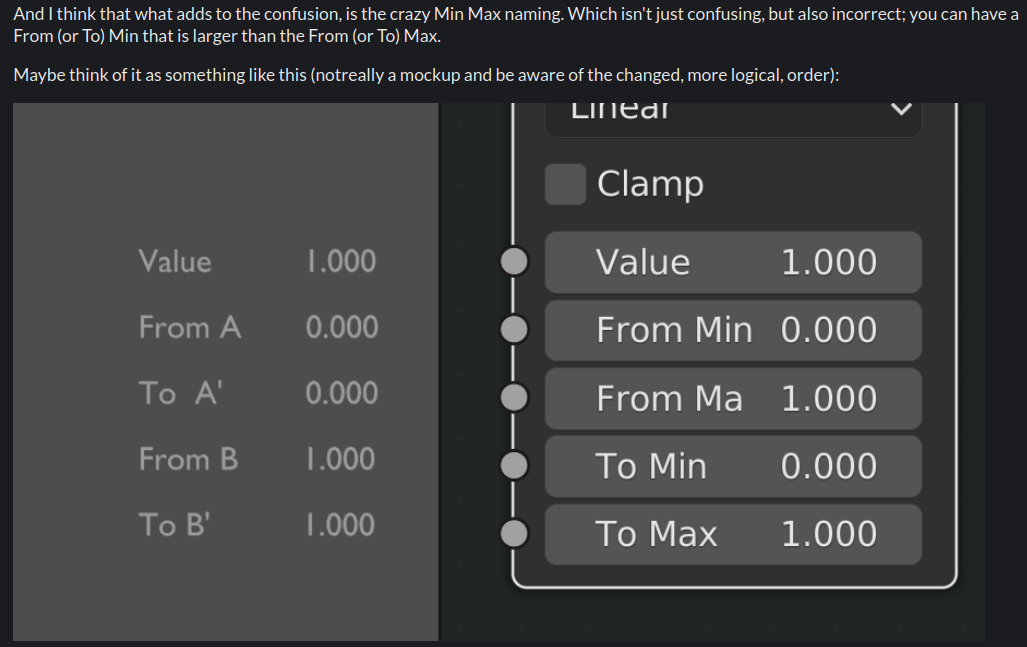 August 28, 2022 at 9:52 pm #75221
Yes, Martin, I had looked at your answers there. And Thank you!
But regarding to the tutorial about making the Earth by Blender Guru. Here I wrote a few additional remarks to dispel my confusion:
Some important points to keep in mind when use the Map Range node to determine which side of the Earth is lightened up by night lights is:
1, use the Map Range to map the values from the dark side of the Earth to the target range.2, the dark side has no light, so the values from the dark side must be negative. That is why the negative values used on “From Min” and “From Max”.
3, Since the target range only has the information (or values) from the dark side, the values from the bright side automatically get ignored, so that no light is turned on on the bright side of the Earth anymore.
August 29, 2022 at 2:14 am #75222@naiad ,
look at it this way: the Map Range Node makes a line (not a line segment!) through two points (in a 2 dimensional space), with coordinates (From Min, To Min) and (From Max, To Max). (If not Clamped). This means, that the Input Values can lie outside the given Input range! So in BlenderGuru’s video, when both Input Values are negative, positive Input Values will still be Mapped (through linear extrapolation).
If you enable Clamped, only the Output values are being clamped (to the given To Min, To Max interval).
So, important: the given Input Range does not determine what Values can be used as input!
I might have to look at the whole video, to see what Andrew is actually doing….
August 29, 2022 at 4:12 am #75223Thanks a lot, Martin! You have spotted my mistake. So I have modified my remark on the number 3 as below:
3, in BlenderGuru’s video, the value on the “From Max” is more negative than the value on the “From Min”, so in this case we have:
“From Max” < “From Min”
Hence, for any input value < “From Max”, the output of that input value will be clamped to 1, which means to turn the light on.
For any input value > “From Min”, the output of that input value will be clamped to 0, which means to turn the light off.
Therefore, the input values from the bright side of the Earth are Not ignored. Instead, all outputs of the corresponding input values from the bright side are clamped to 0, so that no light is turned on on the bright side of the Earth anymore.
August 29, 2022 at 4:17 am #75224I think you got it @naiad !
I saw he also at some point increases the To Max to 2 and even 5, to make the lights brighter (on the bright side).
-
AuthorPosts


- The topic ‘Map Range’ is closed to new replies.