Lost all my pivot and cursor locations for the lid rotation.

Forum Archive Lost all my pivot and cursor locations for the lid rotation.

Viewing 3 posts - 1 through 3 (of 3 total)
  • Author
    Posts
  • #11393
    digitalseed
    Participant

      Hello.

      I have just finished blocking out my metal pieces but lost my pivot and cursor locations for the lid rotation.

      How to get them back?

      Cheers 🙂

      #53263
      Wayne Dixon
      Participant

        Make sure you haven’t disabled the overlays in your viewport (that will hide your cursor)

        I assume that you didn’t specifically disable the visibility of the cursor?

        You can position the origin anywhere you want by snapping.

        First go into edit mode, select the verts where the median point will be where you want, the snap the cursor to that location (Shift S)

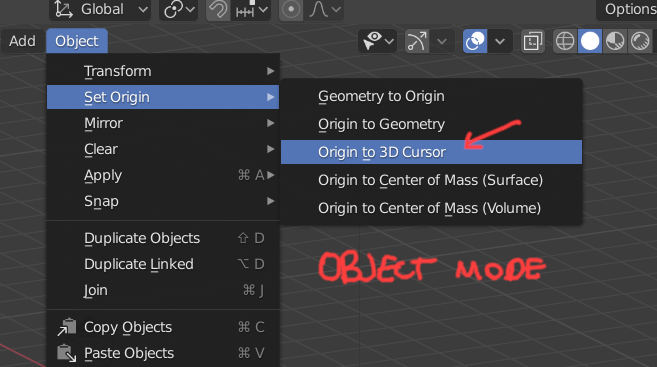
        Then in object mode – in the “Object menu” chose Set Origin > Origin to Cursor

        That will let you position it anywhere you need.  However, it’s possible that you just have the overlays hidden and all this was overkill haha.

        #53264
        digitalseed
        Participant

          Many thanks for the help 🙂

        Viewing 3 posts - 1 through 3 (of 3 total)
        • The topic ‘Lost all my pivot and cursor locations for the lid rotation.’ is closed to new replies.