Loop cut and slide in Blender 2.81 and 2.82 (for thruster)

Forum Archive Loop cut and slide in Blender 2.81 and 2.82 (for thruster)

Viewing 5 posts - 1 through 5 (of 5 total)
  • Author
    Posts
  • #11472
    Ido Reshef
    Participant

      Hello,

      In the Blender 2.81 and 2.82 you can’t add more loops with the scroll wheel anymore with hitting CTRL+R or selecting the icon( :/) . But there is a workaround – In order to do it – Select the edge that suppose to get cut , right click, choose “Loop cut and slide” and then you will get the “old” functionality portrayed in the video. 

      For more details:

      https://blender.stackexchange.com/questions/148039/using-the-loop-cut-and-adding-additional-loops 

      All the best,

      Ido

      #53519
      spikeyxxx
      Participant

        That is only if you use the Industry Compatible keymap! Normal Blender users can still use CTRL+R and scrolling with the mouse wheel.

        #53520
        Ido Reshef
        Participant

          Hi,

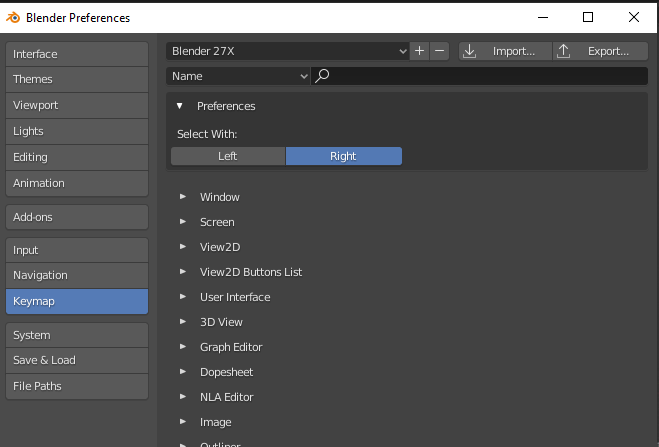
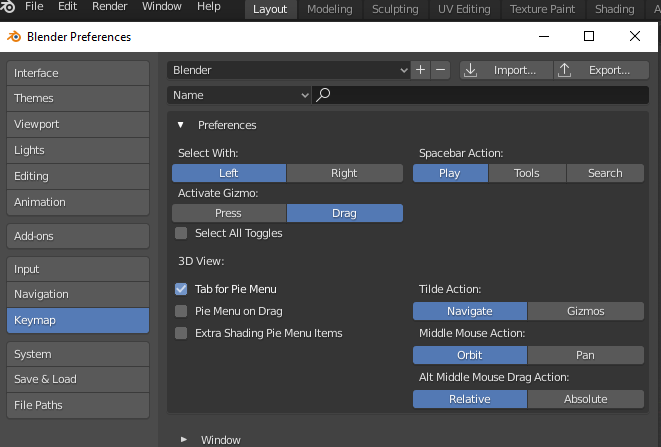
          I have experienced with the different keymaps following your answer. It turns out I use the “Blender” keymap scheme. Only when I switch to “Blender 2.7x” keymap I get the desired functionality back. 

          Anyway your answer shed a clue to the cause of this, so thanks !

          All the best.

          #53521
          Shawn Blanch
          Participant

            That’s funny. Ctrl + R works fine for me and I have just plain Jane blender 2.82 settings. I can scroll multiple loop cuts without issue.

            #53522
            spikeyxxx
            Participant

              That is really strange. I’ve tried it with all three Keymaps and only Industry Compatible was different in this behavior…

            Viewing 5 posts - 1 through 5 (of 5 total)
            • The topic ‘Loop cut and slide in Blender 2.81 and 2.82 (for thruster)’ is closed to new replies.