
Logo modeling from SVG – Quick and Dirty
Forum Archive › Logo modeling from SVG – Quick and Dirty
- This topic has 9 replies, 3 voices, and was last updated 2 years, 6 months ago by
Nathi Tappan.
-
AuthorPosts
-
February 9, 2024 at 9:52 am #17515
Hi there!
I learned how to properly model a logo in the Modeling Bootcamp, but I was wondering if on a real-world scenario, if you need a quick and dirty logo reveal if it’s common to just import the svg file for the logo, extrude it and maybe clean up a bit with limited dissolves?
What are the pitfalls from using this quick technique? Other than being N-gons galore, and a mesh to never see the light of day lol, what will I regret down the road from doing it this way?
Or better yet, what is your preferred method to quickly turn this type of project around?
I’m just asking because my company has over 200 events per year with dedicated logos and while they only asked me to animate this one, we all know it’s a slippery slope… lol.
February 9, 2024 at 10:32 am #84185I have had to do this a lot. I always try first the quick route of importing the logo as SVG and a quick procedural clean up of removing doubles, turn tris to quads, remesh, etc. Sometimes is enough and it works and it serves the purpose, other times there is no other way and I have to remodel the whole thing. But I always start with the quick dirty process because you know how it is, clients always need things fast for some reason, only if it fails I quickly turn to going hands in and model.
And as you say, just to not regret going the SVG direction, you have to make the decision fast if it will be worth it, just so you don’t spend too much time cleaning up and quickly say ok, I’ll just go for modeling and be done with this.
February 9, 2024 at 10:36 am #84186Hi Nathalia,
I don’t have any knowledge about .svg’s and import/export, but I think it will depend on the logo.
What you should probably not do, is Convert it to a Mesh!
I did a small test:
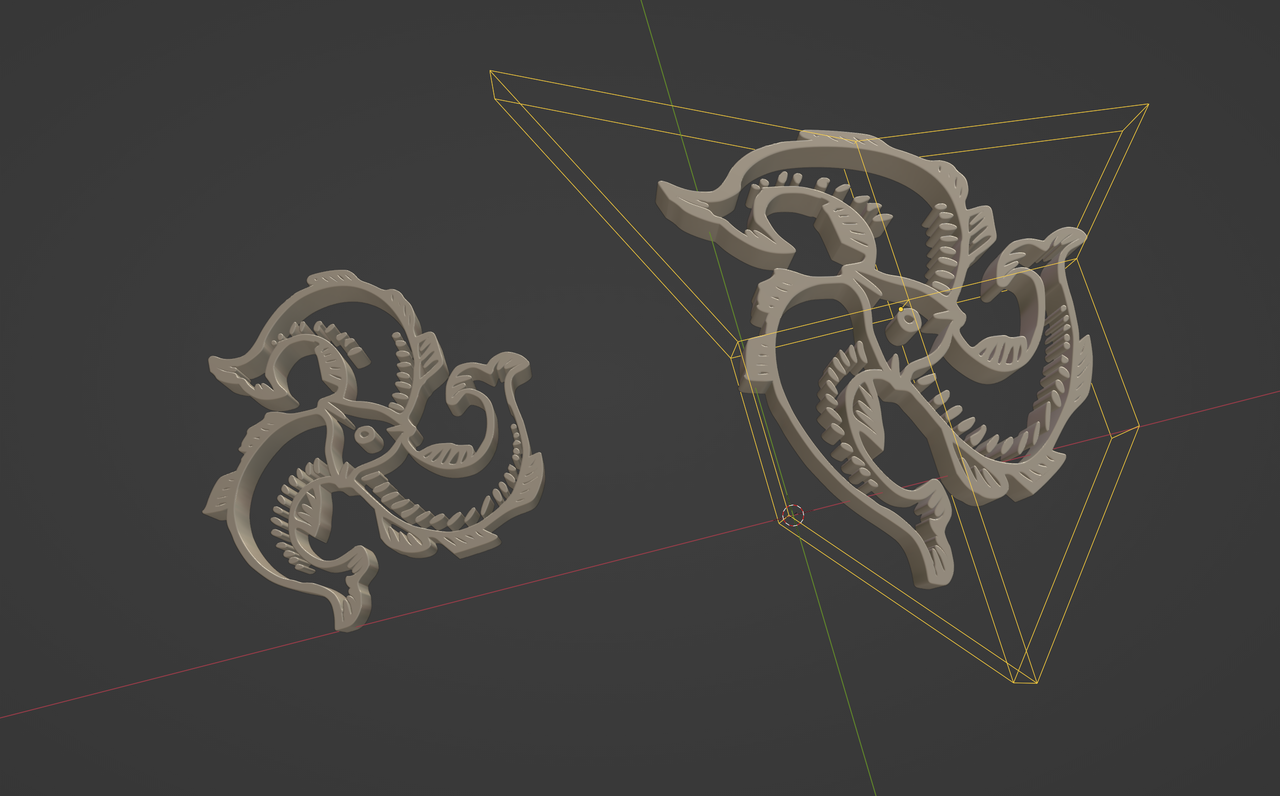
Extrude and Bevel on the Curve and add a Deform Modifier (here a Lattice).
But some .svg’s consist of several Curves and then things might be a bit more complicated (or not…I don’t know)
February 9, 2024 at 10:51 am #84187As Martin says, that is also an option, leaving it as curves whenever possible.
February 9, 2024 at 11:21 am #84188Thank you for the insight! I don’t feel so bad now… lol.
I definitely see the benefit of just taking the time to do it properly, but it’s not uncommon that I have just a day or two to turn some of these animations around.
I’ll do some digging on better ways to clean the mesh up. If you have any recommendations of lessons or streams that might touch this subject, I’m all ears.
I haven’t really played with curves that much yet, so good to know that I shouldn’t transform them into meshes. That was my first instinct. What is better about a curve? The logo I’m working on has around 150 curves once I import the svg, so I’ve been extruding, turning to mesh, limited dissolving the mesh, removing doubles, and joining shapes where it made sense. I might to keep the curves to see what the difference it makes..
The tricky part is that sometimes they want the logo to be true to design (no textures, no fun materials), and sometimes I might have more creative freedom. Maybe those are the ones where I actually take the time to make a proper mesh.
February 9, 2024 at 2:07 pm #84189It’s just that turning them from a curve to a mesh gives you very bad geometry, and then if you want to put a modifier on it’s going to be a mess. So to avoid turning them into a mesh it’s sometimes better leaving them as curves if you can get away with it, because at times having them as curves also gives you very bad results, so it’s a case by case basis.
February 9, 2024 at 5:37 pm #84190Makes sense! Thank you Omar!
February 27, 2024 at 9:59 am #84191One more question, I found this stream on CG Cookie’s library but for some reason can’t watch it? Is there something I’m doing wrong, or elsewhere that I can find it?
https://cgcookie.com/live-streams/importivng-svg-as-a-grease-pencil-object-in-blender
February 27, 2024 at 10:10 am #84192Hi Nathalia @nathitappan ,
You can watch it on YT: https://www.youtube.com/watch?v=BeK–S9kqC8
February 27, 2024 at 10:24 am #84193Perfect! Thank you Martin!
-
AuthorPosts


- The topic ‘Logo modeling from SVG – Quick and Dirty’ is closed to new replies.