
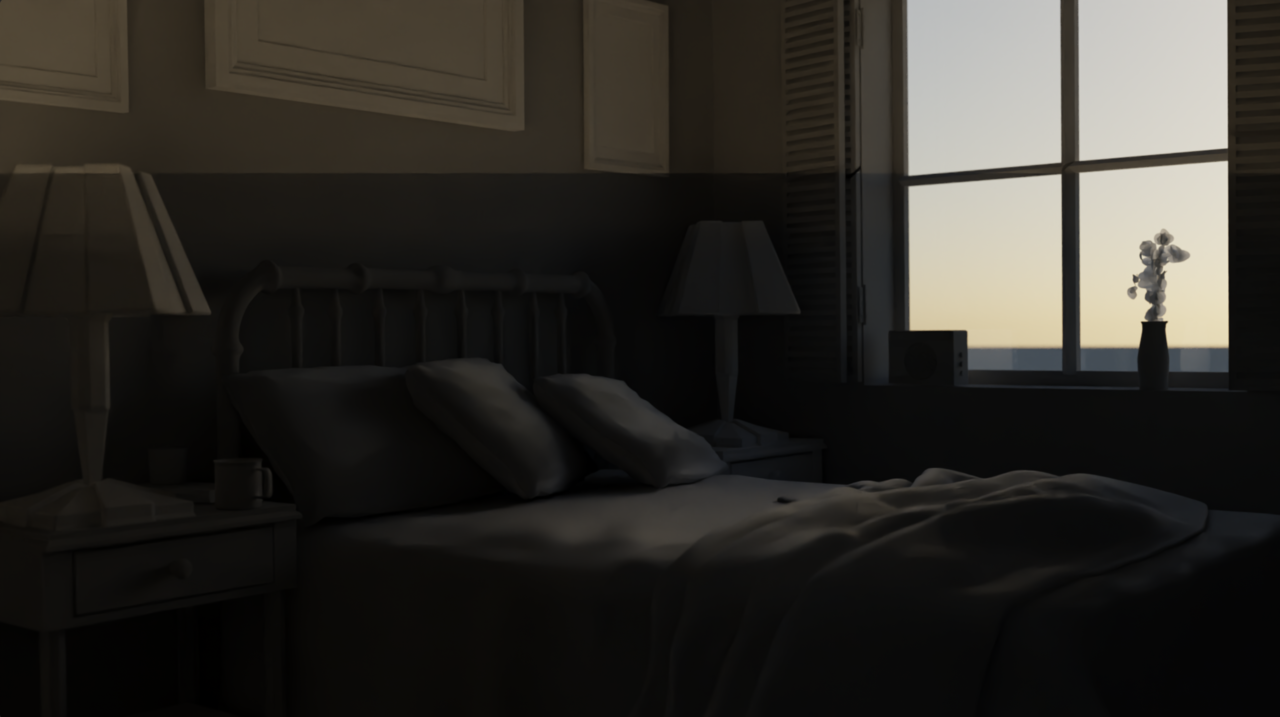
Line in the middle of the render.

Forum Archive Line in the middle of the render.

Viewing 11 posts - 1 through 11 (of 11 total)
  • Author
    Posts
  • #18064
    Maru Kacef
    Participant

      Hi! I’m getting this line in the middle of the render image. Can someone help me?a la(s) 22.02.54.png

      #86484
      Adrian Bellworthy
      Participant

        Looks like a shadow!
        There is no object outside the view?

        I assume you haven’t changed any of the objects in the scene from the course file?
        Such as the window.

        Can you share your .blend file via google drive, dropbox or similar?

        #86485
        Omar Domenech
        Participant

          That seems to be the terminator line of the Irradiance Volume probe, basically where the light bounce calculations end. If you have a volume there, make it bigger in the Z axis so it doesn’t terminate there.

          #86486
          Maru Kacef
          Participant

            There is not any irradiance volume or anything else. I actually didn’t change the course file at all. I added two lights and then erased them to see if they were causing the line, but they weren’t.

            Here is a link to google drive with the .blend https://drive.google.com/file/d/1Jstdx8ArMD7wJIlwfmp639QuQr5bnfqI/view?usp=drive_link

            Thank you for your help!

            #86487
            Adrian Bellworthy
            Participant

              I don’t see anything, not in render viewport mode, nor in a full render.

              This is the exact file you are having the issue with, right?

              #86488
              Martin Bergwerf
              Participant

                Yeah, I can’t see anything wrong with it either, with or without those two Lights….

                So, it might be something on your side…check your drivers.

                Do you have any 3rd party Addons enabled?

                #86489
                Omar Domenech
                Participant

                  Me neither, I thought it might be a compositing node but it’s all good, there’s only a denoise setup. But it looks to be the file that comes with the scene as default, perhaps you uploaded the wrong file?

                  #86490
                  Maru Kacef
                  Participant

                    It is the correct file. I’ll let you know if I figure it out. Thanks!

                    #86491
                    Maru Kacef
                    Participant

                      I rendered the image step by step and the line appears when I add the sky texture. Does that give anyone a clue?

                      #86492
                      Omar Domenech
                      Participant

                        Could it be that you have an object hidden on the Outliner or in the viewport that comes into calculations only at render time? And is throwing that shadow there? 

                        #86493
                        Martin Bergwerf
                        Participant

                          Well, like we already said, we can’t reproduce it, it renders fine for us.

                          What I do notice, is that the ‘line’ is completely horizontal (the bottom 3/4 being darker). That can’t be a coincidence.

                          Have you checked your GPU Driver like I said? And disable all third party Addons if you have any.

                        Viewing 11 posts - 1 through 11 (of 11 total)
                        • The topic ‘Line in the middle of the render.’ is closed to new replies.