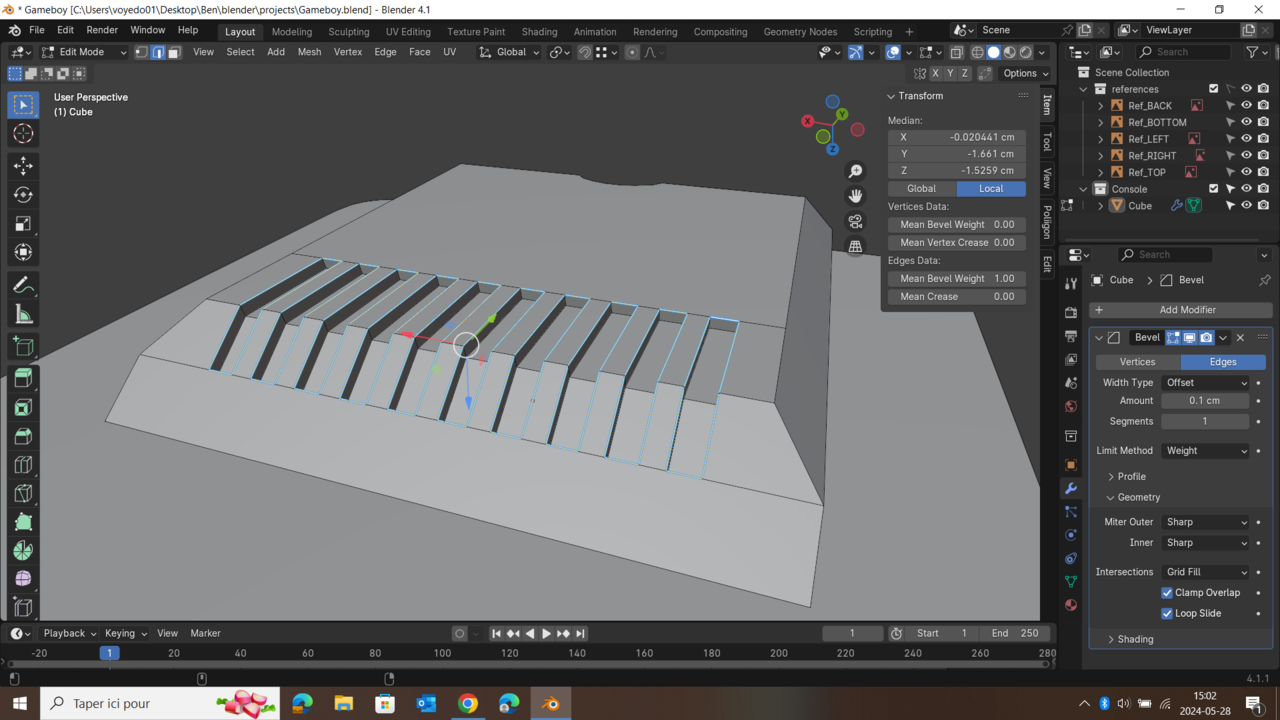
Issue with Bevel

Forum Archive Issue with Bevel

Viewing 7 posts - 1 through 7 (of 7 total)
  • Author
    Posts
  • #18067
    Benjamin Voyer
    Participant

      i am following the game boy course and I am trying to apply a bevel to these slots. They seem to be affected by the bevel, but only by a tiny tiny amount. Note that clamp overlay IS active and the weight is 1.00, wich should work. I checked and there are no overlaying vertices when merging by distance.ture d’écran (5).png

      #86501
      Martin Bergwerf
      Participant

        Well, try disabling ‘Clamp Overlap’.

        #86502
        Benjamin Voyer
        Participant

          Yeah it does work! What does it do since another person had to turn it on for the same problem? Anyways thank you very much!

          #86503
          Blaine Jensen
          Participant

            I might be out to lunch here, but, as I’ve been going through and learning I think I’ve come to the realization that blender isn’t a one size fits all type of program.

            I just went through the same course and had to disable clamp on a few things and enable it on others.

            I discovered through the macro course that there were things like booleans that Kent had his set to exact but for whatever reason, mine only liked to work in fast. But only for half of them.

            Anyway, the TLDR is, play with the settings, sometimes what the instructor does works, and sometimes you need to fiddle with some settings to get it going. I’m sure this hasn’t helped haha, but just one of my observations over the last couple months.

            #86504
            Benjamin Voyer
            Participant

              Thanks Blaine! This actually does help put things into perspective. 

              #86505
              Martin Bergwerf
              Participant

                HI Benjamin @Binjimi ,

                What Clamp Overlap does, is that the Modifier stops Beveling, as soon as two Edges, somewhere in the model meet. It prevents them from ‘overlapping’ each other.

                It is on by default.

                Try this on the default Cube. When the Amount reaches 1 meter (when using the Metric system), the Beveling stops, no matter how much you increase the Amount after that. With Clamp Overlap disabled, Blender will just keep Beveling and when you get above 2 meter, it will get really interesting.

                Maybe, while you are at it, you can (with a Bevel Amount smaller than 1 meter), Scale down the Cube in the Z-Axis (stay in Object Mode!) and see how that affects the Bevel.

                #86506
                Benjamin Voyer
                Participant

                  Oh yes, it is actually pretty fascinating. It’s as if the cube was flipped inside out when it reaches 2m of bevel. Thanks to everybody that answered my questions on this tread!

                Viewing 7 posts - 1 through 7 (of 7 total)
                • The topic ‘Issue with Bevel’ is closed to new replies.