Inset Faces Won’t Inset Faces for me

Forum Archive Inset Faces Won’t Inset Faces for me

Viewing 6 posts - 1 through 6 (of 6 total)
  • Author
    Posts
  • #14087
    Adrian Hersh
    Participant

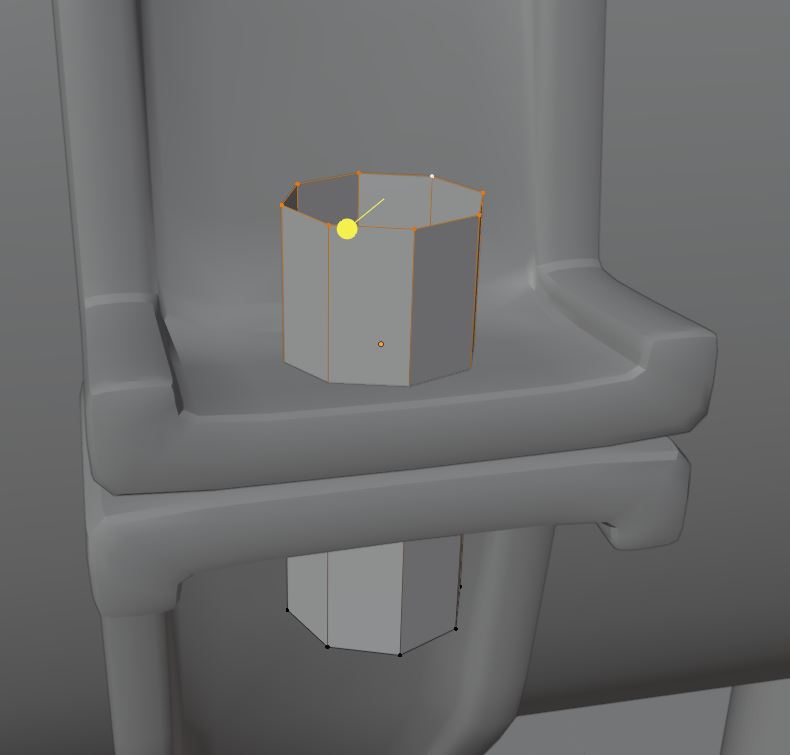
      Hello, I’m can’t seem to inset faces on a small 8 sided Cylinder. I have a feeling it has to do with the proportions/scale, but I can’t be sure. Perhaps the pivot point? Inset faces works on other larger objects, and in fact, it works on this cylinder if I select all of the vertices, just not at the vertices I have selected in this picture.  Any thoughts? 

      #69173
      spikeyxxx
      Participant

        Probably an incorrect selection. (Could even be caused by double Vertices…)

        Try going into Face Select Mode and then select the Face(s) you want to inset.

        #69174
        Adrian Bellworthy
        Participant

          Hey @adrian-h,

          Your image is not showing above, can you post it again below as a reply.

          It is probably what @spikeyxxx said, double verts. In edit mode for the object in question, press ‘A’ to select everything then press ‘M’ and select ‘By Distance’ to remove any double verts.

          #69175
          Adrian Hersh
          Participant

            Thank you, Spikey, but merge verts by distance didn’t work. I uploaded the pic of the verts I was discussing above 

            #69176
            spikeyxxx
            Participant

              Well Adrian, the Tool is called Inset Faces and that is what it does. However you don’t have a Face selected (only an Edge Ring). There is no Face there to inset.

              With that selection you can press F to fill in a Face and the I to inset it. (Or use the Active Tool if you prefer…)

              #69177
              Adrian Hersh
              Participant

                Ah I see! Thank you Spikey! Much obliged! 

              Viewing 6 posts - 1 through 6 (of 6 total)
              • The topic ‘Inset Faces Won’t Inset Faces for me’ is closed to new replies.