Insert operation dont work properly

Forum Archive Insert operation dont work properly

Viewing 12 posts - 1 through 12 (of 12 total)
  • Author
    Posts
  • #14934
    maxcady
    Participant

      I try to insert as the teacher but it does it badly. I tested all kind of things and I didnt find out why. Check the video. https://youtu.be/GL8UtdYqg90

      #73678
      spikeyxxx
      Participant

        Hi @maxcady the YT video is not ideal to troubleshoot issues like this (a few screen shots can be more helpful, or even a link to your .blend file), but This looks like you have inconsistent Normals.

        Select all (A) in Edit Mode (before Insetting) and then SHIFT+N.

        #73679
        maxcady
        Participant

          thx. how to find the link to the blend file?

          #73680
          spikeyxxx
          Participant

            @maxcady you need to upload your .blend to Dropbox, googleDrive or so and then paste a link here.

            #73681
            maxcady
            Participant

              thx. will do

              #73682
              maxcady
              Participant

                I did recalculate the normal with Shift N in edit mode, and it doesnt work. Other solutions?

                Video 

                and

                Blender file

                #73683
                Martin Bergwerf
                Participant

                  Hi @maxcady ,

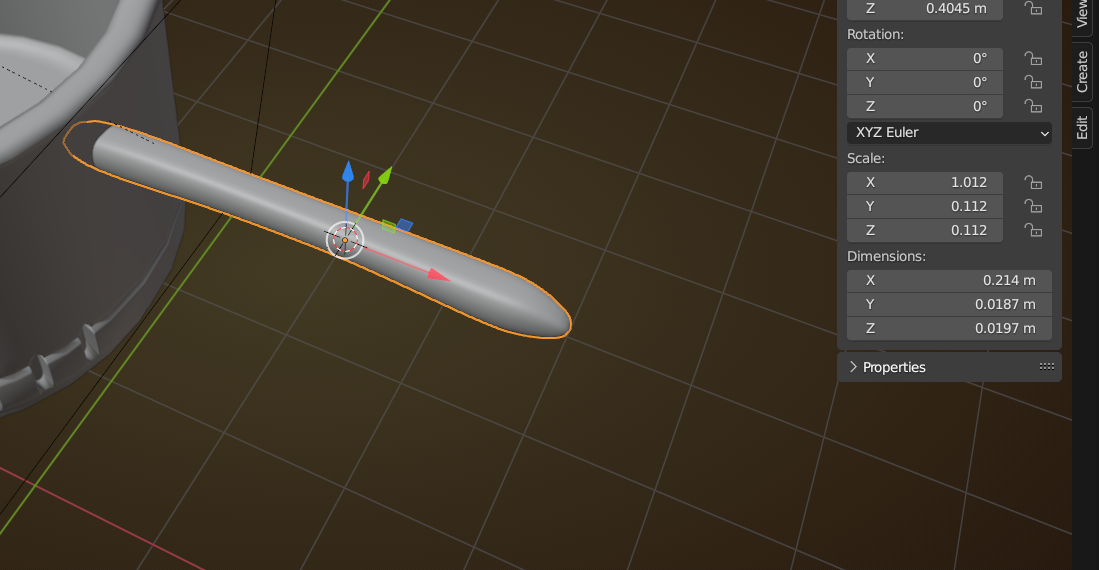
                  This is a classical problem you have here: uneven Scale:

                  Pot.png

                  With the Handle in Object Mode, CTRL+A > Apply > Scale.

                  The side of the Handle is also very wobbly, if that is intentional, than that’s fine, otherwise, select the side and then S, Y, 0 to flatten it.

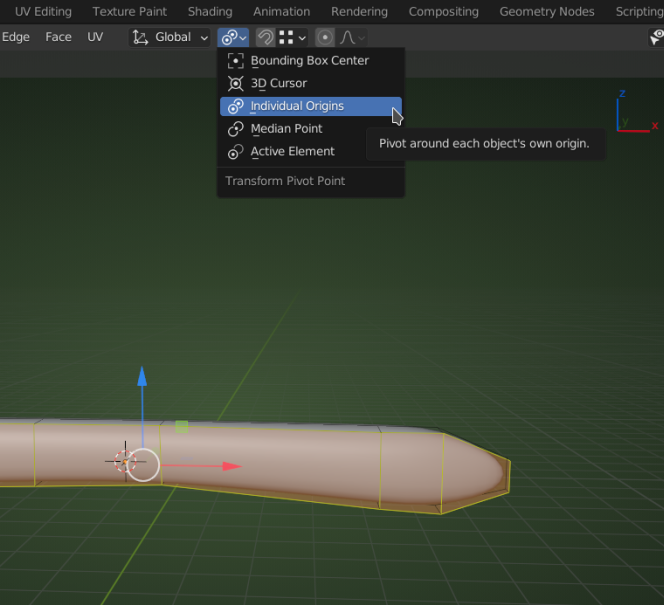
                  You might also want to switch the Pivot Point back to Median Point (is on Individual Origins at the moment).

                  #73684
                  maxcady
                  Participant

                    Thx. The model is not finished yet. So it’s not yet flatten. I will remember now to always apply the scale in object mode. How do you know it’s not median?

                    #73685
                    Martin Bergwerf
                    Participant

                      How do I know it’s not Median? You can see (and set) that here:

                      Pivot.png

                      #73686
                      maxcady
                      Participant

                        Well I know that but I can’t see when it’s median or not. I don’t know what it means either since I just use Individual or 3D cursor for now.

                        #73687
                        Jonathan Lampel
                        Participant

                          Glad that worked! Here’s more info about pivot points, including median: https://cgcookie.com/lessons/pivot-points 

                          #73688
                          maxcady
                          Participant

                            thx. I learned a bit. 

                          Viewing 12 posts - 1 through 12 (of 12 total)
                          • The topic ‘Insert operation dont work properly’ is closed to new replies.