If a light source is below the backdrop paper, how do I pretend it’s not?

Forum Archive If a light source is below the backdrop paper, how do I pretend it’s not?

Viewing 3 posts - 1 through 3 (of 3 total)
  • Author
    Posts
  • #19310
    Sid Edwards
    Participant

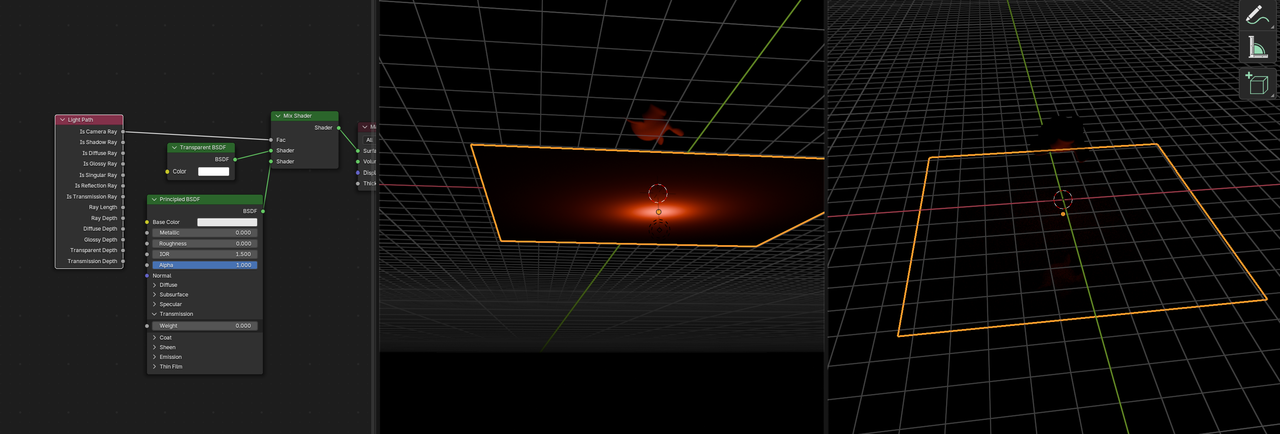
      As in the attached picture, I have a point light below the plane. However, I still want this light to illuminate the object above it anyway. How do I use light/shadow linking to accomplish this?

      #91617
      Martin Bergwerf
      Participant

        Hi Sid,

        Maybe just use a Light Path Node:

        Light.png

        #91618
        Dwayne Savage
        Participant

          First, there’s an easier way, which works in both eevee and cycles.
          1. Select Plane
          2. Properties editor->Object tab->Visibility tab->[eevee]uncheck shadows under ray visibility. [Cycles] Ray Visibly subpanel->Uncheck Shadows

          Second, The answer to your question:
          1. Select Light
          2. Properties editor->Object tab->Shading Panel->Shadow Linking subpannel->Click New
          3. Add the Plane to the Shadow Linking by Pressing and holding LMB on the plane in the outliner add drag and drop it in the shodow linking panel.
          4. Uncheck Plane. 

        Viewing 3 posts - 1 through 3 (of 3 total)
        • The topic ‘If a light source is below the backdrop paper, how do I pretend it’s not?’ is closed to new replies.